

POTS Buddy
MEDUSA LABS L.L.C. Health & Fitness iPhoneiPadiPod touchApple Watch
POTS Buddy is a free Health & Fitness app for iPhone and iPad by MEDUSA LABS L.L.C. Rated 4.0/5 from 10 ratings. Requires iOS 18.5. Updated October 27, 2026.
- Rating
- 4.0
- 10 ratings
- Price
- Free
- on the App Store
- Size
- 5 MB
- Age 12+
- Updated
- Oct 27
- 2026 · v1.1.1
Screenshots



About POTS Buddy
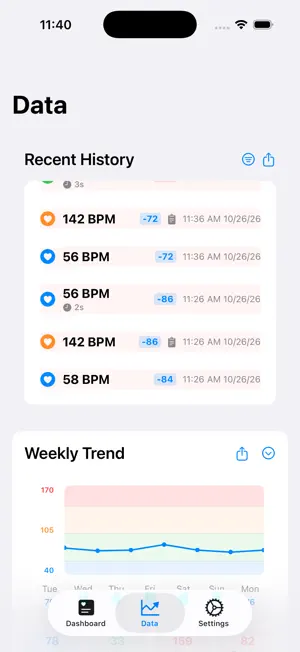
Meet your new heart health companion. POTS Buddy is the Apple Watch app built *with* the POTS and dysautonomia community in mind, not the other way around. Whether you're navigating daily symptom flares, preparing for a doctor's appointment, or just trying to understand what your heart is doing, POTS Buddy is right there on your wrist. **REAL-TIME HEART RATE MONITORING** Your Apple Watch already tracks your heart. POTS Buddy turns that data into something meaningful. See your heart rate, beat-to-beat changes (delta), and trend direction at a glance, color-coded so you always know where you stand without decoding numbers. **POTS STANDING TEST** The guided standing test walks you through a clinically-informed sit-to-stand protocol right from your wrist. Lie down for 5 minutes, then stand for 10. POTS Buddy records your heart rate at key intervals (1, 3, 5, and 10 minutes) and shows you the delta. Share the results with your cardiologist or keep them for your own records. **SMART ALERTS THAT ACTUALLY MAKE SENSE** Set your own alert thresholds based on your body, not generic defaults. POTS Buddy uses two alert levels: a gentle heads-up for elevated readings, and an urgent alert for extreme spikes. You're informed without being overwhelmed. Level 1 alerts quietly dismiss themselves after 60 seconds. Level 2 stays until you're ready to acknowledge it. **SYMPTOM LOGGING ON THE GO** Feeling dizzy? Chest fluttery? Log symptoms directly from your wrist in seconds using the Apple Watch Digital Crown. No fumbling with your phone, no interrupting your day. Every log is timestamped and ready when you need it. **CUSTOMIZABLE WATCH FACES** Make it yours. Choose from multiple themes, including a clean Time & Date only face for those moments when you just need a break from the numbers. Because sometimes the most helpful thing is *not* watching your heart rate. **EXPORTABLE CHARTS & REPORTS** See your heart rate trends visualized in beautiful charts, then export everything (graphs, CSVs and PDF reports) for your care team. Walk into your next appointment with data your doctor can actually use. **PRIVACY THAT ACTUALLY MEANS SOMETHING** We don't want your data. Seriously. Everything POTS Buddy collects stays on your device. No accounts, no cloud sync, no third-party sharing. Your health information is yours. Full stop. **DESIGNED FOR REAL LIFE WITH POTS** We know that anxiety about heart rate can *cause* heart rate spikes. POTS Buddy is designed to be reassuring, not alarming. Calm colors, supportive language, and customizable sensitivity mean the app works *for* you, not against you. --- **GOOD TO KNOW** To keep your heart rate on screen all day, the Apple Watch app runs like a workout, so Apple counts monitoring time as exercise. Your Exercise minutes and Move calories will be higher than your real activity while POTS Buddy is monitoring. POTS Buddy only reads your heart rate from Apple Health and never writes anything to it. You can stop monitoring any time from the watch Settings. The watch also uses noticeably more battery while monitoring. POTS Buddy works with iPhone (iOS 18.5 or later) and Apple Watch (Series 4 or later, watchOS 10.6 or later). *POTS Buddy is a wellness tool, not a medical device. Always consult your healthcare provider for medical advice.* --- **Your heart. Your data. Your choice.**
Ratings & reviews
4.0
10 ratings
What’s new
Version 1.1.1 · Updated October 27, 2026
This update fixes data loss, watch crashes and lag, and makes the app clearer to use. Data and reliability - Heart rate history is now kept for the full 35 days. Older readings are condensed instead of deleted, and alerts and high readings are always kept. This fixes older days disappearing for some people. - Symptoms and triggers you log on your watch now always appear on the correct reading on your iPhone, including logs you made before this update. - Monitoring turns off when you turn it off, and heart rate recovers on its own after you take your watch off and put it back on. - Fixed weekly and monthly exports that could look like they were missing data. Smoother and clearer - The watch is much smoother: faster swiping between faces, quicker taps and a faster History screen. - A new loading spinner shows while the watch waits for a heart rate reading. - Clearer connection messages on the Dashboard and in Settings. - Larger text sizes are easier to read on the Dashboard and Recent History. - New: drag across the daily heart rate graph to read the exact BPM and time at any point. - When you update, a short walkthrough shows what changed. Good to know - To keep your heart rate on screen all day, the Apple Watch app runs like a workout, so Apple counts monitoring time as exercise. Your Exercise minutes and Move calories will be higher than your real activity while POTS Buddy is monitoring. POTS Buddy never writes to Apple Health. You can stop monitoring any time from the watch Settings. - The watch will use noticeably more battery while monitoring. Thank you for your feedback. It drives every update.
App privacy
The developer, MEDUSA LABS L.L.C., reported these privacy practices to Apple.
Data Not Collected
The developer does not collect any data from this app.
Alternatives to POTS Buddy
Looking for apps like POTS Buddy? Here are 6 similar apps on the App Store. The highest rated is POTS Tracker - BP, HR, Pulse (5.0/5), and all 6 are free to download.
-
 POTS Check
-
 POTS-Tracker
3.1
POTS-Tracker
3.1
-
 POTS Tracker - BP, HR, Pulse
5.0
POTS Tracker - BP, HR, Pulse
5.0
-
 POTSie: POTS Symptom Tracker
4.8
POTSie: POTS Symptom Tracker
4.8
-
 Autonomic: HRV & POTS Tracker
4.9
Autonomic: HRV & POTS Tracker
4.9
-
 Dysapp: Dysautonomia & POTS
4.3
Dysapp: Dysautonomia & POTS
4.3
| App | Rating | Price | Last updated | Compare |
|---|---|---|---|---|
| POTS Buddy | 4.0 / 5 (10 ratings) | Free | October 27, 2026 | |
| POTS Check | – | Free | Jul 22, 2026 | Compare |
| POTS-Tracker | 3.1 / 5 (7) | Free | Oct 14, 2026 | Compare |
| POTS Tracker - BP, HR, Pulse | 5.0 / 5 (2) | Free | May 28, 2026 | Compare |
| POTSie: POTS Symptom Tracker | 4.8 / 5 (55) | Free | Oct 13, 2026 | Compare |
| Autonomic: HRV & POTS Tracker | 4.9 / 5 (14) | Free | Oct 23, 2026 | Compare |
| Dysapp: Dysautonomia & POTS | 4.3 / 5 (29) | Free | Oct 23, 2026 | Compare |
Compare POTS Buddy with the top alternatives: ratings, updates, ASO score and keyword gaps →