

Face Blur - Photo Blurring
Applorium Ltd Photo & Video iPhoneiPadiPod touch
Face Blur - Photo Blurring is a free Photo & Video app for iPhone and iPad by Applorium Ltd. Rated 5.0/5 from 2 ratings. Requires iOS 26.2.
- Rating
- 5.0
- 2 ratings
- Price
- Free
- on the App Store
- Size
- 13 MB
- Age 4+
- Updated
- Oct 21
- 2026 · v1.1
Screenshots

About Face Blur - Photo Blurring
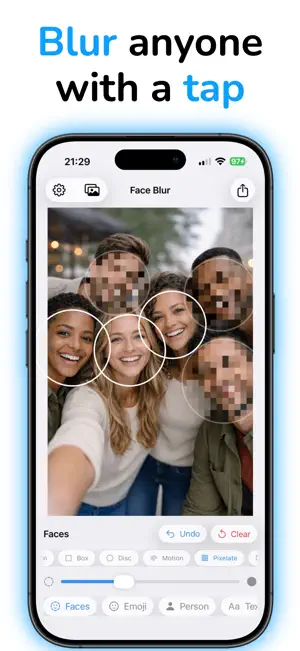
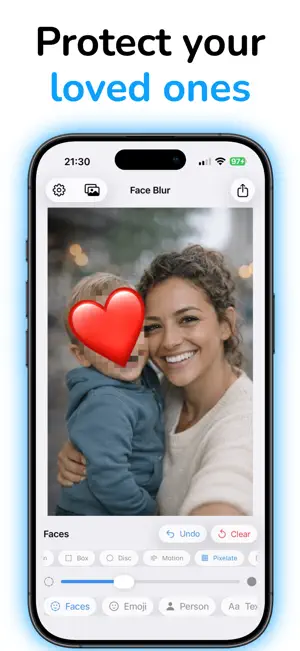
Protect your privacy and the privacy of others before sharing photos. FaceBlur uses on-device AI to automatically detect faces, people, text, and more — then lets you blur, pixelate, or cover them with fun emojis in seconds. Smart Detection, Effortless Editing Simply pick a photo and FaceBlur instantly identifies what needs to be hidden. Tap a detected face to blur it, swipe to adjust intensity, or switch between 20+ effects — from classic Gaussian blur to pixelation, comic, thermal, X-ray, and more. Key Features - Auto Face Detection - AI-powered face recognition finds every face in the frame - Person Blur - Blur entire people while keeping the rest of the photo sharp - Text Detection - Automatically find and hide license plates, addresses, names, and other sensitive text - Background Blur - Create a portrait-mode effect that isolates subjects from the background - Emoji Covers - Replace faces with 50+ fun emojis for a playful twist - Freehand Draw - Manually blur or erase any area with an adjustable brush - 20+ Effects - Gaussian, pixelate, crystallize, halftone, comic, noir, twirl, and many more - Fine-Tuned Control - Drag, resize, and rotate each blur region for a perfect fit - Undo & Redo - Experiment freely with full edit history Privacy First All processing happens entirely on your device. Your photos are never uploaded to any server. What stays on your phone, stays on your phone. Perfect for sharing photos of your kids, blurring strangers in street photography, hiding sensitive information in screenshots, or anonymizing any image before posting online. Subscription terms: - The subscription auto-renews at the end of each term. - Payment will be charged to iTunes Account at confirmation of purchase. - The subscription automatically renews unless auto-renew is turned off at least 24-hours before the end of the current period. - Account will be charged for renewal within 24-hours prior to the end of the current period. - You may manage your subscription and turn off auto-renewal by going to your Account Settings after purchase. Privacy policy and Terms of Use: https://applorium.com/privacy-face-blur
What’s new
Version 1.1 · Updated October 21, 2026
Support for new iOS
App privacy
The developer, Applorium Ltd, reported these privacy practices to Apple.
Data Not Linked to You
The following data, which may be collected but is not linked to your identity, may be used for the following purposes:
- Purchases: Purchase History
Used for: Analytics, App Functionality
Alternatives to Face Blur - Photo Blurring
Looking for apps like Face Blur - Photo Blurring? Here are 6 similar apps on the App Store. The highest rated is BlurFace (4.8/5), and all 6 are free to download.
-
 Censor: Face Blur & Pixelate
4.6
Censor: Face Blur & Pixelate
4.6
-
 BlurFace
4.8
BlurFace
4.8
-
 Blur-Video
4.8
Blur-Video
4.8
-
 Blur Video - AI Blur Maker
4.6
Blur Video - AI Blur Maker
4.6
-
 Blur Photo Background
4.3
Blur Photo Background
4.3
-
 Blur Photo Editor: blur effect
4.7
Blur Photo Editor: blur effect
4.7
| App | Rating | Price | Last updated | Compare |
|---|---|---|---|---|
| Face Blur - Photo Blurring | 5.0 / 5 (2 ratings) | Free | October 21, 2026 | |
| Censor: Face Blur & Pixelate | 4.6 / 5 (69) | Free | Sep 19, 2025 | Compare |
| BlurFace | 4.8 / 5 (120) | Free | Jun 6, 2025 | Compare |
| Blur-Video | 4.8 / 5 (13,927) | Free | Oct 12, 2026 | Compare |
| Blur Video - AI Blur Maker | 4.6 / 5 (1,971) | Free | Sep 4, 2026 | Compare |
| Blur Photo Background | 4.3 / 5 (18,734) | Free | May 23, 2026 | Compare |
| Blur Photo Editor: blur effect | 4.7 / 5 (1,687) | Free | Jul 16, 2026 | Compare |