

MarkSchrift
RFRMD Word Labs LLC Productivity iPhoneiPadiPod touchMac
MarkSchrift is a free Productivity app for iPhone and iPad by RFRMD Word Labs LLC. Requires iOS 18.0. Updated October 14, 2026.
- Price
- Free
- on the App Store
- Size
- 17 MB
- Age 4+
- Updated
- Oct 14
- 2026 · v1.2.1
Screenshots


About MarkSchrift
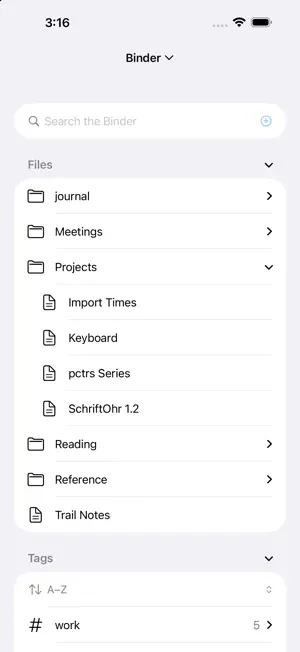
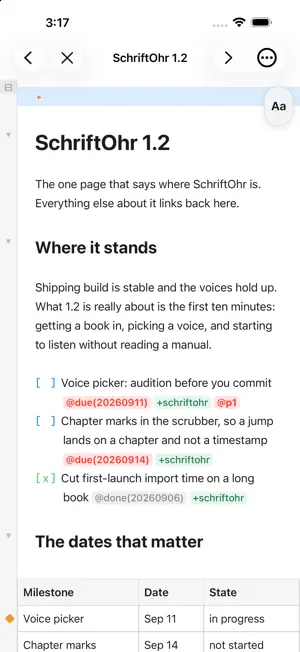
MarkSchrift is the plain-text workspace for iPhone, iPad, and Mac. Write your meeting notes, your class handout, your next chapter - rendered live as you type. Plan your week, track your projects; your files go anywhere. Every document is an ordinary Markdown (.md) text file you own outright: readable in any editor, synced through your own iCloud, portable forever. No proprietary format, no lock-in. WRITE - Markdown styles itself as you type; you always see and edit the real text. - Tables you can edit cell by cell, pictures, footnotes, code with syntax coloring, and typeset math. - Wiki links connect your notes; backlinks and mentions show what points back. PLAN - Tasks are plain checkboxes with small tags for due dates, follow-ups, priorities, and people. - The Agenda gathers every open task across your notes: past due, due today, up next. - Projects roll up their notes, tasks, and people onto a home page; a week note plans your days, and recurring tasks come back on schedule. FIND - Search every note by word, phrase, #tag, or project. - The Binder lists your files, tags, and saved views in one sidebar. SHARE (beta) - Live co-editing with end-to-end encryption: the server only ever stores scrambled bytes it cannot read. - Share an editing link or a read-only link; read-only is enforced cryptographically, not by good manners. - Collaboration keeps maturing release by release: hardened key handling, signed changes, and sessions that stay fast over time. EXPORT - Print or export paginated PDF, Word, and HTML that match what you see. SUBSCRIPTION Collab is an optional subscription: $9.99 a year, after a 14-day free trial. You need it only to host a live session or a hosted project. Joining one that someone shares with you is free, and always will be. Payment is charged to your Apple Account when you confirm. It renews each year unless you turn it off at least 24 hours before the term ends. You can manage or cancel it in your Apple Account settings. Privacy Policy: https://markschrift.com/privacy-policy.html Terms of Use: https://www.apple.com/legal/internet-services/itunes/dev/stdeula/ Your files are yours. That is the whole idea.
What’s new
Version 1.2.1 · Updated October 14, 2026
More done in fewer taps, on every device. • File Completed in the Agenda moves every finished task to the Completed section at the bottom of its note, across all your notes at once. • Select several notes or folders in the Binder and move, tag or delete them together. • Tidy Tags merges or renames tags across all your notes, inline #tags included. • Resolve Conflicts finds the duplicate copies sync can leave behind and keeps the one you choose. • Exports open beside the note you are exporting, or in the last folder you used. Your choice, in Settings. • The ••• menu is a short panel, the same on iPhone, iPad and Mac, with each command's keyboard shortcut. • Every command is reachable from the keyboard on Mac and iPad, through its shortcut or the Command Palette. • Settings are sorted into pages, and Earlier Versions keeps recent text you can copy back. • Reading Mode now shows itself: the logo turns orange (on iPhone, the ••• button). • Access codes for hosted projects are four words, for stronger protection. • Copy Save Report puts a report of how saving has gone over the last three days on your clipboard, ready to send us if anything looks wrong.
App privacy
The developer, RFRMD Word Labs LLC, reported these privacy practices to Apple.
Data Not Linked to You
The following data, which may be collected but is not linked to your identity, may be used for the following purposes:
- Contact Info: Name
- Identifiers: Device ID
Used for: App Functionality
Alternatives to MarkSchrift
Looking for apps like MarkSchrift? Here are 6 similar apps on the App Store.
-
 Relay GTD
-
 Hashy - AI Markdown Editor
-
 Vector ToDo
-
 Chronaya: Deadline Tracker
-
 Bürokratix: Germany Guide
-
 Day Log - your log of the day
| App | Rating | Price | Last updated | Compare |
|---|---|---|---|---|
| MarkSchrift | – | Free | October 14, 2026 | |
| Relay GTD | – | Free | Oct 13, 2026 | Compare |
| Hashy - AI Markdown Editor | – | 4.99 USD | Feb 20, 2026 | Compare |
| Vector ToDo | – | Free | May 26, 2026 | Compare |
| Chronaya: Deadline Tracker | – | Free | Oct 5, 2026 | Compare |
| Bürokratix: Germany Guide | – | Free | Oct 13, 2026 | Compare |
| Day Log - your log of the day | – | Free | Oct 14, 2026 | Compare |
Compare MarkSchrift with the top alternatives: ratings, updates, ASO score and keyword gaps →