

MarkX Image Meter Markup Ruler
Space-Time Transformation Technology Co., Ltd. Graphics & Design iPhoneiPadiPod touch
MarkX Image Meter Markup Ruler is a free Graphics & Design app for iPhone and iPad by Space-Time Transformation Technology Co., Ltd.
- Rating
- 5.0
- 1 ratings
- Price
- Free
- on the App Store
- Size
- 18 MB
- Age 4+
- Updated
- Oct 24
- 2026 · v1.3.7
Screenshots



About MarkX Image Meter Markup Ruler
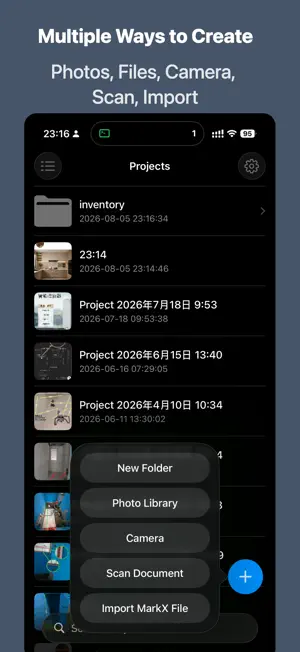
MarkX turns any photo into an accurate, shareable measurement record. Snap a photo, draw a line, type the length — or let MarkX measure it for you with perspective correction, LiDAR depth or a Bluetooth laser meter. Built for contractors, architects, inspectors, interior designers and anyone who measures on site. Measure Faster on Site • Instant length entry — the number pad appears the moment you finish a line, so you can measure room after room without opening menus • Bluetooth laser meters — connect a Leica DISTO or Bosch GLM / PLR and every reading fills in the line automatically • LiDAR depth — on iPhone Pro and iPad Pro, photos taken in MarkX measure any two points without a reference object • Perspective correction — mark a tile, door or A4 sheet of known size and measure accurately even on photos taken at an angle • Reference-line scale — set one known length and every other line, rectangle and circle updates automatically • Area & perimeter — rectangles, circles and polygons show m², ft² and more for flooring, painting and tiling estimates Professional Reports • Measurement report PDF — numbered callouts on the photo plus a table of lengths, sizes and areas • Multi-photo reports — combine a whole folder or any selection of photos into one PDF for clients and crews • Info stamp — add project name, time, address and notes to the photo as on-site evidence • Export as image or PDF, print, or share the editable .markx project file Rich Annotation Tools • Lines with dimension labels and many endpoint styles • Rectangles, circles and polygons with rotation • Arrows, angles, freehand drawing and Bézier curves • Text labels in 4 styles: plain, filled, outlined and callout • Icons and inserted photos for floor plans and site notes • Magnifier to highlight details, mosaic to hide private information • Tiled text watermark to protect your photos Made for Real Work • Units: mm, cm, m, km, in, ft, yd, mi, plus your own custom units • Layers you can lock, hide and reorder, with full undo and redo • Apple Pencil support: draw with the pencil, scroll and select with your fingers • Folders, thumbnails and iCloud sync to keep every job organized • Built-in camera with grid and level, plus document scanning • Available in 14 languages, with dark mode support Who Uses MarkX? • Contractors and renovators — measure rooms, walls and openings, then send a report • Architects and engineers — document site conditions with real dimensions • Inspectors and insurance adjusters — record defects with time, location and size • Interior designers — mark up plans and photos for clients • Real estate agents — add room sizes to property photos • DIY enthusiasts — plan furniture, flooring and home projects Calibrated and LiDAR measurements are estimates based on the photo. Always verify critical dimensions on site. Feedback & suggestions: [email protected]
What’s new
Version 1.3.7 · Updated October 24, 2026
• New font choices for text: browse the built-in library, download more, or import your own fonts • Redesigned canvas toolbars: tools, layers and style controls are clearer, with a floating action bar for the selected mark • All-new layers panel: live thumbnails, rename, drag to reorder, and show-only-this-layer • Property panel now uses tabs: one-tap color presets, and tap any value to type an exact number • Smoother project list: animated list/grid switching, sorting, deleting and drag-into-folder • Completed translations for all 13 supported languages
App privacy
The developer, Space-Time Transformation Technology Co., Ltd., reported these privacy practices to Apple.
Data Not Collected
The developer does not collect any data from this app.
Alternatives to MarkX Image Meter Markup Ruler
Looking for apps like MarkX Image Meter Markup Ruler? Here are 6 similar apps on the App Store. The highest rated is Refbox Mobile (5.0/5), and all 6 are free to download.
-
 Snapatch
-
 hashColor
-
 Refbox Mobile
5.0
-
 MockPaper - Wallpaper Mockup
5.0
-
 LivePop Collage
5.0
-
 Campfire - Safe Space
| App | Rating | Price | Last updated | Compare |
|---|---|---|---|---|
| MarkX Image Meter Markup Ruler | 5.0 / 5 (1 rating) | Free | October 24, 2026 | |
| Snapatch | – | Free | Aug 10, 2026 | Compare |
| hashColor | – | Free | Sep 14, 2026 | Compare |
| Refbox Mobile | 5.0 / 5 (8) | Free | Apr 22, 2026 | Compare |
| MockPaper - Wallpaper Mockup | 5.0 / 5 (1) | Free | Sep 7, 2026 | Compare |
| LivePop Collage | 5.0 / 5 (3) | Free | May 18, 2026 | Compare |
| Campfire - Safe Space | – | Free | Feb 10, 2026 | Compare |