

MyScanPilot: Scan & Organize
Christian Hoepker Productivity iPhoneiPadiPod touchMac
MyScanPilot: Scan & Organize is a free Productivity app for iPhone and iPad by Christian Hoepker. Requires iOS 18.6. Updated November 11, 2026.
- Price
- Free
- on the App Store
- Size
- 26 MB
- Age 4+
- Updated
- Nov 11
- 2026 · v2.4
Screenshots


About MyScanPilot: Scan & Organize
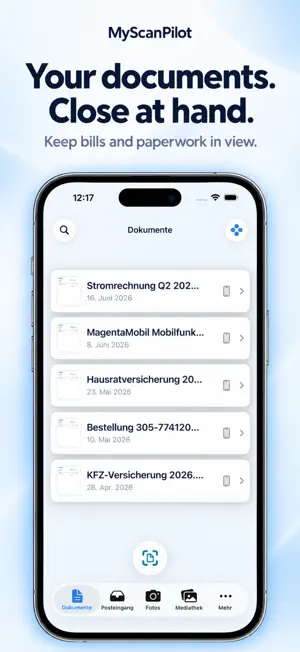
MyScanPilot – your scanner. Your storage. Your data. Scan letters, receipts and contracts in seconds and file them exactly where you want them: on your NAS, in your NextCloud, in iCloud Drive, Google Drive, OneDrive, Dropbox or locally on your device. No third-party cloud, no tracking. FILING PROFILES – ONE TAP INSTEAD OF TEN Save destination, folder, labels and file name as a profile and file with one tap after scanning. A profile can serve several destinations at once, for example your NAS folder and a file in MyOfficePilot. Profiles also work for photos and videos, when importing, in the inbox and when filing from your photo library. With Premium the app suggests the right profile, optionally with Apple Intelligence. SCAN LIKE A PRO • Automatic edge detection, multi-page PDFs in one go • Searchable PDFs with an invisible text layer (OCR) • Smart analysis: sender, date, amount and document type – turned into a meaningful file name • Network scanners on your local network, also on the Mac PDF TOOLS • Merge and split PDFs – by pages, packages or file size • Remove password protection • Sign with your finger or Apple Pencil YOUR DATA STAYS WITH YOU • Synology, QNAP and any NAS via WebDAV or SMB • NextCloud, iCloud Drive, Google Drive, OneDrive, Dropbox • “Local” = real files in the Files app, no hidden copy • Passwords encrypted in the keychain, synced across your devices FILE PHOTOS IN ORDER (PREMIUM) Photo filing copies photos and videos from your library to your NAS, NextCloud or iCloud Drive, sorted by year and month – Wi-Fi only, optionally in the background overnight. Filed photos are never filed twice. ORDER THAT TRAVELS WITH YOU • Labels, filters and full-text search, also via Spotlight • An inbox for everything that arrives – including email attachments from MyOfficePilot • Trash with a 30-day grace period, synced across iPhone, iPad and Mac • The action wheel: a long press shows every action for exactly that item PART OF THE PILOT SUITE MyScanPilot works together with MyOfficePilot, MyFamilyPilot and MyImmoPilot: documents go straight into the right file, contract or property – with the file’s picture and the icon of the app it belongs to. FOR IPHONE, IPAD AND MAC Sidebar, keyboard and mouse on iPad and Mac, widgets and Shortcuts on iPhone. English, German and Spanish. PREMIUM The key features are free. Premium unlocks unlimited filing, photo filing, more than two filing profiles with profile suggestions, and sync across your devices via iCloud or Google Drive – as an affordable yearly subscription. Bugs, wishes or questions? Right in the app under “Bugs & Questions” – we read everything. MyScanPilot Premium – yearly auto-renewable subscription, including a 7-day free trial. Payment is charged to your Apple Account. The subscription renews automatically unless it is cancelled at least 24 hours before the end of the current period. You can cancel anytime in your Apple Account settings. Terms of Use (EULA): https://www.apple.com/legal/internet-services/itunes/dev/stdeula/ Terms of Service: https://myscanpilot.de/agb.html Privacy Policy: https://myscanpilot.de/datenschutz.html
What’s new
Version 2.4 · Updated November 11, 2026
MyScanPilot 2.4 – file with one tap. - Filing profiles Save destination, folder, labels and file name as a profile and file with one tap – after scanning, when importing, in the inbox and from your photo library. Several destinations at once, also for photos and videos. With Premium the app suggests the right profile, optionally with Apple Intelligence. - “Local” = real files Anything stored locally is now a real file in the Files app (On My iPhone › MyScanPilot). If you move the default folder, the app offers to move the files along. - Trash in the menu Its own entry above Settings. Items deleted on one device go to the trash on your other devices too, restored items come back everywhere – and much faster now. - Files in MyPilotSuite File documents into files from MyOfficePilot, MyFamilyPilot and MyImmoPilot – alphabetical, with the file’s picture and the app icon. You can change the assignment later. - New PDF tools Split PDFs, remove password protection and sign. - Spotlight & labels Find PDFs via Spotlight, assign labels faster, also to several photos at once. - Bugs, wishes, questions Report them right from the app, optionally with screenshots. - Polish Faster switch from camera to scan, no more freezing when choosing labels, more reliable passwords for NAS and WebDAV, fewer hangs while syncing. Terms of Use (Apple Standard EULA): https://www.apple.com/legal/internet-services/itunes/dev/stdeula/ MyStudyPilot Terms and Conditions: https://mystudypilot.de/agb/ Privacy Policy: https://mystudypilot.de/datenschutz/
App privacy
The developer, Christian Hoepker, reported these privacy practices to Apple.
Data Not Collected
The developer does not collect any data from this app.
Alternatives to MyScanPilot: Scan & Organize
Looking for apps like MyScanPilot: Scan & Organize? Here are 6 similar apps on the App Store.
-
 CoreFiles
-
 What = Next
-
 Scanno – PDF-Scanner
-
 Parata - Emergency Binder
-
 Raven Documents
-
 Vocapa - Capture & Share Notes
| App | Rating | Price | Last updated | Compare |
|---|---|---|---|---|
| MyScanPilot: Scan & Organize | – | Free | November 11, 2026 | |
| CoreFiles | – | Free | May 26, 2026 | Compare |
| What = Next | – | Free | Oct 6, 2026 | Compare |
| Scanno – PDF-Scanner | – | Free | Nov 17, 2026 | Compare |
| Parata - Emergency Binder | – | Free | Nov 5, 2026 | Compare |
| Raven Documents | – | Free | Nov 7, 2026 | Compare |
| Vocapa - Capture & Share Notes | – | Free | Aug 17, 2026 | Compare |