

SwipeDelete: Photo Cleaner AI
Kiryl Makarevich Photo & Video iPhoneiPadiPod touch
SwipeDelete: Photo Cleaner AI is a free Photo & Video app for iPhone and iPad by Kiryl Makarevich. Requires iOS 17. Updated October 7, 2026.
- Price
- Free
- on the App Store
- Size
- 14 MB
- Age 4+
- Updated
- Oct 7
- 2026 · v2.0
Screenshots

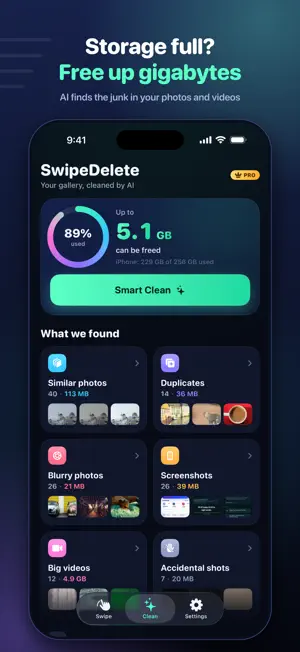


About SwipeDelete: Photo Cleaner AI
Out of storage. Again. SwipeDelete cleans your camera roll the way Tinder cleans your inbox — swipe left to delete, right to keep. AI handles the hard part. WHAT IT FINDS • Blurry shots you'd never spot manually • Selfie bursts — keep one, swipe the rest (NEW) • Chat screenshots piling up for months (NEW) • Photos older than your last phone • Duplicates and near-identical copies • Heavy videos eating gigabytes HOW IT WORKS 1. AI scans your full library in under a minute 2. See exactly how much storage you can reclaim 3. Swipe left to delete, right to keep 4. One-by-one or bulk — your choice 100% PRIVATE Everything runs on-device. Your photos never leave your iPhone. No cloud, no servers, no upload. SMART DUPLICATE FINDER Perceptual hashing groups identical AND near-identical photos. Pick the best shot — we'll mark the rest. Burst captures, screenshots saved twice, lightly edited versions — caught. BUILT FOR YOUR PATTERNS • Track gigabytes reclaimed over time • Statistics that show your cleanup streak • Live Activity during scans • Widget shows what's ready to clean PRO UNLOCKS • Unlimited swipe deletions (free tier: 20) • Full duplicate finder with similarity scoring • Selfie burst grouping • Chat screenshot detection • Detailed analytics & history • Priority support PERFECT FOR • Anyone with 10,000+ photos • Content creators with burst shots • Screenshot collectors • iPhone users running out of storage Free up gigabytes in minutes. Terms & Conditions: https://telegra.ph/Terms--Conditions-02-08-5 Privacy Policy: https://telegra.ph/Privacy-Policy-02-08-123 Weedkly Subscription with 3 days trial - 4.99$
What’s new
Version 2.0 · Updated October 7, 2026
SwipeDelete 2.0, rebuilt from the ground up. • All-new design. Start swiping your own photos right away: left to delete, right to keep. • New on-device AI finds far more junk: blurry and shaky shots, duplicates, similar photos (it keeps the best one), screenshots, screen recordings, big videos, accidental shots and low-quality images. • Smart Clean: check what the AI picked, then clear it all in one tap. • Swipe through AI picks, Recent, On this day or any month. • Big libraries scan faster and keep going in the background. • Choose how strict blur detection is in Settings. Your photos never leave your iPhone. Deleted items wait 30 days in Recently Deleted.
App privacy
The developer, Kiryl Makarevich, reported these privacy practices to Apple.
Data Not Collected
The developer does not collect any data from this app.
Alternatives to SwipeDelete: Photo Cleaner AI
Looking for apps like SwipeDelete: Photo Cleaner AI? Here are 6 similar apps on the App Store. The highest rated is Synology Photos Cleaner (5.0/5), and all 6 are free to download.
-
 Pikondo: AI Photo Cleaner
3.8
-
 Swipe Delete: Photo Cleaner
-
 Synology Photos Cleaner
5.0
-
 Declutr: Photo Cleaner & Swipe
-
 Swipe & Delete Photos
-
 Swipe To Delete: Photo Cleaner
4.6
| App | Rating | Price | Last updated | Compare |
|---|---|---|---|---|
| SwipeDelete: Photo Cleaner AI | – | Free | October 7, 2026 | |
| Pikondo: AI Photo Cleaner | 3.8 / 5 (4) | Free | Sep 24, 2026 | Compare |
| Swipe Delete: Photo Cleaner | – | Free | Feb 5, 2026 | Compare |
| Synology Photos Cleaner | 5.0 / 5 (1) | Free | Oct 26, 2026 | Compare |
| Declutr: Photo Cleaner & Swipe | – | Free | Oct 12, 2026 | Compare |
| Swipe & Delete Photos | – | Free | Oct 6, 2025 | Compare |
| Swipe To Delete: Photo Cleaner | 4.6 / 5 (64) | Free | Sep 1, 2026 | Compare |