

Talkzo - Voice to Text Notes
Maksim Lisitsa Productivity iPhoneiPadiPod touch
Talkzo - Voice to Text Notes is a free Productivity app for iPhone and iPad by Maksim Lisitsa. Requires iOS 18.0. Updated October 23, 2026.
- Price
- Free
- on the App Store
- Size
- 36 MB
- Age 4+
- Updated
- Oct 23
- 2026 · v2.0
Screenshots



About Talkzo - Voice to Text Notes
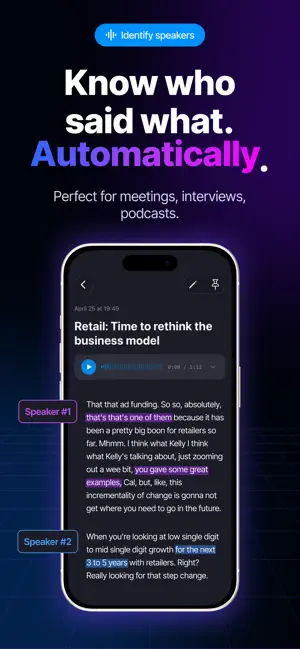
Turn your voice into text. Talkzo records your voice and turns it into text with AI. Record lectures, meetings, interviews or a quick idea. When you stop recording, Talkzo transcribes it, marks who spoke and gives the note a title that fits the topic. ▸ RECORD OR IMPORT Record in the app, from a widget on the Home Screen or Lock Screen, or from Control Center. Import audio files (m4a, mp3, wav, ogg/opus, flac) or send them to Talkzo from other apps with the Share button. ▸ TRANSCRIPTION BY SPEAKER The language is detected automatically. When several people speak, the text is split by speaker, so you can see who said what. ▸ TEXT THAT FOLLOWS THE AUDIO During playback, words light up as they are spoken. Tap any word to jump to that moment. ▸ WORKS IN THE BACKGROUND Lock your iPhone or switch apps: the upload keeps going. No connection? Talkzo waits for the internet and continues on its own. You get a notification when the note is ready. ▸ SCANS, PDFS AND WEB PAGES Scan text from documents with your camera. Save a web page from its link. With Pro, import PDFs of up to 40 pages. ▸ AI TEXT IN 12 STYLES (PRO) Turn a note into an email, a social media post, a message, lecture notes, key points, a task list or a meeting summary. Or make the text professional, casual or concise. ▸ TRANSLATION (PRO) Translate a note into any of 15 languages, including English, Spanish, German, French and Chinese. ▸ AI CHAT ABOUT A NOTE (PRO) Ask questions about a recording and get answers based on its text. The answer appears as it is written, and you can stop it at any time. If the note has timestamps, tap a time in the answer to hear that moment. ▸ STAY ORGANIZED Tags, full-text search, archive and pinned notes. Light, dark and Ocean themes, or match the system. FREE AND PRO Free: • 120 transcription minutes a month • Recordings up to 30 minutes, audio files up to 10 minutes • Speakers, text that follows the audio, smart titles and notifications • Document scan: up to 3 pages at a time, 30 pages a month Talkzo Pro: • No monthly limit on transcription minutes • Recordings and audio files up to 120 minutes • AI text in 12 styles, translation, AI chat and PDF import • Document scan: up to 5 photos at a time Transcription and AI features need an internet connection. Audio and text are sent to the Talkzo server and processed by our AI service providers. Details are in the Privacy Policy. SUBSCRIPTION Talkzo Pro is an auto-renewable subscription. Plans and prices are shown in the app before you buy. Payment is charged to your Apple Account when you confirm the purchase or, if your plan includes a free trial, when the trial ends. The subscription renews automatically unless you cancel it at least 24 hours before the end of the current period. You can manage or cancel it in your App Store account settings. Download Talkzo. Start speaking, stop typing. Terms of Use: https://www.apple.com/legal/internet-services/itunes/dev/stdeula/
What’s new
Version 2.0 · Updated October 23, 2026
What's new: • A new note screen: Transcript and AI text tabs, and the player stays at hand while you scroll • Name your speakers: tap a speaker and say who it is. Names show up in the transcript, when you copy or share, and in AI Chat • Fix the transcript right in the text: tap the pencil and edit any paragraph • AI text and translation (Pro) get their own tab and keep going after you leave the note • AI Chat opens over the note. Tap a timestamp in an answer to hear that moment • New player: change the speed with one tap and control playback from the Lock Screen • Bug fixes and improvements Thanks for using Talkzo!
App privacy
The developer, Maksim Lisitsa, reported these privacy practices to Apple.
Data Used to Track You
The following data may be used to track you across apps and websites owned by other companies:
- Identifiers: Device ID
Data Linked to You
The following data, which may be collected and linked to your identity, may be used for the following purposes:
- Identifiers: User ID, Device ID
- User Content: Photos or Videos, Audio Data, Other User Content
Used for: Analytics, App Functionality
Data Not Linked to You
The following data, which may be collected but is not linked to your identity, may be used for the following purposes:
- Usage Data: Product Interaction
- Identifiers: Device ID
Used for: Analytics, App Functionality
Alternatives to Talkzo - Voice to Text Notes
Looking for apps like Talkzo - Voice to Text Notes? Here are 6 similar apps on the App Store. The highest rated is HiNoter - AI Note Taker (4.8/5), and all 6 are free to download.
-
 NoteX: AI Meeting Assistant
4.6
-
 Transkriptor - Speech to Text
4.7
-
 HiNoter - AI Note Taker
4.8
-
 Note AI: Smart Note Taker
4.5
-
 Summary - AI Note Taker
4.7
-
 CraftNote: Smart AI Note Taker
4.7
| App | Rating | Price | Last updated | Compare |
|---|---|---|---|---|
| Talkzo - Voice to Text Notes | – | Free | October 23, 2026 | |
| NoteX: AI Meeting Assistant | 4.6 / 5 (726) | Free | Oct 21, 2026 | Compare |
| Transkriptor - Speech to Text | 4.7 / 5 (1,099) | Free | Oct 16, 2026 | Compare |
| HiNoter - AI Note Taker | 4.8 / 5 (943) | Free | Oct 17, 2026 | Compare |
| Note AI: Smart Note Taker | 4.5 / 5 (729) | Free | Oct 13, 2026 | Compare |
| Summary - AI Note Taker | 4.7 / 5 (55,559) | Free | Oct 22, 2026 | Compare |
| CraftNote: Smart AI Note Taker | 4.7 / 5 (4,855) | Free | Sep 26, 2026 | Compare |