

Peak Fitness
Tyler Edwards Health & Fitness iPhoneiPadiPod touch
Peak Fitness is a free Health & Fitness app for iPhone and iPad by Tyler Edwards. Rated 5.0/5 from 5 ratings. Requires iOS 17.6. Updated August 17, 2026.
- Rating
- 5.0
- 5 ratings
- Price
- Free
- on the App Store
- Size
- 30 MB
- Age 12+
- Updated
- Aug 17
- 2026 · v2.0
Screenshots
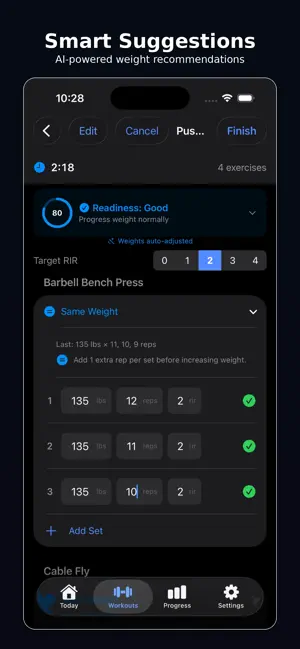


About Peak Fitness
Reach the peak of your fitness journey! Most workout trackers just log what you did. Peak Fitness reads how recovered you are — sleep, energy, soreness, Apple Health data — and adjusts your working weights before you lift. Train smarter, not just harder. SMART READINESS Daily check-in scores your recovery and adapts your session Tap exactly where you're sore and get told what to train instead Auto-fills from Apple Health using your own HRV and resting heart rate baselines Deload week reminders with auto-adjusted volume TRAIN 590+ exercises including Stability Ball, Medicine Ball, Bosu Ball and EZ Bar Plate calculator for barbell, EZ curl, trap, safety squat and Smith machine Rest timer between sets and isometric hold timer for timed work RIR (Reps in Reserve) tracking with intelligent weight and volume progression Supersets, warmup and drop sets, per-exercise notes Save and resume workouts anytime PROGRAMS 12 built-in programs from beginner full-body to PPL, Upper/Lower and PHUL Build your own program from your saved workouts Peak Fitness tracks your week and day and shows what's next PROGRESS Earn XP, climb 50 levels and rank from Bronze to Legend 19 achievements to unlock PR celebrations, progress charts and personal records Share your lifter card with your rank, streak and top lifts Home screen widgets for your streak, level and weekly progress CYCLE-SYNCED TRAINING Optional cycle tracking that adjusts recommendations by phase PREMIUM Unlimited workout templates Auto-adjust weights based on readiness Auto-progress sets by muscle group Advanced analytics and volume landmark tracking Data export Start your free trial today. Terms of Use (EULA): https://www.apple.com/legal/internet-services/itunes/dev/stdeula/
Ratings & reviews
5.0
5 ratings
What’s new
Version 2.0 · Updated August 17, 2026
Rank system — Bronze through Legend, 3 divisions each, badge geometry escalates per tier 19 achievements with rarity tiers Shareable lifter card with rank, streak, volume, top PRs Share prompts on rank-up and new PR Avatar system removed, replaced by rank badges Per-region soreness across 6 body regions Training suggestions from soreness, shown in check-in and on Today HRV and resting heart rate compared against personal 30-day baselines instead of population norms Recovery trend vs 7-day average Active program tracking — week/day pointer, next workout on Today, progress vs target Custom programs built from your own templates Plate calculator with 8 bar types and automatic bar inference from exercise name Per-exercise notes during workouts Rest timer with floating pill, +15s, skip, haptic, notification Sessions now award XP and count toward streaks, challenges, achievements Sessions now show a full summary screen Widget uses the app icon Fixes Buttons unresponsive on the first exercise (.onTapGesture swallowing taps) Recovery score could never reach "Needs Rest" — old formula bottomed out at 20/100 Three divergent recovery scoring implementations unified Sleep duration was collected but never used in the score Rest timer shipped defaulted off, so the checkmark did nothing Weekly challenges awarded no XP Rating XP invisible and stackable on repeated taps Widget weekly count never reset — now calendar week, counts sessions, refreshes on launch and midnight Cascade deletes added — deleting templates/workouts was orphaning rows Reset All Data was missing 4 model types, 11 settings keys, and scheduled notifications Dynamic Type inflating exercise headers and input labels Sheets presented from List rows dismissing the workout StrongLifts 5x5 renamed to Linear 5x5 (trademark)
App privacy
The developer, Tyler Edwards, reported these privacy practices to Apple.
Data Not Linked to You
The following data, which may be collected but is not linked to your identity, may be used for the following purposes:
- Health & Fitness: Health, Fitness
Used for: Analytics