
LazyBudget: What's Left
Ken Hodgson Finance iPhoneiPadiPod touchApple Watch
LazyBudget: What's Left is a free Finance app for iPhone and iPad by Ken Hodgson. Rated 5.0/5 from 1 ratings. Requires iOS 17.0. Updated September 29, 2026.
- Rating
- 5.0
- 1 ratings
- Price
- Free
- on the App Store
- Size
- 37 MB
- Age 4+
- Updated
- Sep 29
- 2026 · v1.15
Screenshots


About LazyBudget: What's Left
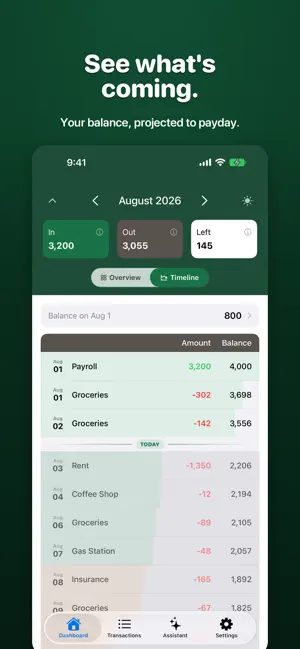
Stop guessing. Start knowing. LazyBudget answers the one question that matters: What can I actually spend? No spreadsheets. No complicated categories. Just income, bills, and what’s left—so you can see your real spending power in seconds. Why LazyBudget? What’s Left — See exactly how much you can spend after bills and income Bills & budgets — Track due dates, spending limits, and reminders Optional bank sync — Connect your bank for automatic transaction updates File import — Use OFX/QFX statements if you prefer manual import Monthly recap — Get a summary of how you did with your budgets Low-balance alerts — Get notified before you run low App lock — Optional Face ID or passcode to protect your data Privacy first Your budget is kept on your device and in your account, so it follows you between devices. We don’t sell it or use it for advertising. Subscriptions Some features require a subscription or one-time purchase. You can manage or cancel anytime in your Apple ID settings. Privacy Policy: https://lazybudget.app/privacy-policy.html Terms of Service: https://lazybudget.app/terms-of-service.html
What’s new
Version 1.15 · Updated September 29, 2026
• Set up your month in one step: LazyBudget finds your paychecks and bills in your transactions — privately on your phone, or with AI (Claude, by Anthropic) if you choose. You review everything before it's added. • Households: share a budget with a partner — one set of transactions and banks, each person's own bills, paychecks and starting balance, a Mine / Household view, and every row shows whose it is. • Budget periods that follow your paychecks, with carry-over. • Text size: pick a size in Settings, or follow your iPhone's setting. • Your budget follows your account: sign in on another device and it's all there. • Signing out no longer disconnects your banks. • Privacy: no analytics, a clearer privacy policy, and account deletion that never touches a partner's data. • Fixes: bills due on the 31st land on the last day of shorter months; each day's transactions appear in the order your bank posted them; the starting balance never counts a loan or mortgage.
App privacy
The developer, Ken Hodgson, reported these privacy practices to Apple.
Data Linked to You
The following data, which may be collected and linked to your identity, may be used for the following purposes:
- Purchases: Purchase History
- Financial Info: Other Financial Info
- Contact Info: Email Address, Name
- User Content: Other User Content
- Identifiers: User ID
Used for: App Functionality
Alternatives to LazyBudget: What's Left
Looking for apps like LazyBudget: What's Left? Here are 6 similar apps on the App Store. The highest rated is Monelyx: Money Manager (5.0/5), and all 6 are free to download.


| App | Rating | Price | Last updated | Compare |
|---|---|---|---|---|
| LazyBudget: What's Left | 5.0 / 5 (1 rating) | Free | September 29, 2026 | |
| StackStats | – | Free | Apr 22, 2026 | Compare |
| Forseera: Bill Organizer | – | Free | Jul 17, 2026 | Compare |
| SpendLow | – | Free | Aug 18, 2026 | Compare |
| Monelyx: Money Manager | 5.0 / 5 (1) | Free | Oct 11, 2026 | Compare |
| Markulator | – | Free | Feb 26, 2026 | Compare |
| MWC Monitor | – | Free | Sep 22, 2026 | Compare |