

ContextVoca - Scan to Learn
Junghyun Park Education iPhoneiPadiPod touch
ContextVoca - Scan to Learn is a free Education app for iPhone and iPad by Junghyun Park. Requires iOS 16.4. Updated October 10, 2026.
- Price
- Free
- on the App Store
- Size
- 70 MB
- Age 4+
- Updated
- Oct 10
- 2026 · v1.0.11
Screenshots
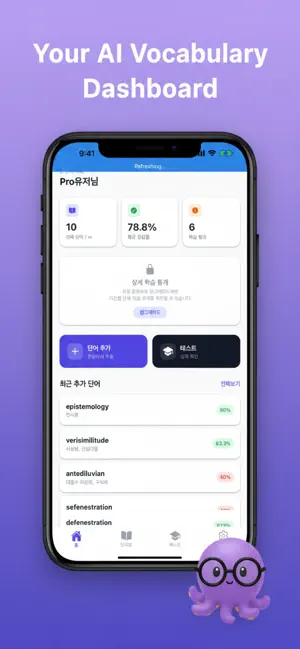


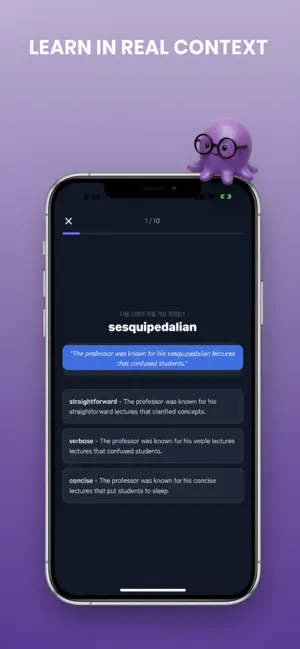
About ContextVoca - Scan to Learn
ContextVoca uses AI to turn photos and text into your personal vocabulary list — then quizzes you until you own those words. [SNAP - LEARN - REMEMBER] Point your camera at a book, menu, sign, or any text. Our OCR engine reads it, and our AI extracts the vocabulary words most worth learning. No more manual lookup — just learn. [AI-POWERED WORD EXTRACTION] ContextVoca's LLM engine analyzes your captured text and selects the most meaningful words for your level. It strips away common words and surfaces the ones that will expand your vocabulary fastest. [SMART QUIZ SYSTEM] Our adaptive quiz engine schedules reviews based on how well you know each word. The more you struggle with a word, the more often it appears — so you never forget what you've worked hard to learn. [CONTEXT-BASED LEARNING] Every word is stored with the sentence or phrase it came from. Seeing a word in context is proven to dramatically improve retention compared to isolated flashcards. [KEY FEATURES] - OCR text recognition from photos and camera - AI keyword extraction - Spaced repetition quiz (multiple choice + fill-in) - Context sentences saved with every word - Vocabulary statistics and learning streaks - Word tagging and custom categories - Available in English, Korean, Japanese, and Chinese [SUBSCRIPTION PLANS] - Free — up to 100 words, core features - Basic — up to 1,000 words, all features (monthly or yearly auto-renewing subscription) - Pro — unlimited words, all features, priority support (monthly or yearly auto-renewing subscription) Prices are shown on the in-app subscription screen. Payment is charged to your Apple ID account at confirmation of purchase. The subscription automatically renews unless it is canceled at least 24 hours before the end of the current period, and your account is charged for renewal within 24 hours prior to the end of the current period. You can manage and cancel your subscription in your Apple ID account settings after purchase. Terms of Use (EULA): https://www.apple.com/legal/internet-services/itunes/dev/stdeula/ Privacy Policy: https://contextvoca.app/en/privacy/
What’s new
Version 1.0.11 · Updated October 10, 2026
New: review reminders. On days you have words to review, we send one reminder around your usual study time. Turn it on or off anytime in Settings. Plus stability improvements.
App privacy
The developer, Junghyun Park, reported these privacy practices to Apple.
Data Linked to You
The following data, which may be collected and linked to your identity, may be used for the following purposes:
- Purchases: Purchase History
- Search History: Search History
- Browsing History: Browsing History
- Identifiers: Device ID, User ID
- Usage Data: Product Interaction
- Contact Info: Email Address, Phone Number
Used for: Analytics, Product Personalization, App Functionality
Data Not Linked to You
The following data, which may be collected but is not linked to your identity, may be used for the following purposes:
- Contacts: Contacts
- User Content: Photos or Videos
Used for: App Functionality
Alternatives to ContextVoca - Scan to Learn
Looking for apps like ContextVoca - Scan to Learn? Here are 6 similar apps on the App Store.
-
 Lexidotori: English Vocab OCR
-
 단어샷 셀프
-
 독파 : AI 수능 국어 공부 문학 비문학
-
 단어샷 홈
단어샷 홈
-
 캔톡 Cantok - 영어듣기 쉐도잉 받아쓰기 연음
-
 Smart Vocabulary Card
| App | Rating | Price | Last updated | Compare |
|---|---|---|---|---|
| ContextVoca - Scan to Learn | – | Free | October 10, 2026 | |
| Lexidotori: English Vocab OCR | – | Free | Oct 12, 2026 | Compare |
| 단어샷 셀프 | – | Free | Jun 17, 2026 | Compare |
| 독파 : AI 수능 국어 공부 문학 비문학 | – | Free | Sep 15, 2026 | Compare |
| 단어샷 홈 | – | Free | Jun 17, 2026 | Compare |
| 캔톡 Cantok - 영어듣기 쉐도잉 받아쓰기 연음 | – | Free | Oct 7, 2026 | Compare |
| Smart Vocabulary Card | – | Free | Apr 9, 2026 | Compare |