

Swipeo: Swipe to Delete Photos
Emil Svetlichnyy Utilities iPhoneiPadiPod touch
Swipeo: Swipe to Delete Photos is a free Utilities app for iPhone and iPad by Emil Svetlichnyy. Rated 3.0/5 from 1 ratings. Requires iOS 18.4.
- Rating
- 3.0
- 1 ratings
- Price
- Free
- on the App Store
- Size
- 19 MB
- Age 4+
- Updated
- Oct 22
- 2026 · v32.0
Screenshots


About Swipeo: Swipe to Delete Photos
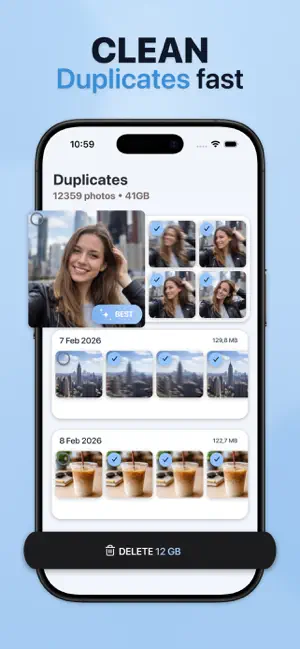
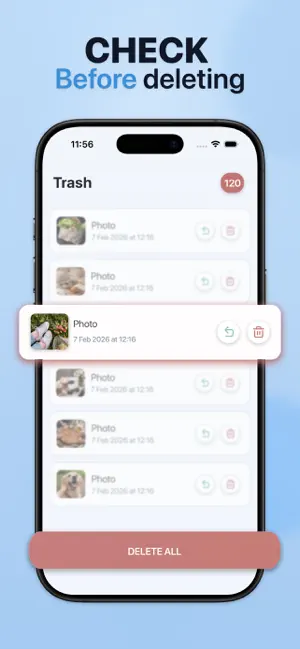
Swipeo is a gallery cleaner for iPhone and iPad. You review photos and videos one card at a time, swipe or tap to keep or delete, and free storage with an in-app Trash before permanent delete. It works with your on-device Photos library and includes Swipe, Duplicates, Statistics, and Trash. Use it when storage is full, after trips leave near-same shots, or when screenshots and bursts fill the camera roll — a focused swipe review with a recoverable step before hard delete. FEATURES • Swipe keep/delete for photos and videos (gestures, buttons, undo) • Filters: photos / videos / all; newest, oldest, or random; album or capture day • Fullscreen preview with video playback, favorites, and share • In-app Trash: restore, delete one, or delete all (short retention) • Duplicates: group by type, resolution, and capture time; delete to Trash requires Pro • Statistics: storage overview, media-type breakdown (photos, videos, screenshots, Live Photos, burst), monthly cleanup dynamics • Session summary; Settings for language, light/dark theme, restore purchases, About, Terms, Privacy • Free core cleanup; Pro (weekly/yearly) for unlimited swipes and duplicate deletion; trial may appear on weekly HOW TO Allow Photo Library access. Open Swipe; set type, sort, album, or day filters if needed. Keep or delete card by card; undo if you change your mind. Review Trash — restore or delete permanently. Optionally scan Duplicates and check Statistics. DESIGN / CONTROLS One-card flow with keep, delete, undo, filters, fullscreen, and tabs for Duplicates, Statistics, and Trash. Language and theme are in Settings. EXPORT / SAVE / SHARE Share from fullscreen via the iOS share sheet to Messages, Mail, Notes, Files, and other apps on your device. Toggle Photos favorites. No cloud upload, ZIP/CSV export, or cross-device sync. ORGANIZE Filter by media type, sort, album, or day. Review duplicate groups before deleting. Use Statistics for storage by type and monthly cleanup progress. WHO IT IS FOR • People with an iPhone or iPad storage warning • Heavy camera-roll users after travel, events, or kids’ bursts • Anyone clearing screenshots, bursts, and near-duplicates • Users who prefer swipe review over a grid-only editor • Anyone who wants Trash restore before permanent delete WHY SWIPEO One-card review of your real Photos library, in-app Trash, local duplicate grouping, and storage statistics — without cloud upload. A focused alternative to slow manual gallery scrolling when the job is keep, delete, and free space. WORKFLOW Open Swipeo → filter → keep or delete → confirm in Trash → optionally clear duplicates and check Statistics. FAQ Q: What devices does Swipeo support? A: iPhone and iPad, using your on-device Photos library. Q: Does Swipeo upload my photos? A: No. Cleanup runs on device. No cloud backup or web dashboard. Q: How do I delete photos and videos? A: Delete in Swipe moves items to Trash. Restore later or delete permanently there. Q: Can I undo a delete? A: Yes — undo in-session, or restore from Trash while items are retained. Q: Does Swipeo use AI for duplicates? A: No. Groups use type, resolution, and capture-time buckets — not face or ML matching. Q: What is free vs Pro? A: Free: swipe cleanup with a daily limit, Trash, Statistics, duplicates scan/view. Pro: no swipe cap and duplicate deletion. Q: Can I share from Swipeo? A: Yes — fullscreen uses the iOS share sheet to apps on your device. Q: Does it compress or convert photos? A: No. Swipeo only helps you review and remove media from Photos. Q: Which languages are available? A: English, Russian, Spanish, French, German, Italian, Simplified Chinese, Japanese, and Korean. Download Swipeo to review your gallery, free storage with recoverable Trash, and keep what matters. Terms of Use: https://www.apple.com/legal/internet-services/itunes/dev/stdeula/ Privacy Policy: https://emilsvetlichnyy.github.io/swipeclean-privacy/
What’s new
Version 32.0 · Updated October 22, 2026
Minor bugs fixed
App privacy
The developer, Emil Svetlichnyy, reported these privacy practices to Apple.
Data Not Linked to You
The following data, which may be collected but is not linked to your identity, may be used for the following purposes:
- Identifiers: Device ID
- Usage Data: Product Interaction, Other Usage Data
- Diagnostics: Crash Data, Performance Data, Other Diagnostic Data
Used for: Analytics, App Functionality
Alternatives to Swipeo: Swipe to Delete Photos
Looking for apps like Swipeo: Swipe to Delete Photos? Here are 6 similar apps on the App Store. The highest rated is Gon - AI Photo & Video Cleaner (5.0/5), and all 6 are free to download.
-
 Swipeos: Gallery Cleaner
-
 Gon - AI Photo & Video Cleaner
5.0
Gon - AI Photo & Video Cleaner
5.0
-
 Swipe! Photo Cleaner
-
 Gallery Swipe: Photo Cleanup
-
 Swipe To Delete Photos - Sweep
-
 Photo Cleaner: RollSweep
| App | Rating | Price | Last updated | Compare |
|---|---|---|---|---|
| Swipeo: Swipe to Delete Photos | 3.0 / 5 (1 rating) | Free | October 22, 2026 | |
| Swipeos: Gallery Cleaner | – | Free | Jul 25, 2026 | Compare |
| Gon - AI Photo & Video Cleaner | 5.0 / 5 (4) | Free | Oct 22, 2026 | Compare |
| Swipe! Photo Cleaner | – | Free | Jun 29, 2026 | Compare |
| Gallery Swipe: Photo Cleanup | – | Free | Sep 21, 2026 | Compare |
| Swipe To Delete Photos - Sweep | – | Free | Oct 15, 2026 | Compare |
| Photo Cleaner: RollSweep | – | Free | Oct 14, 2026 | Compare |