

Flippy: AI PDF & EPUB Reader
Trison Braithwaite Book iPhoneiPadiPod touchMac
Flippy: AI PDF & EPUB Reader is a free Book app for iPhone and iPad by Trison Braithwaite. Rated 4.6/5 from 19 ratings. Requires iOS 15.1.
- Rating
- 4.6
- 19 ratings
- Price
- Free
- on the App Store
- Size
- 33 MB
- Age 4+
- Updated
- Oct 19
- 2026 · v4.9
Screenshots

About Flippy: AI PDF & EPUB Reader
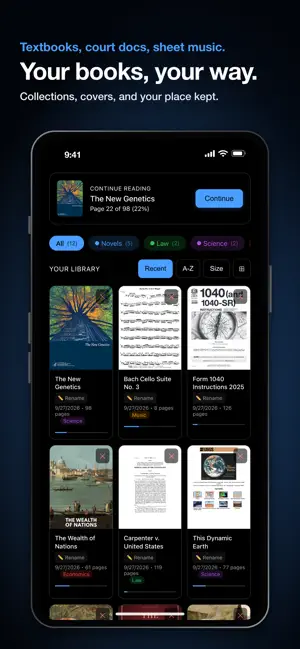
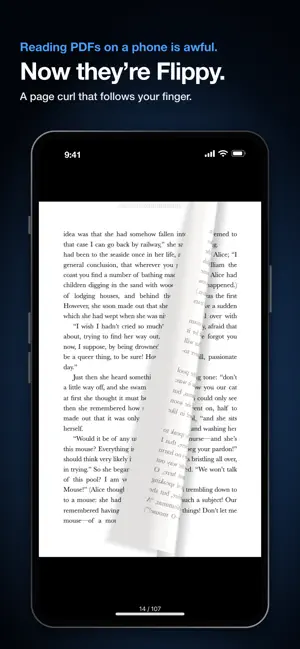
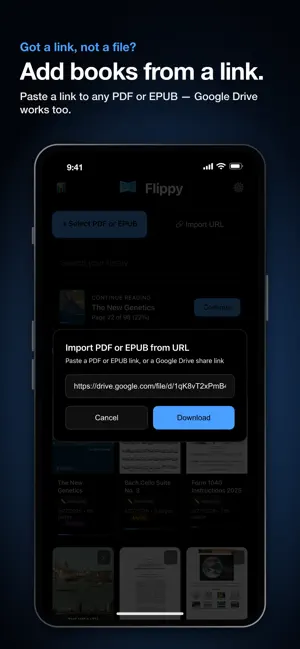
Flippy turns your PDFs and EPUBs — even scanned books, manga and comics — into real, flippable books: pages curl under your finger, a natural voice reads every page aloud, and built-in AI explains anything you don't understand. REALISTIC PAGE FLIP Swipe anywhere and watch pages curl, fold and settle with real physics. Tap the edges to turn, or glide with the chapter scrubber. On iPad, two-page book mode turns pages over the spine like a real book, and on iPhone Duo the spine sits right on the fold. SCANNED BOOKS, NOW READABLE A PDF that is just pictures of pages — an old textbook, a scanned manga? Flippy recognizes the text on your device, so Read Aloud, selection, Define, AI and Contents work like on any other PDF. Latin-alphabet languages, Chinese, Japanese, Korean, Hindi, Arabic and Russian. LISTEN TO ANY BOOK (Premium) Any PDF or EPUB becomes an audiobook. 8 natural voices read in the language of the text. Lock-screen controls, screen-off listening, speed from 0.75x to 2x. Highlight while you listen; tap the chip to return to the voice. Page numbers and repeated headers are skipped. Hearing the words while you see them helps readers with dyslexia, low vision and ADHD. TAKE IT WITH YOU Download a chapter — or just the pages you pick — and listen offline like a podcast. Saved it in another voice? Flippy tells you and switches in a tap. UNDERSTAND ANYTHING (Premium) Highlight a confusing passage and tap the glowing orb for a clear explanation, right on the page. Ask about your book — or another book in your library, with page citations. The AI can see the page, too: ask about a chart, figure, table or comic panel, even one on another page. Or ask out loud and hear the answer back. STUDY SMARTER Turn any chapter into flashcards or a practice quiz, save study sets, get chapter summaries. Define any word in any language, hear it pronounced, and keep it in My Words with the book it came from. IN YOUR LANGUAGE Flippy speaks 18 languages, now including Japanese, and follows your device language. Arabic and Farsi get a full right-to-left interface. AI answers in the language you read in. SMARTER CONTENTS Every PDF gets a tap-to-jump table of contents, even without one: Flippy finds the chapters by itself right after you open the book. A Bible lists its 66 books, a scanned course every lesson. Plus instant text search. FREE CLOUD SYNC Sign in with Google — free for everyone — and your bookmarks, highlights, notes, reading positions, collections and reading stats follow you across devices. Your PDF and EPUB files are never uploaded. READING FEATURES • Import from files, URLs or Google Drive links; Collections, a Continue Reading card, progress and streaks • Bookmarks with notes; multi-color highlighting, drawing and annotation • Scroll mode — continuous vertical reading • Fullscreen with pinch-to-zoom • Two-page spreads on iPad — beautiful for manga, comics and sheet music (Right-To-Left supported) • Pure-black interface, easy on your eyes and battery; works offline FREE & PREMIUM Reading, highlighting, bookmarking and cloud sync are free, and your first week unlocks every Premium feature — no card, no account. Premium then adds read-aloud, AI explanations and summaries, offline audio, every highlight color, extra bookmarks and note export. Pro suits heavy listeners; one-time packs like the Boost add minutes and AI uses, no subscription needed. PRIVACY FIRST No ads. No selling your data. Your files are never uploaded, and highlights and notes stay on your device unless you choose Cloud Sync — free, optional, deletable any time. Read Aloud sends only the text it reads; AI sends your question, the relevant page text and pictures of the pages involved, so it can read charts and figures. Details in our privacy policy. Download Flippy and rediscover the pleasure of turning pages. Terms of Use: https://flippypdf.github.io/terms-of-use/ Privacy Policy: https://flippypdf.github.io/privacy-policy/
Ratings & reviews
4.6
19 ratings
What’s new
Version 4.9 · Updated October 19, 2026
v4.9 Made for iPhone Duo: open it and your book becomes two pages, with the spine right on the fold. Close it for one page. On iPad, the AI chat is roomier too. Ask about charts and tables: the AI now looks at the page itself, so it can read the numbers, even when you’re on another page. Read Aloud starts sooner: a long page starts playing while the rest is still on its way. Pictures in EPUBs: illustrations now show up in the text. Added the book before? Add it again to see them. Chapters, found for you: a PDF with no contents gets its chapters by itself, so there's no need to open Contents first. Also: Flippy now speaks Japanese, a Boost adds minutes and AI uses with no subscription, you can select sideways text on charts, the full screen lock keeps your zoom when you turn your device, and fixes.
App privacy
The developer, Trison Braithwaite, reported these privacy practices to Apple.
Data Linked to You
The following data, which may be collected and linked to your identity, may be used for the following purposes:
- Contact Info: Email Address, Name
Used for: Third-Party Advertising
Alternatives to Flippy: AI PDF & EPUB Reader
Looking for apps like Flippy: AI PDF & EPUB Reader? Here are 6 similar apps on the App Store. The highest rated is SideBooks (4.6/5), and all 6 are free to download.
-
 PDF to Books
4.3
PDF to Books
4.3
-
 leaf: eBook Reader
3.8
leaf: eBook Reader
3.8
-
 eBook Flip
-
 SideBooks
4.6
SideBooks
4.6
-
 Realbook: EPUB PDF Book Reader
-
 BookShelves eBook Reader
3.8
BookShelves eBook Reader
3.8
| App | Rating | Price | Last updated | Compare |
|---|---|---|---|---|
| Flippy: AI PDF & EPUB Reader | 4.6 / 5 (19 ratings) | Free | October 19, 2026 | |
| PDF to Books | 4.3 / 5 (3) | Free | Nov 19, 2025 | Compare |
| leaf: eBook Reader | 3.8 / 5 (6) | Free | Oct 16, 2026 | Compare |
| eBook Flip | – | Free | Aug 20, 2024 | Compare |
| SideBooks | 4.6 / 5 (97) | Free | Aug 21, 2026 | Compare |
| Realbook: EPUB PDF Book Reader | – | Free | Sep 26, 2026 | Compare |
| BookShelves eBook Reader | 3.8 / 5 (19) | Free | Oct 18, 2026 | Compare |