

qPlayer
Matrix Productions Ltd Music iPhoneiPadiPod touchMacApple Watch
qPlayer is a free Music app for iPhone and iPad by Matrix Productions Ltd. Requires iOS 26.0. Updated October 8, 2026.
- Price
- Free
- on the App Store
- Size
- 33 MB
- Age 4+
- Updated
- Oct 8
- 2026 · v2.2.1
Screenshots



About qPlayer
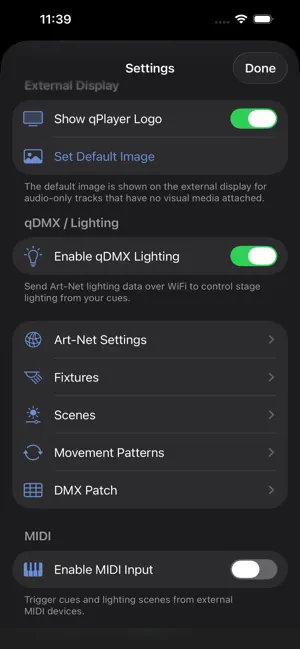
qPlayer is the professional cue player for live performers, function bands, DJs, theatre, and venues. Organise your setlists, play stereo or multitrack audio, output video to external screens, control stage lighting, and trigger everything from MIDI — all from one app. SETLISTS & CUE MANAGEMENT Build your setlists with drag-and-drop ordering. Set cue points, configure fade times, and lock in your running order so you never miss a beat on stage. AUDIO PLAYBACK Play stereo backing tracks with professional transport controls. Upgrade to Plus for multitrack audio routing — send click tracks to your drummer and backing tracks to front-of-house simultaneously. VIDEO OUTPUT Display lyrics, visuals, or video files on external screens via HDMI or AirPlay. Attach media to individual tracks so the right content plays automatically. qDMX LIGHTING CONTROL (Pro) Control your stage lighting directly from qPlayer via Art-Net over WiFi. Build fixtures, design scenes with colour palettes, and create movement patterns for moving heads — all synced to your setlist. MIDI TRIGGERING Trigger play, stop, next track, and lighting scenes from external MIDI devices like drum pads, foot controllers, or keyboards. Fully configurable mappings with MIDI learn. qSTEMS Split any audio file into individual stems using AI-powered separation. Build custom multitrack files from stems right in your browser at my.qplayer.app. CLOUD SYNC & WEB PORTAL Manage setlists, upload media, configure DMX fixtures, and build stems from any browser at my.qplayer.app. Everything syncs to your device automatically. PLANS • Basic (Free) — Stereo audio, 1 setlist, 1 GB cloud storage • Plus — Multitrack audio, video, MIDI, unlimited setlists, 10 GB storage • Pro — Everything in Plus, plus qDMX lighting and 32-channel multitrack • Lifetime Plus — All Plus features with a single payment Made by event professionals, for event professionals. Terms of Use (EULA): https://www.apple.com/legal/internet-services/itunes/dev/stdeula/ Privacy Policy: https://qplayer.app/privacy
What’s new
Version 2.2.1 · Updated October 8, 2026
Setlists and cues Drag to reorder cues works again. You can also use Move Up and Move Down in the right click menu on a cue. New Setlist now appears in the sidebar, ready to name, instead of opening a separate window. Add one with the plus button at the bottom of the sidebar, by right clicking, or from the File menu. Setlists always stay in the one window. Other bug fixes.
App privacy
The developer, Matrix Productions Ltd, reported these privacy practices to Apple.
Data Not Linked to You
The following data, which may be collected but is not linked to your identity, may be used for the following purposes:
- Contact Info: Email Address, Name
- User Content: Photos or Videos, Audio Data, Customer Support
- Identifiers: User ID
- Diagnostics: Crash Data
Used for: App Functionality
Alternatives to qPlayer
Looking for apps like qPlayer? Here are 6 similar apps on the App Store. The highest rated is DSSampleSpread (5.0/5), and 4 of the 6 are free to download.





| App | Rating | Price | Last updated | Compare |
|---|---|---|---|---|
| qPlayer | – | Free | October 8, 2026 | |
| QJump Remote | – | Free | Jul 20, 2025 | Compare |
| PA Align Pro: Soundcheck | – | Free | Oct 10, 2026 | Compare |
| saimox Player | – | Free | Sep 20, 2026 | Compare |
| DSSampleSpread | 5.0 / 5 (1) | 5.99 USD | Aug 3, 2026 | Compare |
| SonicMind | 1.0 / 5 (1) | Free | Feb 8, 2024 | Compare |
| ScaleGen | 4.7 / 5 (12) | 3.99 USD | Dec 17, 2025 | Compare |
Compare qPlayer with the top alternatives: ratings, updates, ASO score and keyword gaps →