

CalendarWake
Afonso de Mello Lifestyle iPhoneiPadiPod touch
CalendarWake is a free Lifestyle app for iPhone and iPad by Afonso de Mello. Rated 1.0/5 from 1 ratings. Requires iOS 26.1. Updated June 11, 2026.
- Rating
- 1.0
- 1 ratings
- Price
- Free
- on the App Store
- Size
- 5 MB
- Age 4+
- Updated
- Jun 11
- 2026 · v1.6
Screenshots
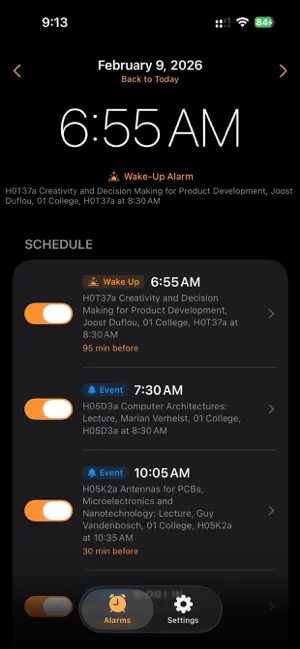
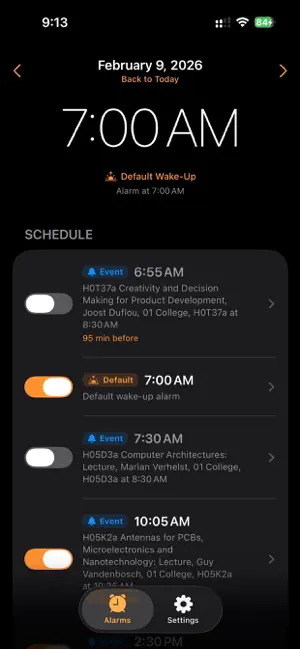
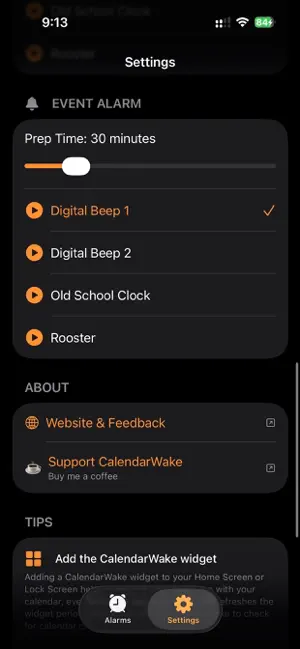

About CalendarWake
Your calendar knows your day. Now your alarm does too. CalendarWake automatically creates alarms based on your calendar events, so you always wake up and arrive on time, without having to set a single alarm manually. How it works: Simply grant calendar access and CalendarWake scans your day. It sets an alarm before each event, giving you the prep time you need. Toggle events on or off, customize per-event settings, and swipe between days to see what's ahead. Key Features: • Calendar-synced alarms — Automatically generates alarms from your calendar events. No manual setup required. • Live Activity & Dynamic Island — See your next alarm countdown right on your Lock Screen and in the Dynamic Island. • Two alarm types — Mark alarms as "Wake Up" or "Event" with separate sounds and prep times for each. • Smart prep time — Set how many minutes before each event your alarm should ring, from 0 to 180 minutes. • Pre-alarm check-in — Get a notification 5 minutes before your alarm rings. Long press to cancel if plans change. • Per-event customization — Override the default sound and prep time for any individual event. • Multiple alarm sounds — Choose from built-in tones including digital beeps, a classic clock, and more. • Backup wake time — Set a default wake-up time for days with no events, so you're always covered. • Swipe navigation — Browse your upcoming schedule by swiping between days. • +5 minute snooze — Tap the snooze button directly from the Live Activity for five more minutes. • Dark, Light & System themes — Match CalendarWake to your style. CalendarWake uses Apple's AlarmKit to deliver reliable, full-volume alarms — even when your phone is locked or on silent. It's the alarm clock built for people with busy calendars. Terms of Use: https://www.apple.com/legal/internet-services/itunes/dev/stdeula/
What’s new
Version 1.6 · Updated June 11, 2026
Added "Vibration Only" sound.
App privacy
The developer, Afonso de Mello, reported these privacy practices to Apple.
Data Not Collected
The developer does not collect any data from this app.
Alternatives to CalendarWake
Looking for apps like CalendarWake? Here are 6 similar apps on the App Store. The highest rated is Milestone: Log Events (5.0/5), and all 6 are free to download.
-
 Calarm: Event-Based Alarm
-
 DateMark
-
 Manifestia
-
 Milestone: Log Events
5.0
Milestone: Log Events
5.0
-
 YoonSeul - A Moment Diary
-
 echor|Idea Notes & Quotes
| App | Rating | Price | Last updated | Compare |
|---|---|---|---|---|
| CalendarWake | 1.0 / 5 (1 rating) | Free | June 11, 2026 | |
| Calarm: Event-Based Alarm | – | Free | Jun 21, 2026 | Compare |
| DateMark | – | Free | Jan 21, 2026 | Compare |
| Manifestia | – | Free | Aug 6, 2026 | Compare |
| Milestone: Log Events | 5.0 / 5 (4) | Free | May 23, 2026 | Compare |
| YoonSeul - A Moment Diary | – | Free | Sep 22, 2026 | Compare |
| echor|Idea Notes & Quotes | – | Free | Oct 7, 2026 | Compare |
Compare CalendarWake with the top alternatives: ratings, updates, ASO score and keyword gaps →