

Background Noises: White Noise
Third Space LLC Health & Fitness iPhoneiPadiPod touch
Background Noises: White Noise is a free Health & Fitness app for iPhone and iPad by Third Space LLC. Rated 5.0/5 from 3 ratings. Requires iOS 15.1.
- Rating
- 5.0
- 3 ratings
- Price
- Free
- on the App Store
- Size
- 50 MB
- Age 4+
- Updated
- Oct 28
- 2026 · v5.0.3
Screenshots


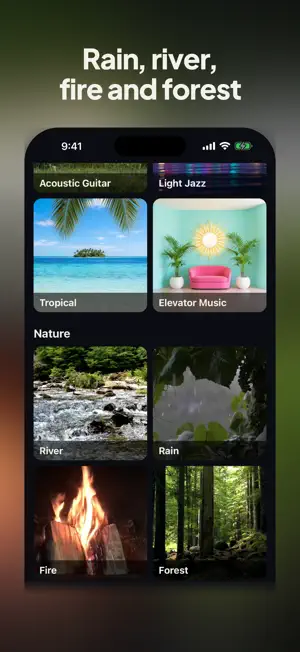

About Background Noises: White Noise
Background Noises is a white noise and sleep sounds app for iPhone and iPad. Tap a tile and it plays: white, pink, brown or grey noise, rain and other nature sounds, eight music stations or ten steady tones. Free plays a 60-second sample of every sound, with no sign-up; Premium plays every sound with no time limit and adds a sleep timer and offline play. WHAT PLAYS Music: Calm, Ambient, Soft Piano, Classical, Acoustic Guitar, Light Jazz, Tropical and Elevator Music Nature: River, Rain, Fire and Forest Noise: White, Pink, Brown and Grey Tones: 174, 285, 396, 417, 432, 528, 639, 741, 852 and 963 Hz, the nine solfeggio frequencies plus 432 Hz The music and nature sounds are original, generated and mastered by eleMusic. The noise and tones are synthesized. Play them as sleep sounds at bedtime, as white noise or brown noise while you work or study, or as quiet music in the background of your day. THE STATIONS Calm: slow, simple melodies on felt piano, electric piano and warm strings, with no beat. Ambient: warm pads, soft drones and airy textures, with no melody. Soft Piano: one acoustic piano playing light, flowing melodies. Classical: strings, flute, clarinet, piano and classical guitar playing sunny, easygoing tunes. Acoustic Guitar: one or two acoustic guitars, fingerpicked slowly. Light Jazz: piano, nylon guitar or electric piano with upright bass and brushes, with an easy swing or a soft bossa lilt. Tropical: steel pan, ukulele, marimba and island guitars over an easygoing island groove. Elevator Music: lush strings, vibraphone, cocktail organ and a soft bossa sway, straight out of an old hotel lobby. River: a calm stream flowing evenly over stones. Rain: steady rain at a comfortable distance, one continuous texture. Fire: a small wood fire, soft crackles over a low, warm wash. Forest: a few small songbirds singing softly in a daytime woodland. THE PLAYER Each sound opens full screen with its own video. Play or pause, skip ahead or go back: a Premium station moves track by track, and everything else steps to the next sound in its group. The volume is your device's own volume. Lock your iPhone or iPad and the sound keeps playing. Send it to a speaker or a TV with AirPlay or Google Cast. PREMIUM Every sound with no time limit, and: Sleep timer: stop the sound after 15, 30 or 45 minutes, or 1, 1.5, 2, 4 or 8 hours. Offline: a noise or tone you have played on Wi-Fi then plays with no connection, and stations keep playing the tracks they saved on Wi-Fi. Flag a track: on a station, flag a track you would rather not hear; it skips at once and goes for review. Monthly or yearly, with a 7-day free trial for new subscribers. Your price shows in your currency before you subscribe. In the App Store the plan may also be listed as Essentials; every Essentials plan includes everything Premium does. Payment is charged to your Apple Account when you confirm the purchase, or when the free trial ends if you start one. Premium renews automatically unless it is canceled at least 24 hours before the end of the current period. Manage or cancel it in your App Store account settings. GOOD TO KNOW Signing in is optional: the app makes a guest account on its own. Sign in with Apple, Google or email to use one plan on several devices at once, and delete your account at any time in Settings. Streaming a station uses about 60 MB an hour. With Premium, noise and tones download once, then play offline. Offline play needs the app to have checked your plan online in the last 7 days. Starting a sound pauses other audio, and other audio pauses Background Noises. No ads. No voiceovers. For general listening; not a medical device. Background Noises is a product of Third Space LLC. It plays music and sound streamed by eleMusic, a separate service. Powered by eleMusic.fm Terms of Use (EULA): https://www.apple.com/legal/internet-services/itunes/dev/stdeula/ Terms: https://bgnoises.com/terms Privacy Policy: https://bgnoises.com/privacy
What’s new
Version 5.0.3 · Updated October 28, 2026
The screen now turns off when your phone normally would, and the video keeps moving until it does. To keep the screen on while a sound plays, turn on Keep screen on while playing in Settings. After an alarm, a call or Siri, your sound now starts again by itself when iPhone hands the audio back.
App privacy
The developer, Third Space LLC, reported these privacy practices to Apple.
Data Linked to You
The following data, which may be collected and linked to your identity, may be used for the following purposes:
- Purchases: Purchase History
- Usage Data: Product Interaction
- Contact Info: Email Address, Name
- Identifiers: User ID
Used for: Analytics, Product Personalization, App Functionality
Data Not Linked to You
The following data, which may be collected but is not linked to your identity, may be used for the following purposes:
- Identifiers: Device ID
- Diagnostics: Crash Data, Performance Data, Other Diagnostic Data
Used for: Analytics, App Functionality
Alternatives to Background Noises: White Noise
Looking for apps like Background Noises: White Noise? Here are 6 similar apps on the App Store. The highest rated is Hzera - Tinnitus Relief (4.3/5), and all 6 are free to download.
-
 Noctra: Sleep & White Noise
-
 Noise Mixer: Sleep Sounds
-
 Sonastra: Find Your Frequency
-
 Better Noise
-
 Hzera - Tinnitus Relief
4.3
Hzera - Tinnitus Relief
4.3
-
 White Noise Napp
| App | Rating | Price | Last updated | Compare |
|---|---|---|---|---|
| Background Noises: White Noise | 5.0 / 5 (3 ratings) | Free | October 28, 2026 | |
| Noctra: Sleep & White Noise | – | Free | Aug 26, 2026 | Compare |
| Noise Mixer: Sleep Sounds | – | Free | Oct 24, 2026 | Compare |
| Sonastra: Find Your Frequency | – | Free | Jun 3, 2026 | Compare |
| Better Noise | – | Free | Dec 28, 2024 | Compare |
| Hzera - Tinnitus Relief | 4.3 / 5 (3) | Free | Oct 27, 2026 | Compare |
| White Noise Napp | – | Free | Jan 29, 2026 | Compare |