

Wallora - AI Painting Art
Navid Gooranourimi Graphics & Design iPhoneiPadiPod touch
Wallora - AI Painting Art is a free Graphics & Design app for iPhone and iPad by Navid Gooranourimi. Requires iOS 18.0. Updated October 12, 2026.
- Price
- Free
- on the App Store
- Size
- 74 MB
- Age 12+
- Updated
- Oct 12
- 2026 · v2.0
Screenshots



About Wallora - AI Painting Art
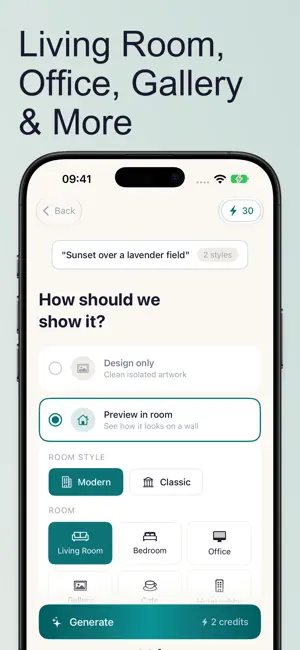
Turn your ideas into stunning paintings, then see them on your wall before you print. Wallora uses advanced AI to create original paintings in seconds. Describe what you imagine, choose from 25 fine art styles, and watch your idea come to life. Then go further: preview the painting in a realistic room to see exactly how it will look in your space. TRY IT FREE New to Wallora? Our guided onboarding lets you create your first two paintings for free. Pick a concept, choose two styles, select a room, and see your paintings hanging on a wall. Your paintings are saved automatically so you can revisit them anytime. PAINT WITH WORDS Type a description of any scene, subject, or mood. Wallora's AI understands your vision and turns it into a painting. Keep it simple, like "a golden sunset over the ocean", or describe colors, light, and composition in detail. REFINE ANY PAINTING Love a painting but want one thing different? Tap Refine and describe the change: "warmer colors", "add a sailboat", "make it a night scene". You get a new version that keeps everything else. It works on room previews too. SEE IT ON YOUR WALL Wondering how a painting would look at home? Preview it on the wall in 10 realistic rooms: living room, bedroom, office, gallery, cafe, hotel lobby, restaurant, modern loft, library, and nursery. Choose a modern or classic interior, and compare before you print or frame. 25 ART STYLES TO EXPLORE From timeless classics to modern expressions: - Impressionism, Renaissance, Baroque, Romanticism - Surrealism, Abstract, Cubism, Art Nouveau - Watercolor, Pop Art, Minimalist - Digital Art, Pixel Art, Anime & Manga, Street Art - Art Deco, Expressionism, Gothic, Ukiyo-e, Pointillism - Fauvism, Bauhaus, Photorealism, Vaporwave, Stained Glass Each style captures the techniques and character of its movement. EXTRACT THE ARTWORK Like how a painting looks in a room preview? Extract just the artwork for a clean, standalone image ready to print or share. Both versions stay linked, so you always have the original room concept. MADE FOR BIG SCREENS On iPad and iPhone Duo, Wallora uses the extra space to show your paintings and their details side by side. HOW IT WORKS 1. Describe your painting idea 2. Choose one or more art styles 3. Generate your paintings in seconds 4. Preview them on a wall in any room 5. Refine, save, share, or print your favorites BUILD YOUR COLLECTION Save every painting to your personal gallery and star your favorites. Your paintings stay on your device, private and secure. Every painting is generated at high resolution, ready to save to Photos or share. NO SUBSCRIPTION. PAY ONCE, USE ANYTIME. Your first two paintings are free. After that, buy a credit pack when you need one: each painting costs one credit, and credits never expire. New users can start with an intro pack of 10 paintings for $1.99. Nothing renews, and nothing is charged unless you buy a pack. --- Credit packs are one-time, non-renewing in-app purchases charged to your Apple ID at confirmation of purchase. Privacy Policy: https://applestan.com/wallora/privacy/ Terms of Use: https://applestan.com/wallora/terms/
What’s new
Version 2.0 · Updated October 12, 2026
Wallora 2.0: no subscription, and refine your paintings. No more subscription. Your first two paintings are free, then buy a credit pack only when you need one. Credits never expire, nothing renews, and new users can start with 10 paintings for $1.99. If you have an active Premium subscription, it keeps working until you cancel. Refine your paintings. Like a painting but want one thing different? Tap Refine, describe the change ("warmer colors", "add a sailboat", "make it a night scene"), and get a new version that keeps everything else. It works on room previews too. Also new: - Made for iPhone Duo and iPad: layouts use the bigger screens, with paintings and details side by side - Slow generations no longer give up early - Save to Photos now tells you if it worked, and how to allow access if it didn't - Faster onboarding with two styles picked for you, which you can change - Clearer messages when something goes wrong
App privacy
The developer, Navid Gooranourimi, reported these privacy practices to Apple.
Data Not Linked to You
The following data, which may be collected but is not linked to your identity, may be used for the following purposes:
- Identifiers: Device ID
- Usage Data: Product Interaction
- Purchases: Purchase History
- User Content: Photos or Videos, Other User Content
Used for: Analytics, App Functionality
Alternatives to Wallora - AI Painting Art
Looking for apps like Wallora - AI Painting Art? Here are 6 similar apps on the App Store. The highest rated is Tileodile (5.0/5), and 5 of the 6 are free to download.
-
 Tileodile
5.0
Tileodile
5.0
-
 PixSprite: Pixel Art Studio
-
 Aquarell: Drawing & Watercolor
3.0
Aquarell: Drawing & Watercolor
3.0
-
 Line Lift – Watercolor Studio
5.0
Line Lift – Watercolor Studio
5.0
-
 Shake Brush & AI Painting
-
 AI Art Generator: Create Art
| App | Rating | Price | Last updated | Compare |
|---|---|---|---|---|
| Wallora - AI Painting Art | – | Free | October 12, 2026 | |
| Tileodile | 5.0 / 5 (2) | Free | Oct 6, 2026 | Compare |
| PixSprite: Pixel Art Studio | – | Free | Oct 25, 2026 | Compare |
| Aquarell: Drawing & Watercolor | 3.0 / 5 (3) | 0.99 USD | Oct 29, 2026 | Compare |
| Line Lift – Watercolor Studio | 5.0 / 5 (2) | Free | Oct 26, 2026 | Compare |
| Shake Brush & AI Painting | – | Free | Sep 8, 2024 | Compare |
| AI Art Generator: Create Art | – | Free | Jan 28, 2026 | Compare |