

Snaglist: Punch List & Reports
Daniel McCann Business iPhoneiPadiPod touch
Snaglist: Punch List & Reports is a free Business app for iPhone and iPad by Daniel McCann. Requires iOS 17.0. Updated October 15, 2026.
- Price
- Free
- on the App Store
- Size
- 27 MB
- Age 4+
- Updated
- Oct 15
- 2026 · v2.0.1
Screenshots


About Snaglist: Punch List & Reports
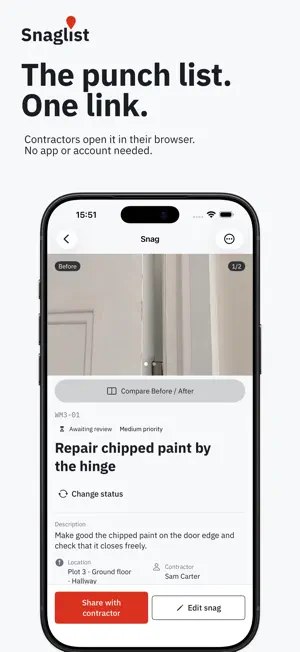
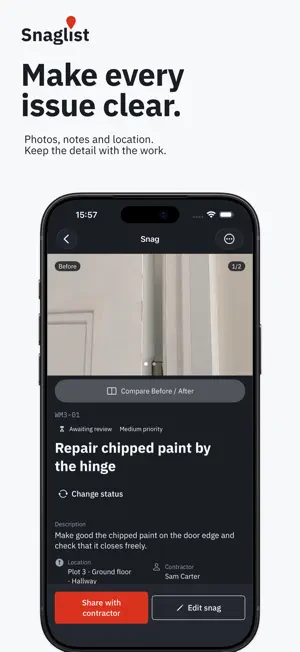
Send a Contractor link. Get completion photos back. Review every punch list fix before sign-off. Snaglist helps site managers and builders manage punch lists on new builds, renovations and project handovers. Capture the problem, share it with the right person and keep a clear record of what still needs doing. Share the work Send selected punch list items through a Contractor link. Your contractor opens it in a browser, with no app, account or subscription needed. They see the photos, location and notes, then send back completion evidence. A personal Snaglist account is enough to send Contractor links. You do not need to create or join a company. Add an optional PIN, choose an expiry and revoke access when needed. Review before sign-off A contractor's submission stays awaiting review until an authorized manager accepts the work. Compare the completion photos with the original issue, then accept it or send it back with a reason. Make every issue clear • Take photos on site or add them from your library. • Keep the description, location, priority, contractor and due date together. • Mark up photos to show exactly what needs attention. • See outstanding work and progress across the project. Keep going without a signal Start recording punch list items without an account. Photos and notes are saved on your device. Sign in to share work online; creating Contractor links and exchanging project updates need a connection. Guest projects stay separate from your account. Choose to copy a guest project into your account when you are ready; the original stays on your device. Projects from earlier versions remain available in Older device work. Work on your own or with a team Use your personal account for your own projects, or work with invited colleagues on company projects they have permission to access. Company membership is free at launch. Snaglist Pro remains a separate subscription. Be ready for handover Export PDF reports with a punch list schedule, photos, locations and status. Keep completion evidence and manager decisions clear in the project record. Add your own report branding with Snaglist Pro. Free and Pro Snaglist is free to start. Optional Snaglist Pro adds unlimited projects, punch list items, photos per item and Contractor links, plus custom report branding. Contractors opening your links never need a subscription. Current plans and prices are shown in the app before purchase. Snaglist Pro is an auto-renewable subscription, billed monthly or annually. Payment is charged to your Apple Account when you confirm the purchase. The subscription renews automatically unless cancelled at least 24 hours before the end of the current period. Your account is charged for renewal within 24 hours before that period ends. Manage or cancel your subscription in your Apple Account settings. Support: https://usesnaglist.com/support Terms of Use: https://usesnaglist.com/terms Privacy Policy: https://usesnaglist.com/privacy
What’s new
Version 2.0.1 · Updated October 15, 2026
Snaglist 2.0.1 makes Pro clearer and brings your project work closer to the web portal. • Clearer Pro prompts explain the Free limit you have reached. Once Pro is confirmed, return to the task you were doing. • Improved purchase, cancellation and restoration messages. • Review the original issue and Before photos alongside a contractor’s completion evidence. Missing completion photos are clearly flagged before you accept work. • Open the web portal from Settings or a project’s menu. • Improved account-deletion cleanup, accessibility and Reduce Motion support. Prices, Free limits and existing subscriptions are unchanged. Contractors still need no app or account to use a Contractor link. Questions? [email protected]
App privacy
The developer, Daniel McCann, reported these privacy practices to Apple.
Data Linked to You
The following data, which may be collected and linked to your identity, may be used for the following purposes:
- Purchases: Purchase History
- Identifiers: User ID, Device ID
- Usage Data: Other Usage Data
- Other Data: Other Data Types
- Location: Precise Location, Coarse Location
- Contact Info: Physical Address, Email Address, Name, Phone Number
- User Content: Photos or Videos, Other User Content
Used for: Analytics, App Functionality
Alternatives to Snaglist: Punch List & Reports
Looking for apps like Snaglist: Punch List & Reports? Here are 6 similar apps on the App Store. The highest rated is Punch Me (1f4c9c) (5.0/5), and all 6 are free to download.
-
 SpenIt: AI Spending Tracker
-
 Punch Me (1f4c9c)
5.0
Punch Me (1f4c9c)
5.0
-
 Spark Ring
-
 Skift: Mental Load
-
 SnagNote
-
 CarbonData
3.0
CarbonData
3.0
| App | Rating | Price | Last updated | Compare |
|---|---|---|---|---|
| Snaglist: Punch List & Reports | – | Free | October 15, 2026 | |
| SpenIt: AI Spending Tracker | – | Free | Sep 10, 2026 | Compare |
| Punch Me (1f4c9c) | 5.0 / 5 (1) | Free | Nov 3, 2025 | Compare |
| Spark Ring | – | Free | Oct 19, 2026 | Compare |
| Skift: Mental Load | – | Free | Aug 28, 2026 | Compare |
| SnagNote | – | Free | Jul 1, 2026 | Compare |
| CarbonData | 3.0 / 5 (1) | Free | Aug 19, 2025 | Compare |