

CoPaMemo - Custom Keyboard
Ryoma Yanagimoto Productivity iPhoneiPadiPod touch
CoPaMemo - Custom Keyboard is a free Productivity app for iPhone and iPad by Ryoma Yanagimoto. Requires iOS 17.0. Updated February 16, 2026.
- Price
- Free
- on the App Store
- Size
- 6 MB
- Age 4+
- Updated
- Feb 16
- 2026 · v1.1.1
Screenshots

About CoPaMemo - Custom Keyboard
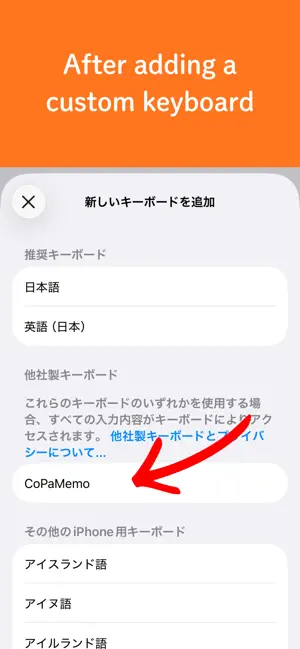
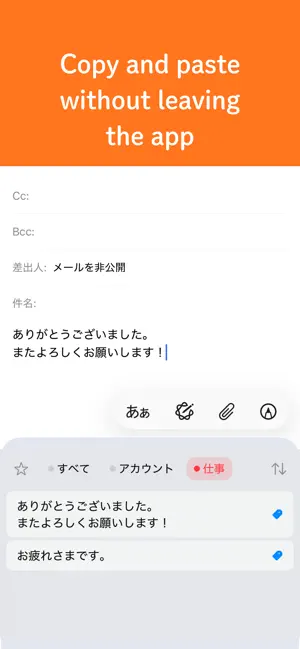
CoPaMemo is a memo app optimized for copy and paste workflows. Quickly save and retrieve text you frequently copy and paste. KEY FEATURES Memo Management - Create, edit, and delete memos - Separate title and content - Favorite memos - Automatic usage statistics (usage count, last used date) Organization with Tags - Create multiple tags freely - Set colors for tags for visual management - Filter by tags - Apply multiple tags simultaneously Create from Clipboard - Quickly convert clipboard content to memos - Register multiple lines of text at once - Split each line into individual memos Custom Keyboard Extension - Access memos while using other apps - Input memos directly from keyboard - Paste instantly with a tap - Priority display for favorites and recently used memos - Filter by tags - Customize sort order, display limit, and height iCloud Sync (New in v1.1) - Automatic sync across devices - Seamlessly share data between iPhone and iPad - Restore data after reinstalling the app Search and Filtering - Text search (title and content) - Filter by tags - Show favorites only - Multiple sort options - By creation date - By update date - By usage frequency - By title Display Modes - List view - Grid view - Compact overview for quick reference Multi-language Support - Supports Japanese, English, Spanish, German, French, Chinese (Simplified), and Korean - Automatic switching based on system settings - Can set language individually within the app Free and Premium Versions - Free version: Basic memo features (limited memos and tags, with ads) - Premium version: Unlimited memos and tags, ad-free PERFECT FOR - Managing login information (IDs and passwords) - Inputting templates (email signatures, greetings) - Code snippets (frequently used code fragments) - Addresses and phone numbers (for form input) - Multi-language text (special characters and foreign language templates) - Shopping lists - Frequently used URLs PRIVACY AND SECURITY - Data stored locally and in iCloud (optional) - iCloud sync protected by Apple's encryption - No transmission to external servers - Data shared only between main app and keyboard via App Groups - Custom keyboard works without Full Access ABOUT THE ICON The pasta icon is derived from the internet slang "copypasta," a portmanteau of "copy paste" and "pasta," meaning text that is copied and pasted repeatedly. It represents the core concept of this app.
What’s new
Version 1.1.1 · Updated February 16, 2026
Minor bug fixes
App privacy
The developer, Ryoma Yanagimoto, reported these privacy practices to Apple.
Data Not Collected
The developer does not collect any data from this app.
Alternatives to CoPaMemo - Custom Keyboard
Looking for apps like CoPaMemo - Custom Keyboard? Here are 6 similar apps on the App Store. The highest rated is Obsideck (5.0/5), and all 6 are free to download.
-
 MemoLinker
-
 Levity Markdown Notes
-
 コピペ手帳 - 定型文キーボード
-
 MonoMemo - 階層型メモ帳&ToDoリスト
-
 Obsideck
5.0
Obsideck
5.0
-
 Markdown Viewer - MD Reader
| App | Rating | Price | Last updated | Compare |
|---|---|---|---|---|
| CoPaMemo - Custom Keyboard | – | Free | February 16, 2026 | |
| MemoLinker | – | Free | Jun 15, 2026 | Compare |
| Levity Markdown Notes | – | Free | Aug 18, 2026 | Compare |
| コピペ手帳 - 定型文キーボード | – | Free | Oct 22, 2026 | Compare |
| MonoMemo - 階層型メモ帳&ToDoリスト | – | Free | Aug 29, 2026 | Compare |
| Obsideck | 5.0 / 5 (1) | Free | Oct 1, 2026 | Compare |
| Markdown Viewer - MD Reader | – | Free | Oct 7, 2026 | Compare |