
Nimble Music
Amer Awad Music iPhoneiPadiPod touch
Nimble Music is a free Music app for iPhone and iPad by Amer Awad. Rated 4.4/5 from 7 ratings. Requires iOS 26.0. Updated September 20, 2026.
- Rating
- 4.4
- 7 ratings
- Price
- Free
- on the App Store
- Size
- 10 MB
- Age 4+
- Updated
- Sep 20
- 2026 · v2.0
Screenshots


About Nimble Music
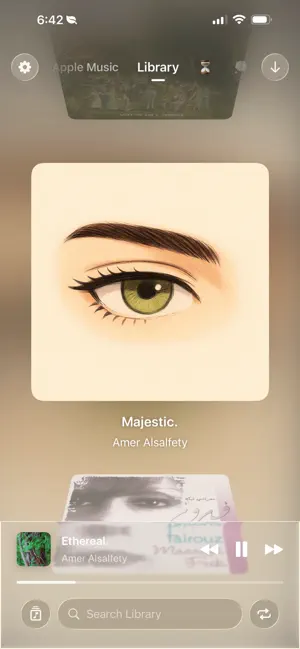
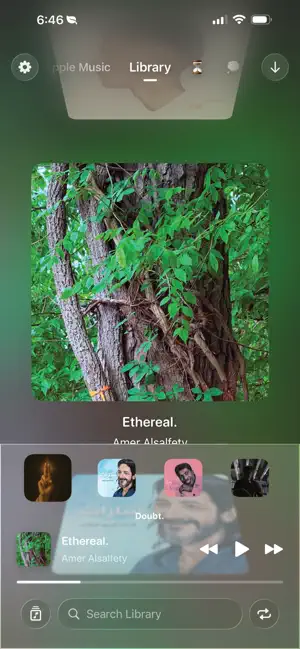
I built Nimble Music because I got tired of soulless music apps that make me go through five different tabs just to play the song I already knew I wanted to hear. Most music apps try to do everything—radio, social, discovery, podcasts. Nimble does one thing: make it fast and genuinely enjoyable to move around the music you already love. Fast, one-handed navigation: * Swipe to Navigate: Forget back buttons. Move fluidly between your library and playlists with broad, satisfying swipes. * Tap and hold: tapping a song will play it, holding it will add it to queue. * Reorder your playlists: give your playlists the order you like, Nimble lets you rearrange them however you see fit (this won’t change the order in Apple Music). * Instant Search: Every page has its own search ready at all times. Start typing and the app jumps straight to the track. Clear the text and you’re right back where you started. It’s designed so you never lose your flow. (Searching for new songs requires Apple Music subscription) * The "Queue Peek": Slide your finger over the mini player to quickly peek at your upcoming queue and jump to a specific song—without opening a full-screen player. Designed to feel joyful, not generic: * Tactile & Clicky: I added subtle haptics and sound cues so scrolling and selecting feels mechanical and precise. It just feels good to use. * Artwork-forward design: immersive artwork cards make your library look great without the UI getting in the way. * New songs look up: Nimble allows you to brows songs on Apple Music in a completly new way, adding songs is simplified while still having nostalgic skeuomorphic animation that makes it satisfying to use. Respectful by Design: * Nimble Music talks directly to Apple Music using Apple’s MusicKit on your device. * Nimble Music is a MusicKit-based player for navigating the user’s existing Apple Music library more quickly. It does not host its own catalog, sell music, or use any developer-run backend servers. All library data comes from the system Music app / Apple Music account on the device. * Nimble Music is not affiliated with Apple and is not sponsored or endorsed by Apple. The availability of songs, playlists, artwork, metadata and playback feaures may vary by region, subscription status, content rights, and device settings. * Privacy: I’m a solo developer, not a data company. I don’t collect your data, and I don’t want to. If you want a minimal, fast, and actually pleasant way to move through your Apple Music library—without the extra noise—Nimble Music is built for you.
Ratings & reviews
4.4
7 ratings
What’s new
Version 2.0 · Updated September 20, 2026
- Recommendations, without a whole second app The Apple Music tab now suggests songs and playlists. It's there when you don't know what you want, and it stays out of your way when you do. - Add songs without leaving Hear something good, put it in your library or any playlist right where you are. It also shows you what you already have, so you stop adding the same song three times. I did that a lot. - Loop One tap and the song repeats. That's the whole feature. It should have been in 1.0. - See the album you're listening to Tap the button, get the album. Hold it instead and you get share, view the artist, and open in Apple Music - without digging through anything. - Scrubbing that lands where you meant You can see the time while you're dragging now, which is obvious in hindsight. Stop moving mid-drag and it slows right down, so you can get to the exact second instead of sailing past it. - It keeps up with the music When one song ends and the next starts, the app moves with it. No more scrolling around to work out where you are. - Search drops to a plain list Big artwork is great for browsing and useless for finding one specific song. Tap search and you get a simple list instead. - Stand Mode Turn your phone on its side on a desk or a car mount and the whole thing gets simpler. Bigger controls, less to look at, your music still a swipe away. • There's a clock, cause why not. • Search listens instead of making you type - just say the song. It needs mic access, it's Apple's on-device dictation, no Al nonsense, and nothing leaves your phone.
App privacy
The developer, Amer Awad, reported these privacy practices to Apple.
Data Not Linked to You
The following data, which may be collected but is not linked to your identity, may be used for the following purposes:
- Usage Data: Product Interaction
Used for: Other Purposes
Alternatives to Nimble Music
Looking for apps like Nimble Music? Here are 6 similar apps on the App Store.
-
 Audo: Swipe To Discover Music
-
 døPe
-
 Emotion Music
-
 Pulse Vinyl: Record Collection
-
 Track Record: Vinyl Catalog
-
 Miryam
| App | Rating | Price | Last updated | Compare |
|---|---|---|---|---|
| Nimble Music | 4.4 / 5 (7 ratings) | Free | September 20, 2026 | |
| Audo: Swipe To Discover Music | – | Free | Aug 13, 2026 | Compare |
| døPe | – | Free | Jul 17, 2026 | Compare |
| Emotion Music | – | Free | May 15, 2017 | Compare |
| Pulse Vinyl: Record Collection | – | Free | Oct 20, 2026 | Compare |
| Track Record: Vinyl Catalog | – | Free | Oct 10, 2026 | Compare |
| Miryam | – | Free | May 15, 2026 | Compare |
Compare Nimble Music with the top alternatives: ratings, updates, ASO score and keyword gaps →