

WLED Max
MeowScript LLC Utilities iPhoneiPadiPod touch
WLED Max is a free Utilities app for iPhone and iPad by MeowScript LLC. Rated 4.8/5 from 6 ratings. Requires iOS 17.0. Updated October 21, 2026.
- Rating
- 4.8
- 6 ratings
- Price
- Free
- on the App Store
- Size
- 41 MB
- Age 4+
- Updated
- Oct 21
- 2026 · v1.1.8
Screenshots

About WLED Max
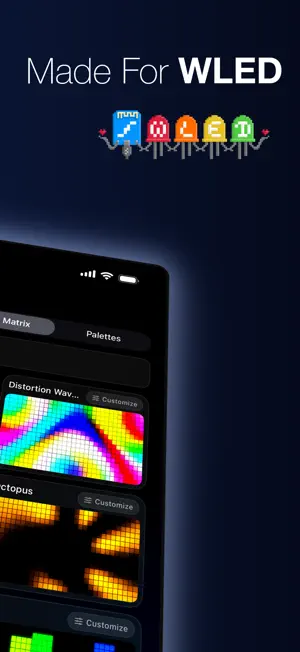
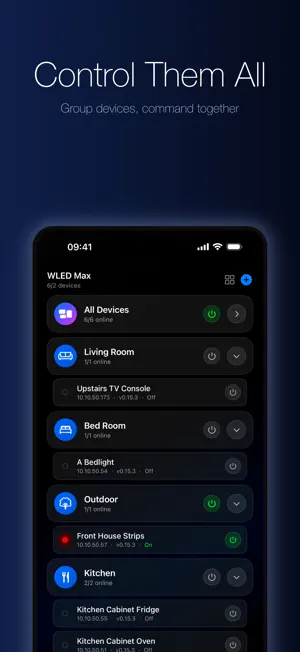
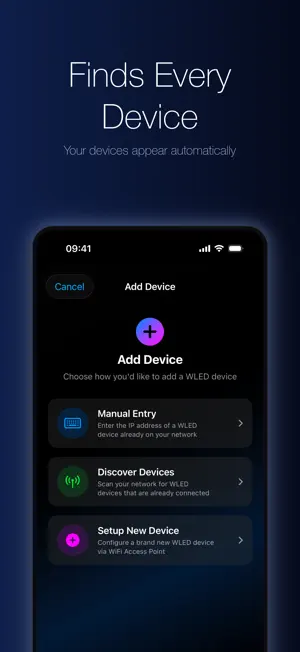
WLED Max controls WLED lights from your iPhone and iPad: LED strips, holiday lights on the roofline and 2D pixel matrices. It needs a WLED controller (an ESP32 or ESP8266 running WLED) and does not work with Bluetooth or IR remote light strips. New in 1.1.4: Pattern Maker. Build bulb patterns like 2 red, 1 white or start from Classic Christmas, Candy Cane or Diwali Diyas, add motion and watch it on your lights as you go. Every feature is free for one light. A one-time purchase adds unlimited lights. No account, no ads, no subscription. EASY SETUP Open the app and your WLED devices appear automatically. Just tap to add them. Got a brand new device still in setup mode? A step-by-step wizard walks you through connecting it to your Wi-Fi. No computer required. You can also add devices by IP address if they're on a different network. FULL CONTROL AT YOUR FINGERTIPS Adjust brightness with a slider or tap 25/50/75/100% quick-set buttons. Pick colors from a full color wheel, choose from quick-access swatches, or dial in a warm-to-cool white temperature. Set up to 6 favorite effects for one-tap access. Everything responds instantly. 180+ EFFECTS WITH LIVE PREVIEWS Every WLED effect renders a live animated preview right in the grid. See exactly what each one looks like before you apply. Search, filter by category (solid, rainbow, fire, 2D, audio-reactive), and tune speed, intensity, custom parameters, and palette in real time. Pair any effect with any color palette. SEGMENTS STUDIO A visual zone editor with drag-to-resize and full 2D matrix support. Split a single LED strip into independent zones and give each one its own effect, colors, brightness, speed, and direction. Light your desk, shelf, and ceiling from one controller with completely different looks. The visual editor shows you exactly what you're building. FULL WLED CONFIG IN-APP Every native WLED setting is available right in the app: Wi-Fi, LED layout, sync interfaces, schedules, macros, user mods, security, and updates. No more opening device IPs in your browser. DEVICE GROUPS Organize lights into groups like Living Room, Bedroom, or Gaming Setup with custom icons. Turn an entire group on or off with one tap. Devices can belong to multiple groups. PRESETS & CLOUD SYNC Save any lighting setup as a preset and reapply it instantly. Build playlists that cycle through your favorites, edit them any time and turn on Shuffle if you like. With iCloud sync, your lights, groups and presets follow you across your iPhone and iPad. OTA FIRMWARE UPDATES Update your WLED firmware right from the app. WLED Max picks the right file for your board and handles the install. Release notes included so you know what's new. WIDGETS & SIRI Add a power toggle to your Lock Screen and Home Screen widgets with power, brightness, colors, effects and presets. Use Siri to turn lights on, set colors, apply presets, trigger effects, or control groups, all hands-free. HELP WHEN YOU NEED IT Questions or ideas? Tap Contact Us in Settings. Replies arrive as a notification right in the app. DESIGNED FOR YOUR SETUP Dark interface that looks great next to your LEDs. Clean card-based layout. Five tabs: Devices, Control, Effects, Presets, and Settings. Everything is exactly where you expect it. ABOUT WLED WLED is free, open-source firmware built by a community of volunteers. WLED Max is an independent app and is not affiliated with or endorsed by the official WLED project. Download WLED Max and see what your lights can really do.
Ratings & reviews
4.8
6 ratings
What’s new
Version 1.1.8 · Updated October 21, 2026
New: Daily Schedules. Open Schedule & Timer on the Control tab, pick the Schedule tab, and set a turn-on and turn-off time for every day or just the days you choose. It runs on your light, so your phone does not need to be nearby. Also in this update: - Schedule & Timer now has two clear tabs, Timer and Schedule. - Saving a playlist no longer starts it, and stopping a playlist brings your lights back to how they were. - Clearer progress while the app talks to your light. - Small fixes and improvements.
App privacy
The developer, MeowScript LLC, reported these privacy practices to Apple.
Data Linked to You
The following data, which may be collected and linked to your identity, may be used for the following purposes:
- Purchases: Purchase History
- Search History: Search History
- Identifiers: Device ID
- Usage Data: Product Interaction, Advertising Data, Other Usage Data
- Contact Info: Email Address
- User Content: Customer Support
Used for: Analytics, App Functionality
Data Not Linked to You
The following data, which may be collected but is not linked to your identity, may be used for the following purposes:
- User Content: Photos or Videos
- Diagnostics: Crash Data, Performance Data, Other Diagnostic Data
Used for: App Functionality
Alternatives to WLED Max
Looking for apps like WLED Max? Here are 6 similar apps on the App Store. The highest rated is WLED Hub - LED light control (5.0/5), and all 6 are free to download.
-
 WLED Hub - LED light control
5.0
WLED Hub - LED light control
5.0
-
 WLED+
4.6
WLED+
4.6
-
 3d WLED Mapper to xLights
-
 Bright Home App
4.2
Bright Home App
4.2
-
 WLED Pro
4.4
WLED Pro
4.4
-
 Modern WLED
| App | Rating | Price | Last updated | Compare |
|---|---|---|---|---|
| WLED Max | 4.8 / 5 (6 ratings) | Free | October 21, 2026 | |
| WLED Hub - LED light control | 5.0 / 5 (5) | Free | Sep 24, 2026 | Compare |
| WLED+ | 4.6 / 5 (13) | Free | Jun 13, 2026 | Compare |
| 3d WLED Mapper to xLights | – | Free | Jun 11, 2026 | Compare |
| Bright Home App | 4.2 / 5 (6) | Free | Jul 5, 2026 | Compare |
| WLED Pro | 4.4 / 5 (16) | Free | Sep 22, 2026 | Compare |
| Modern WLED | – | Free | Oct 6, 2026 | Compare |
Compare WLED Max with the top alternatives: ratings, updates, ASO score and keyword gaps →