

Speech to Text Pro
Bhavika Vora Productivity iPhoneiPadiPod touch
Speech to Text Pro is a free Productivity app for iPhone and iPad by Bhavika Vora. Rated 3.5/5 from 2 ratings. Requires iOS 13.0. Updated February 10, 2026.
- Rating
- 3.5
- 2 ratings
- Price
- Free
- on the App Store
- Size
- 37 MB
- Age 4+
- Updated
- Feb 10
- 2026 · v1.0
Screenshots
About Speech to Text Pro
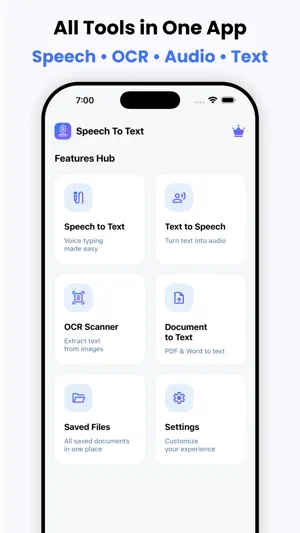
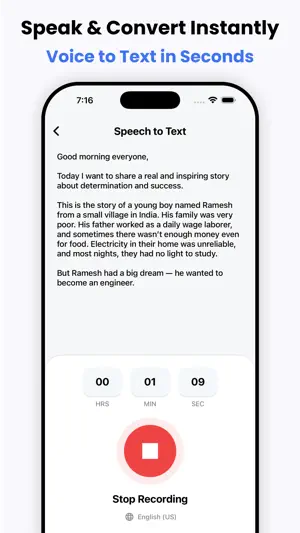
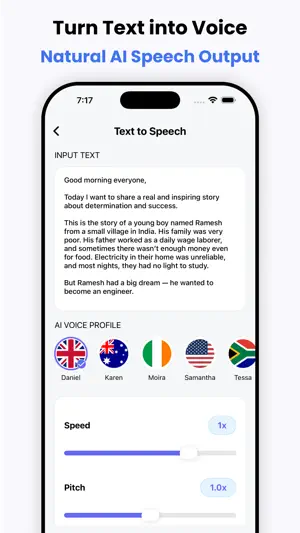
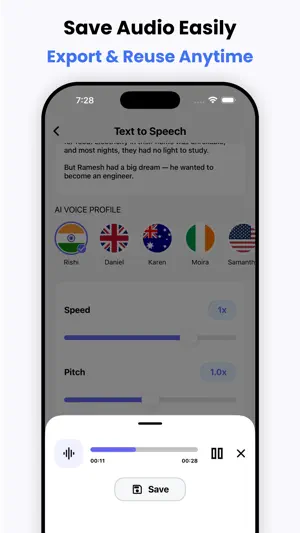
Speech to Text Pro – Voice Typing, OCR Scanner & Text to Speech Speech to Text Pro is a powerful all-in-one productivity app for iPhone and iPad that helps you convert speech, text, images, and documents into editable content instantly. Designed for students, professionals, creators, and business users, this smart tool offers fast and accurate speech recognition, natural text to speech voice output, advanced OCR scanning, and document-to-text conversion — all in one easy-to-use iOS app. Boost your productivity, save time, and simplify your daily workflow with one of the best voice typing and OCR scanner apps available on the App Store. Features : - Speech to Text - Text to Speech - OCR Scanner - Document to Text Speech to Text – Accurate Voice Typing Turn your voice into text instantly with advanced speech recognition technology. Speech to Text Pro helps you write faster without typing. Perfect for notes, emails, messages, meetings, lectures, and content creation. - Real-time speech to text conversion - Fast and accurate voice typing - Multi-language speech recognition - Edit, copy, and share text easily - Ideal for students, writers, and professionals Use voice typing anytime, anywhere and convert spoken words into accurate written text within seconds. Text to Speech – Natural Voice Reader Convert text into high-quality natural sounding speech. Listen to documents, notes, and articles on the go with powerful text-to-speech technology. - Realistic voice reader - Adjustable speed and pitch - Multiple languages and voices - Listen to documents and text files - Great for learning and accessibility Text to Speech Pro helps you read hands-free and improve productivity while multitasking. OCR Scanner – Image to Text Scan printed documents, photos, notes, receipts, and images to extract text instantly with advanced OCR (Optical Character Recognition). - Scan images and convert to text - Extract text from photos and screenshots - High accuracy OCR scanning - Edit and share scanned text - Perfect for students and office work Turn any image into editable text within seconds using the powerful OCR scanner. Document to Text – PDF & File Converter Convert documents into editable text quickly. Import and scan PDF, DOC, DOCX, and TXT files and extract text easily. - PDF to text converter - DOC/DOCX to text - Fast document scanning - Easy editing and sharing - Supports multiple file formats Manage all your documents and convert them into text effortlessly. Why Choose Speech to Text Pro? - All-in-one voice and text converter - Fast, accurate, and reliable - User-friendly interface - Supports multiple languages - Secure and private processing - Perfect for work, study, and daily use Speech to Text Pro is the ultimate voice typing, OCR scanner, and text reader app for iOS users. Download now and experience the smartest way to convert speech, text, images, and documents into editable content. Privacy Policy: https://sites.google.com/view/softiosapps/privacypolicy Terms of use: https://sites.google.com/view/softiosapps/termsofuse Keywords included naturally: - speech to text - voice typing - text to speech - voice to text - audio to text - speech recognition - voice recorder to text - ocr scanner - image to text - photo to text - pdf to text - document scanner - text reader - voice notes - voice typing app - dictation app - scan to text - convert speech to text - voice translator - ai speech to text - voice typing keyboard - ocr text scanner - text scanner - document to text - pdf converter - voice memo to text - speech converter - ai voice typing - voice typing ios - speech to text ios - text to speech ios
App privacy
The developer, Bhavika Vora, reported these privacy practices to Apple.
Data Used to Track You
The following data may be used to track you across apps and websites owned by other companies:
- User Content: Audio Data
- Usage Data: Advertising Data
Data Not Linked to You
The following data, which may be collected but is not linked to your identity, may be used for the following purposes:
- User Content: Audio Data
- Usage Data: Advertising Data
Used for: Third-Party Advertising
Alternatives to Speech to Text Pro
Looking for apps like Speech to Text Pro? Here are 6 similar apps on the App Store. The highest rated is taqtak (5.0/5), and all 6 are free to download.
-
 Voice Reader: Text to Audio AI
-
 Speech Notes: Voice Note Taker
-
 FlexiCHURCH
-
 NoteTap - Voice to Notes
-
 taqtak
5.0
taqtak
5.0
-
 WhisperVoice - AI Keyboard
| App | Rating | Price | Last updated | Compare |
|---|---|---|---|---|
| Speech to Text Pro | 3.5 / 5 (2 ratings) | Free | February 10, 2026 | |
| Voice Reader: Text to Audio AI | – | Free | Sep 30, 2026 | Compare |
| Speech Notes: Voice Note Taker | – | Free | Oct 11, 2026 | Compare |
| FlexiCHURCH | – | Free | May 18, 2026 | Compare |
| NoteTap - Voice to Notes | – | Free | Feb 21, 2026 | Compare |
| taqtak | 5.0 / 5 (3) | Free | Jul 16, 2026 | Compare |
| WhisperVoice - AI Keyboard | – | Free | Sep 6, 2026 | Compare |
Compare Speech to Text Pro with the top alternatives: ratings, updates, ASO score and keyword gaps →