

Ohako - Recipe Notebook
Michiru Seki Food & Drink iPhoneiPadiPod touch
Ohako - Recipe Notebook is a free Food & Drink app for iPhone and iPad by Michiru Seki. Requires iOS 16.0. Updated July 21, 2026.
- Price
- Free
- on the App Store
- Size
- 89 MB
- Age 4+
- Updated
- Jul 21
- 2026 · v2.10.0
Screenshots


About Ohako - Recipe Notebook
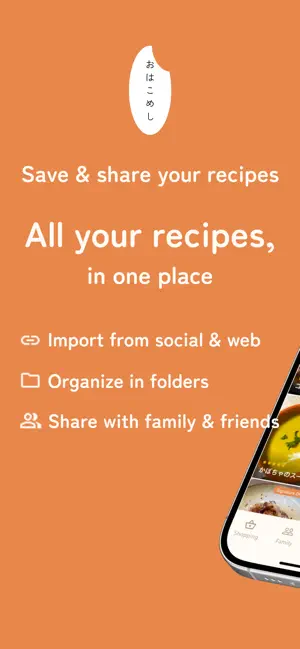
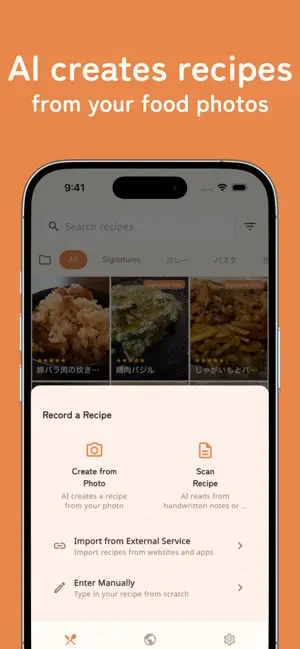
"Where did I save that recipe?" — never again. Collect scattered recipes into one place. Snap a photo, AI creates the recipe. Perfect your cooking with Ohako. No account needed to get started. Open the app and start recording recipes, running AI analysis, and building your shopping list right away. Sign up later when you want to publish, like, or share with family — your recipes carry over seamlessly. ■ Start Without an Account Recording, AI analysis, shopping list, and cooking logs work from the moment you open the app. Sign up later with email, Apple, or Google for community features — every recipe stays with you. ■ Record Recipes Beautifully - Add multiple photos per recipe - Manage ingredients and quantities at a glance - Organize ingredients with headers (e.g. "Seasonings," "Main Ingredients") - Record step-by-step cooking instructions - Track cooking time, servings, and tastiness (5-star rating) - Categorize with tags (Japanese, Western, Chinese, Main, Side, etc.) ■ Easy Registration with AI Paste a URL or photo and AI analyzes the recipe automatically. Websites, recipe services, handwritten notes, and cookbook photos all work. Foreign recipes are translated automatically. ■ Shopping List Add ingredients from any recipe with a single tap. Items are sorted into categories — vegetables, meat, seafood, seasonings — and identical items merge quantities automatically. Share the list with notes and source recipes included. ■ Family Sharing Share recipes with your family or people you cook with. Create a family group with an invite code and share your favorite recipes privately. Check the latest cooking activity on the timeline. ■ Cooking Journey Record photos and notes every time you cook the same dish, and look back from your first attempt to your latest. Review cards show your progress. ■ Cook Mode Tap "Start Cooking" on a recipe to see each step one at a time in large text. The screen stays awake while you cook. On iPad, an ingredient checklist sits alongside the steps. ■ Kitchen Report (Pro) Your cooking count, streaks, genre trends, monthly activity, and most-cooked recipes — all in clean charts. Switch between this month, 3 months, 1 year, and all time. ■ Weekly Reminder A gentle notification every Sunday at 8:30 PM to look back on this week's dishes. Build the habit of saving what you cooked. Toggle anytime in settings. ■ Search by Recipe Name or Ingredient Search recipes not only by name but also by ingredient. Finds what you're looking for quickly and easily. ■ Organize with Folders Classify and manage recipes by folder. Create your own categories like "Weekday Quick Meals" or "Party Dishes." ■ Discover Your Signatures Mark dishes you've mastered as your "Signature." Your list of signature dishes grows naturally. Track how many times you've cooked with the "Made It!" button. ■ Community Signatures Share your signature recipes and discover other users' dishes for inspiration. A New Recipes section highlights just-shared dishes, and likes you receive show on your recipe list. Copy any recipe and make it your own. ■ Favorite Chefs Browse a user's profile to see all their signature dishes and add them to your Favorites for quick access. ■ Like Rankings Popular recipes ranked by likes, in a cookbook-style layout: photos, ingredients, and steps. ■ Made for iPad View list and details side by side in two panes. Organize with drag and drop, plus keyboard shortcuts and trackpad support. ■ Multi-Language Support Available in Japanese, English, Korean, and Chinese (Simplified), following your device language. AI results appear in your language too. ■ Pro Plan 10 photos per recipe, 100 AI analyses per month, Kitchen Report, recipe image export, unlimited family groups, and more. Choose between the monthly plan or the annual plan (~17% off, 2 months free). First-time users get a 2-week free trial. Terms of Use: https://legal.ohakomeshi.app/#terms Privacy Policy: https://legal.ohakomeshi.app/#privacy
What’s new
Version 2.10.0 · Updated July 21, 2026
- Like Rankings redesigned with a cookbook-style layout: top recipes show photos, ingredients, and steps at a glance - New Recipes section in Community Signatures, with a New badge on just-shared dishes - Your recipes and family recipes now show how many likes they have received - New Pro feature: share any recipe as a single cookbook-style image, great for friends without the app or for printing into your recipe binder - Plus performance improvements and bug fixes
App privacy
The developer, Michiru Seki, reported these privacy practices to Apple.
Data Linked to You
The following data, which may be collected and linked to your identity, may be used for the following purposes:
- Contact Info: Email Address
- User Content: Photos or Videos, Other User Content
- Usage Data: Product Interaction
Used for: App Functionality
Data Not Linked to You
The following data, which may be collected but is not linked to your identity, may be used for the following purposes:
- Location: Coarse Location
- Identifiers: Device ID
Used for: Analytics
Alternatives to Ohako - Recipe Notebook
Looking for apps like Ohako - Recipe Notebook? Here are 6 similar apps on the App Store. The highest rated is Cookey: Recipe Manager (5.0/5), and all 6 are free to download.
-
 Cookey: Recipe Manager
5.0
-
 Tastetale- Recipes Organiser
-
 My Yumlog
-
 煮 Fun - 美食记录工具
5.0
-
 PennyCooking - Cookbook
-
 开饭
| App | Rating | Price | Last updated | Compare |
|---|---|---|---|---|
| Ohako - Recipe Notebook | – | Free | July 21, 2026 | |
| Cookey: Recipe Manager | 5.0 / 5 (1) | Free | Oct 9, 2026 | Compare |
| Tastetale- Recipes Organiser | – | Free | Oct 10, 2026 | Compare |
| My Yumlog | – | Free | Sep 10, 2026 | Compare |
| 煮 Fun - 美食记录工具 | 5.0 / 5 (1) | Free | Oct 14, 2026 | Compare |
| PennyCooking - Cookbook | – | Free | Oct 7, 2026 | Compare |
| 开饭 | – | Free | Sep 29, 2026 | Compare |