

KidsRadar: Parental Control
PatchworkGames Lifestyle iPhoneiPadiPod touch
KidsRadar: Parental Control is a free Lifestyle app for iPhone and iPad by PatchworkGames. Requires iOS 17.0. Updated September 19, 2026.
- Price
- Free
- on the App Store
- Size
- 74 MB
- Age 4+
- Updated
- Sep 19
- 2026 · v1.0.8
Screenshots



About KidsRadar: Parental Control
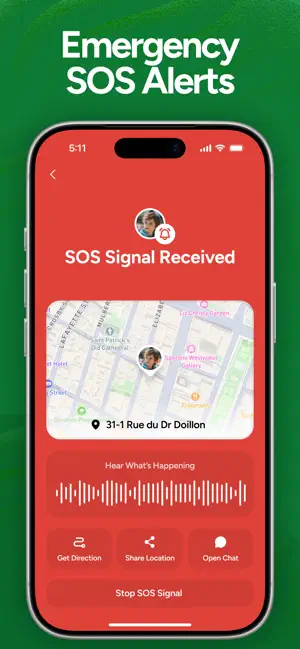
KidsRadar – Parental Control & Family GPS KidsRadar is a parental control app for parents and guardians. You set it up on your own phone, add your child's device, and manage everything from your account — location, safe places, screen time and app limits. Features for parents • See where your child is, in real time • Safe Places with arrival and departure alerts • Location history, so you can review the day • Screen time insight and app limits on your child's device • SOS alerts from your child when they need help • Battery level warnings, so you know before their phone dies • A private family space for messages between you and your child Whether your child is walking to school, visiting friends or travelling without you, KidsRadar keeps you informed. How it works 1. Install KidsRadar on your phone and create your family. 2. Generate a pairing code from your parent account. 3. Install KidsRadar on your child's phone and enter that code. 4. Manage locations, alerts and limits from your device. Parents stay in control Only a parent can create the family, add a device or change a setting. A child's device cannot register itself, and cannot alter or remove the protections a parent has set. Subscriptions are purchased and managed by the parent. Privacy Location and activity are visible only to the parents and guardians in your own family. KidsRadar does not share your family's data with other users, and nothing is monitored until a parent has paired the device and granted the required permissions on it. Terms of Use (EULA): https://www.apple.com/legal/internet-services/itunes/dev/stdeula/
What’s new
Version 1.0.8 · Updated September 19, 2026
Performance improvements
App privacy
The developer, PatchworkGames, reported these privacy practices to Apple.
Data Used to Track You
The following data may be used to track you across apps and websites owned by other companies:
- Identifiers: Device ID
Data Linked to You
The following data, which may be collected and linked to your identity, may be used for the following purposes:
- Identifiers: Device ID
- Usage Data: Product Interaction
Used for: Developer’s Advertising or Marketing, Analytics
Data Not Linked to You
The following data, which may be collected but is not linked to your identity, may be used for the following purposes:
- Contact Info: Name, Email Address, Physical Address, Phone Number
- Location: Precise Location, Coarse Location
- Diagnostics: Crash Data, Performance Data
Used for: Analytics, Product Personalization, App Functionality, Other Purposes
Alternatives to KidsRadar: Parental Control
Looking for apps like KidsRadar: Parental Control? Here are 6 similar apps on the App Store. The highest rated is KidSafe24 - Parental Control (5.0/5), and all 6 are free to download.
-
 VitalTiles
-
 RestBud - Parental Screen Time
-
 KidSafe24 - Parental Control
5.0
KidSafe24 - Parental Control
5.0
-
 Dream Journal - DreamCut
4.5
Dream Journal - DreamCut
4.5
-
 Find My Friends - Kido
-
 Lost Cat!
| App | Rating | Price | Last updated | Compare |
|---|---|---|---|---|
| KidsRadar: Parental Control | – | Free | September 19, 2026 | |
| VitalTiles | – | Free | Oct 5, 2026 | Compare |
| RestBud - Parental Screen Time | – | Free | Oct 13, 2026 | Compare |
| KidSafe24 - Parental Control | 5.0 / 5 (1) | Free | Sep 28, 2026 | Compare |
| Dream Journal - DreamCut | 4.5 / 5 (2) | Free | Feb 16, 2025 | Compare |
| Find My Friends - Kido | – | Free | Aug 20, 2026 | Compare |
| Lost Cat! | – | Free | Jul 8, 2026 | Compare |