

Subs: Subscription Manager
展 陆 Productivity iPhoneiPadiPod touch
Subs: Subscription Manager is a free Productivity app for iPhone and iPad by 展 陆. Requires iOS 18.6. Updated March 1, 2026.
- Price
- Free
- on the App Store
- Size
- 2 MB
- Age 4+
- Updated
- Mar 1
- 2026 · v1.0.1
Screenshots



About Subs: Subscription Manager
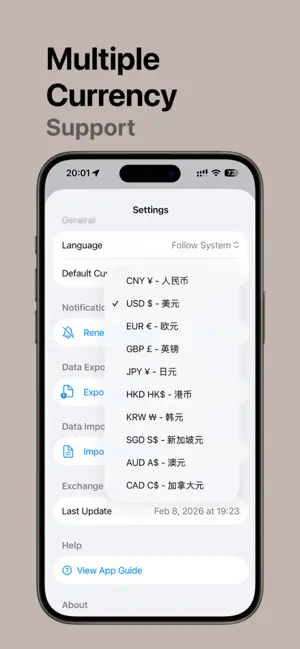
Subs is a simple subscription management tool that helps you track and manage all your subscription expenses. Whether it's streaming services, software subscriptions, or memberships, you can view and control everything in one place. Key Features Subscription Management • Add and edit subscription details: name, cost, billing cycle (weekly/monthly/yearly) • Support for recurring subscriptions and one-time purchases • Set start date and custom icons for each subscription • Stop subscriptions: keep records while excluding from cost calculations • Restore subscriptions: reactivate stopped subscriptions • Delete subscriptions: permanently remove unwanted records Cost Tracking • View daily, monthly, and yearly subscription totals in real-time • Cost summary cards for intuitive expense overview • Multi-currency support with automatic exchange rate conversion • Set different currencies for each subscription Up Next Feature • Clearly shows the next upcoming charge • Renewals listed in chronological order • Avoid forgetting to cancel unwanted trial subscriptions • Quickly view upcoming charges for the next few days Subscription List • Overview of all active subscriptions • Sort and filter by different criteria • Swipe left for quick actions: edit, delete • Swipe right for quick actions: stop, restore (for active recurring subscriptions only) • Tap to view subscription details Multi-Currency Support • Set individual currency for each subscription • Automatically calculate total across different currencies • Supports common currencies: USD, EUR, CNY, JPY, and more Data Privacy • All subscription data stored locally on your device only • No account registration or internet connection required • No collection or upload of any personal information • Completely offline usage Pro Version Features Upgrade to Pro to unlock advanced features: Unlimited Subscriptions • Free version has subscription limits • Pro version allows unlimited subscriptions Notification Reminders • Customizable renewal reminder notifications • Set reminder timing: 1 day, 3 days, 7 days in advance, etc. • Avoid unexpected charges and forgotten cancellations • Configure notification preferences for each subscription individually Advanced Analytics • Visual charts displaying subscription trends • View spending distribution by category • Track historical cost changes • Data-driven subscription optimization suggestions One-Time Purchase • Pro version uses a one-time payment model • Permanently unlocks all features after purchase • No additional subscription fees or hidden charges • Restore purchase support included Use Cases • Manage streaming subscriptions: Netflix, Disney+, Spotify, Apple Music, YouTube Premium, etc. • Track software subscriptions: Adobe Creative Cloud, Microsoft 365, Notion, etc. • Record membership services: gym memberships, iCloud storage, Amazon Prime, etc. • Monitor insurance and utilities: car insurance, home insurance, utility bills, etc. • Control subscription spending: understand monthly totals, optimize subscription portfolio How to Use Add Subscription 1. Tap the + button at the bottom 2. Enter subscription name and cost 3. Select billing cycle and currency 4. Set start date (optional) 5. Save subscription Edit Subscription • Swipe left in the subscription list and tap edit button • Or tap subscription card to view details, then edit Stop Subscription • Swipe right in the subscription list and tap stop button • Stopped subscriptions continue until the current billing cycle ends • No longer included in cost calculations afterward Delete Subscription • Swipe left in the subscription list and tap delete button • Permanently deleted after confirmation, cannot be recovered View Cost Statistics • Homepage top shows daily, monthly, and yearly totals • Up Next card displays upcoming renewals • Subscription list shows all active subscriptions
What’s new
Version 1.0.1 · Updated March 1, 2026
We've unified your subscription list and overview into a single, cleaner screen. Minor bug fixes.
App privacy
The developer, 展 陆, reported these privacy practices to Apple.
Data Not Collected
The developer does not collect any data from this app.
Alternatives to Subs: Subscription Manager
Looking for apps like Subs: Subscription Manager? Here are 6 similar apps on the App Store. The highest rated is Side Hustle Income Tracker (5.0/5), and all 6 are free to download.
-
 A Fair Days
-
 Shoulder: Screen to AI
-
 Mark PDF Editor : PDF Smart
-
 Simple Calendar - Calendar
1.0
Simple Calendar - Calendar
1.0
-
 Side Hustle Income Tracker
5.0
Side Hustle Income Tracker
5.0
-
 Famnest: Family Organizer
4.7
Famnest: Family Organizer
4.7
| App | Rating | Price | Last updated | Compare |
|---|---|---|---|---|
| Subs: Subscription Manager | – | Free | March 1, 2026 | |
| A Fair Days | – | Free | Feb 11, 2026 | Compare |
| Shoulder: Screen to AI | – | Free | Oct 6, 2026 | Compare |
| Mark PDF Editor : PDF Smart | – | Free | Apr 10, 2026 | Compare |
| Simple Calendar - Calendar | 1.0 / 5 (1) | Free | Dec 17, 2024 | Compare |
| Side Hustle Income Tracker | 5.0 / 5 (2) | Free | Aug 26, 2026 | Compare |
| Famnest: Family Organizer | 4.7 / 5 (53) | Free | Oct 6, 2026 | Compare |