

audiOS Terminal Keyboard
Luis Gutierrez Utilities iPhoneiPadiPod touch
audiOS Terminal Keyboard is a free Utilities app for iPhone and iPad by Luis Gutierrez. Rated 5.0/5 from 3 ratings. Requires iOS 26.0.
- Rating
- 5.0
- 3 ratings
- Price
- Free
- on the App Store
- Size
- 29 MB
- Age 4+
- Updated
- Oct 17
- 2026 · v1.5
Screenshots

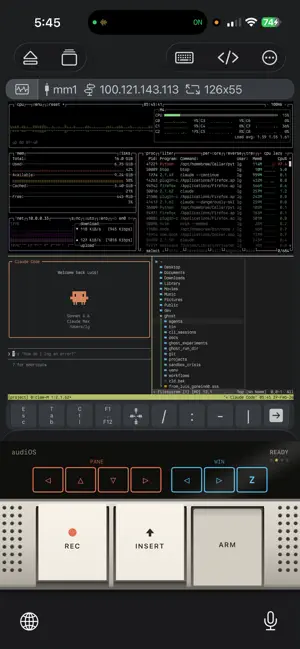
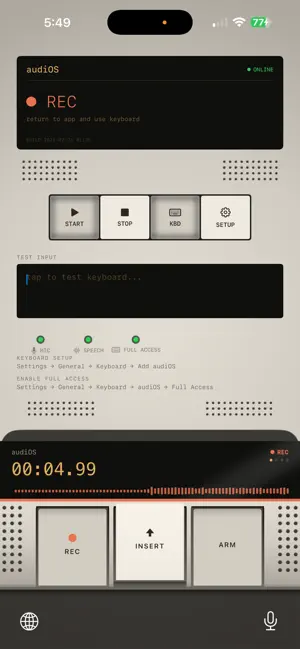
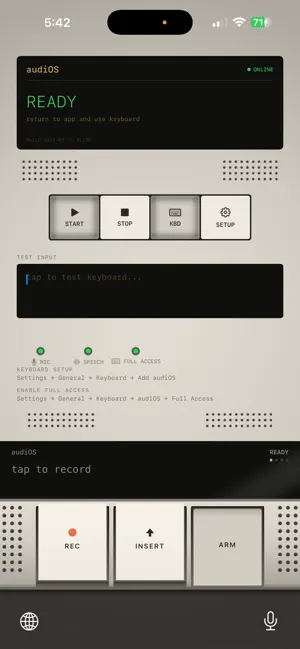
About audiOS Terminal Keyboard
Voice-to-text keyboard that turns speech into text faster than you can type. audiOS sits in your keyboard tray and transcribes speech in near-real-time using the speech model you choose — cloud, live-streaming, or fully on-device. Speak naturally. WORKS EVERYWHERE • iMessage, WhatsApp, Slack, Notes, Mail, social media — anywhere the iOS keyboard works • ARM/DISARM safety switch — armed mode submits text with a newline, disarmed mode inserts only. No accidental sends. • Built-in TMUX / Claude Code shortcut pages for terminal power users HOW IT WORKS 1. Open the audiOS app and tap START to activate the background audio service 2. Switch to any app and select the audiOS keyboard 3. Tap REC to record — speak naturally 4. Watch your transcript appear in real-time on the keyboard display 5. Tap INSERT to paste text POWER FEATURES: • LIFT - Cut the text before your cursor into a stack, INSERT to paste it anywhere else • ARM - **Claude Code only** ARM-up: INSERT adds a newline, ARM-down: INSERT submits the prompt • AUTO - **Claude Code only** Automatically press INSERT every 1 second LIVE ACTIVITY Recording status appears on your Lock Screen and Dynamic Island so you always know when the mic is hot. CHOOSE YOUR MODEL • Cloud models from Groq, OpenAI, xAI, and Cloudflare (Deepgram) — each row names who runs it • Live models stream your voice while you speak, so your text is ready the instant you stop • On-device models (Apple, WhisperKit) keep your audio on your phone FINE-TUNE YOUR EXPERIENCE • Idle shutdown control — keep the audio service alive from 5 minutes to 4 hours depending on your workflow HARDWARE AESTHETIC Inspired by legendary field recorders. Convex mechanical buttons with haptic feedback and tape-deck sound effects. An OLED-style display. It's a real device. 14-DAY FREE TRIAL Try audiOS free for 14 days. Then unlock with a one-time Lifetime purchase or a monthly subscription. With a cloud or live model, your audio is sent through our proxy server to the company that runs that model (Groq, OpenAI, xAI, or Cloudflare/Deepgram) for transcription. On-device models never leave your phone. We do not store your audio. See our privacy policy for details. Requires iOS 26.0+. Keyboard extension requires Full Access enabled in Settings. Terms of Use: https://www.apple.com/legal/internet-services/itunes/dev/stdeula/
What’s new
Version 1.5 · Updated October 17, 2026
• NEW: Live transcription — pick "Deepgram Nova 3 · Live" and your words are transcribed while you speak, so the text is ready the moment you stop. • More models to choose from, including Deepgram Nova 3, OpenAI and Grok voice models. Each model names who runs it. • Clearer model status on the keyboard display, with download progress and a plain reason when an on-device model isn't ready. • Transcription time limit setting. Long recordings are always saved. • Sign in with Apple, Bluetooth headset support, and a faster, more responsive keyboard. • Reliability fixes.
App privacy
The developer, Luis Gutierrez, reported these privacy practices to Apple.
Data Linked to You
The following data, which may be collected and linked to your identity, may be used for the following purposes:
- Location: Coarse Location
- Identifiers: Device ID, User ID
- Usage Data: Product Interaction
- Diagnostics: Crash Data, Performance Data, Other Diagnostic Data
- Purchases: Purchase History
- Contact Info: Email Address, Name
Used for: Analytics, App Functionality
Data Not Linked to You
The following data, which may be collected but is not linked to your identity, may be used for the following purposes:
- User Content: Audio Data
Used for: App Functionality
Alternatives to audiOS Terminal Keyboard
Looking for apps like audiOS Terminal Keyboard? Here are 6 similar apps on the App Store. The highest rated is Copy as... (5.0/5), and all 6 are free to download.
-
 FlowMount
4.0
FlowMount
4.0
-
 Copy as...
5.0
Copy as...
5.0
-
 LudyRec - Lossless Recorder
3.7
LudyRec - Lossless Recorder
3.7
-
 CENFC
5.0
CENFC
5.0
-
 Tools & Converters
-
 LudyServer - File Transfer
3.7
LudyServer - File Transfer
3.7
| App | Rating | Price | Last updated | Compare |
|---|---|---|---|---|
| audiOS Terminal Keyboard | 5.0 / 5 (3 ratings) | Free | October 17, 2026 | |
| FlowMount | 4.0 / 5 (2) | Free | Mar 5, 2026 | Compare |
| Copy as... | 5.0 / 5 (1) | Free | Aug 28, 2026 | Compare |
| LudyRec - Lossless Recorder | 3.7 / 5 (12) | Free | Sep 3, 2026 | Compare |
| CENFC | 5.0 / 5 (3) | Free | Oct 20, 2026 | Compare |
| Tools & Converters | – | Free | Mar 27, 2026 | Compare |
| LudyServer - File Transfer | 3.7 / 5 (3) | Free | Sep 8, 2026 | Compare |