

Rotator: Lists That Take Turns
Possibility Outpost Inc. Productivity iPhoneiPadiPod touchApple Watch
Rotator: Lists That Take Turns is a free Productivity app for iPhone and iPad by Possibility Outpost Inc. Requires iOS 27.0. Updated October 1, 2026.
- Price
- Free
- on the App Store
- Size
- 60 MB
- Age 4+
- Updated
- Oct 1
- 2026 · v1.21
Screenshots
About Rotator: Lists That Take Turns
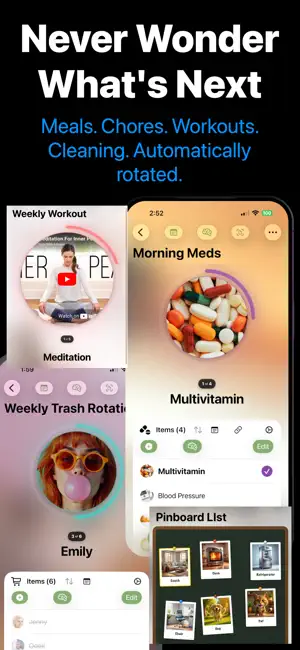
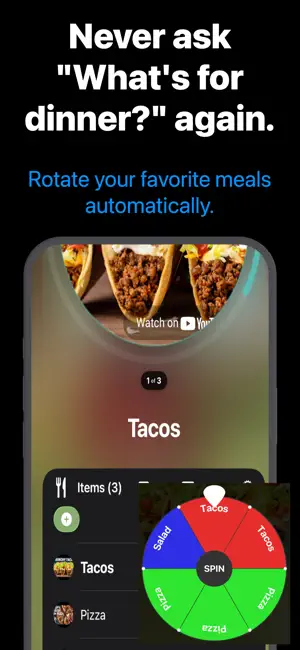
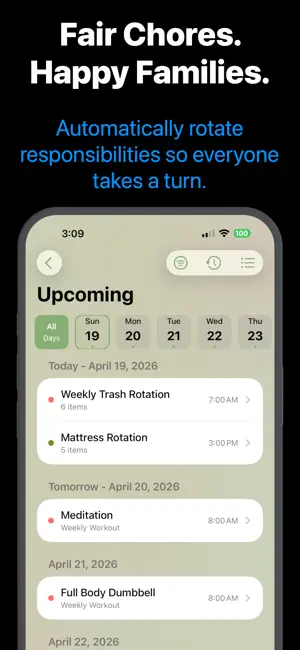
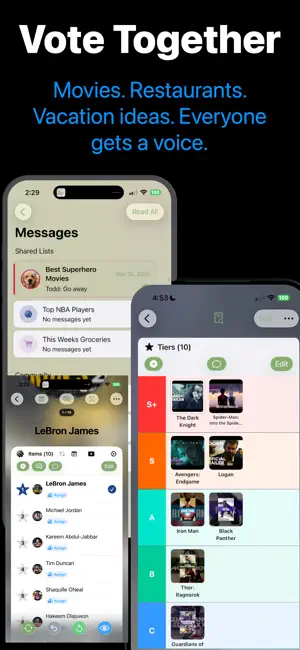
Rotator turns everything you juggle into lists that run themselves — chore rotations, meal plans, shared shopping lists, family pin boards. Stop deciding, start rotating. WHY A ROTATION LIST? A list remembers. A rotation list decides. Whose turn is it to pick the movie? What's for dinner Thursday? Which workout is next? Rotator advances automatically on your schedule — daily, weekly, monthly, or whenever you tap — so the next thing is always waiting for you. NEW: PIN BOARDS Turn any list into a shared cork board. Photos become polaroids, notes become handwritten stickies, dates become countdowns, recordings become voice memo pins. Drag anything anywhere — your arrangement syncs to every device and every person you share with. Choose Cork, Blackboard, Whiteboard, or Linen. Put the important thing in the middle and the fun thing in the corner, and next Tuesday it's still right there. SIX KINDS OF LISTS - Rotation Lists: cycle in order, randomly, or weighted toward favorites - Checklists: simple checkmarks, to-dos, or three-state progress tracking - Shopping Lists: quantities, price estimates, budgets, grouped by store - Tier Lists: drag items into S+ through F ranks - Top 10 Lists: ranked lists your group can vote on - Pin Boards: free-form boards for the stuff that matters BUILT FOR FAMILIES, COUPLES, AND ROOMMATES Share any list and collaborate in real time. Assign chores, vote on movie night, chat inside the list, and watch updates land on everyone's devices instantly. Turn-taking without the arguments. CREATE LISTS IN SECONDS Speak it: describe a list out loud and AI builds it — items, schedule, colors, even a board layout. Scan it: point your camera at a paper list or whiteboard and OCR turns it into a list. Share it: send text, links, or PDFs from any app straight into Rotator. Or browse community templates in Discover and start with one tap. EVERYWHERE YOU ARE Interactive home screen widgets let you check off items and rotate without opening the app. Pin board widgets put your board on your home screen. Quick Add lives in Control Center and on your lock screen. There's a native Apple Watch app for your wrist, and iCloud keeps every device in sync — no accounts, no sign-ups, your data stays in your iCloud. SMART SCHEDULING Automatic rotation on any cadence with reminders before it's your turn. See everything coming in list, calendar, or hour-by-hour timeline views. PEOPLE USE ROTATOR FOR Chore charts and allowance turns. Dinner rotations that end the "I don't know, what do you want?" loop. Workout splits that never skip leg day. Long-distance couples' boards with countdowns to the next visit. Grocery runs organized aisle by aisle. Movie-night democracies. Medication and pet-care schedules. If it repeats, rotate it. Download Rotator and let your lists do the deciding. Privacy: https://rotationlist.possibility.com/RotationPrivacyPolicy.html ToS: https://rotationlist.possibility.com/RotationTermsofService.html
What’s new
Version 1.21 · Updated October 1, 2026
Your lists now listen. This update brings full Siri and Apple Intelligence support: • Talk to your lists — "Create a list called Camping in Rotation List," "Add milk to Groceries," "Mark milk as completed," or "Whose turn is it for Dishes." Just speak naturally. • Rotate by voice — asking "what's next" shows a live card with the new item and Undo and Rotate buttons, right in Siri, without opening the app. • Prefer shorter commands? Say "in My Lists" instead of the app name, or wrap any action in a Shortcut with your own phrase, like "Hey Siri, chore time." • Lists in iPhone Search — swipe down and type any list or item name, like "milk," and jump straight to it. • Drag items anywhere — long-press and drag to reorder, now including across sections and stores. No Edit mode needed. • Refined toolbars that adapt to smaller screens and tuck rarely used actions into a standard overflow menu. • In a list, long tap on a section with the title NO SECTION and you can change the section name right there. • Plus dozens of under-the-hood improvements and fixes throughout the app. See Help → Siri & Shortcuts in the app for everything you can say. BUG FIXES → For iOS27 users Apple removed the ability to generate images using image playground programmatically. Now the user must generate the image. As a work around I've created over 600 common images that will be applied based on the item name. You see these items in Settings -> Auto Item templates. You can also add your own images their as well. Any item names you add will take precedence over the global list. For example, Apple in our My Template list will be used before the Image Library Apple.
App privacy
The developer, Possibility Outpost Inc., reported these privacy practices to Apple.
Data Not Linked to You
The following data, which may be collected but is not linked to your identity, may be used for the following purposes:
- Usage Data: Product Interaction
- Diagnostics: Performance Data, Other Diagnostic Data
Used for: Analytics, Product Personalization, App Functionality
Alternatives to Rotator: Lists That Take Turns
Looking for apps like Rotator: Lists That Take Turns? Here are 6 similar apps on the App Store. The highest rated is Give A Chit (5.0/5), and all 6 are free to download.
-
 Log It All
-
 Give A Chit
5.0
Give A Chit
5.0
-
 Bari - Whose turn? sorted.
-
 LifeLog: Event Notes
-
 HabitMark - Battle
-
 ParentSplit
| App | Rating | Price | Last updated | Compare |
|---|---|---|---|---|
| Rotator: Lists That Take Turns | – | Free | October 1, 2026 | |
| Log It All | – | Free | Sep 3, 2026 | Compare |
| Give A Chit | 5.0 / 5 (1) | Free | Sep 17, 2026 | Compare |
| Bari - Whose turn? sorted. | – | Free | Sep 30, 2026 | Compare |
| LifeLog: Event Notes | – | Free | Jul 20, 2026 | Compare |
| HabitMark - Battle | – | Free | Jun 11, 2026 | Compare |
| ParentSplit | – | Free | Apr 27, 2026 | Compare |