

ChordWise: Piano Chords
Agile Works Music iPhoneiPadiPod touch
ChordWise: Piano Chords is a free Music app for iPhone and iPad by Agile Works. Rated 5.0/5 from 3 ratings. Requires iOS 16.0. Updated September 22, 2026.
- Rating
- 5.0
- 3 ratings
- Price
- Free
- on the App Store
- Size
- 13 MB
- Age 4+
- Updated
- Sep 22
- 2026 · v3.5
Screenshots


About ChordWise: Piano Chords
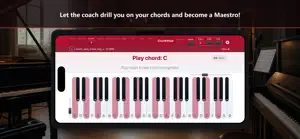
Learn piano chords with live chord recognition as you play — on MIDI, on-screen keys, or mic AI. ChordWise is a piano chord trainer and piano chord finder: build practice drills, follow chord progressions, train your ear, and see chord names on the keyboard. Interactive chord practice — not a piano game. Theory sticks because you hear it, see it on the keys, and play it yourself. PLAY YOUR WAY • MIDI — connect a digital piano or keyboard (Bluetooth / USB) for the most accurate response • On-screen piano — practice anywhere without a keyboard • Mic AI — play an acoustic piano and let ChordWise listen (best near the instrument) WHY CHORDWISE • Live chord recognition — see chord names, notes, and inversions as you play • Practice Builder — create custom drills: chord types, scales, degrees, tempo, hints, and order • Ear training — learn to hear chord types and intervals • Chord progressions — Pop, Jazz, and Blues with smart next-chord suggestions • Step-by-step lessons — theory on the keyboard, not only on a staff • Maestro Coach — guided paths tailored to your level LEARN & PRACTICE Structured modules: scales and keys, major and minor chords (all keys), 7ths, and more. Each lesson explains, highlights keys, and lets you practice until it sticks. Buy only the modules you need. TOOLS FOR EVERY SESSION • Find Chord — pick a root and type, hear it and see it on the keyboard • Freeplay recording — save sessions, replay with expected chords, export JSON or PDF • Metronome, keyboard hints, and adjustable display sizes FREE TO START Live recognition and a generous Practice Builder are free. Maestro unlocks Coach, extended limits, longer recordings, and more. Lesson modules are one-time purchases. Perfect for piano students, self-taught players, and anyone who wants real chord practice with MIDI, screen, or mic — in one app. Download ChordWise and start practicing today. Terms: https://www.apple.com/legal/internet-services/itunes/dev/stdeula/
What’s new
Version 3.5 · Updated September 22, 2026
ChordWise 3.5 — a faster start and a more reliable on-screen piano. WHAT'S NEW • New players land on Live right away; the guided tour stays in Settings • Note names on the keys from first launch • When you first tap the on-screen piano with sound off, ChordWise asks if you want piano audio on • Holding a chord on the on-screen keyboard no longer triggers random extra notes • A subtle hint when you can still scroll (Find, lessons, Progress, Settings) • All 10 languages cover recent features Thank you for playing ChordWise. Share feedback from inside the app anytime.
App privacy
The developer, Agile Works, reported these privacy practices to Apple.
Data Not Linked to You
The following data, which may be collected but is not linked to your identity, may be used for the following purposes:
- Usage Data: Product Interaction, Other Usage Data
Used for: Analytics
Alternatives to ChordWise: Piano Chords
Looking for apps like ChordWise: Piano Chords? Here are 6 similar apps on the App Store. The highest rated is WhatChord MIDI (5.0/5), and all 6 are free to download.
-
 WhatChord MIDI
5.0
-
 Piano Chord Trainer
-
 ChordFlow: Piano Chord Trainer
5.0
-
 ChordFrog: Piano Ear Training
5.0
-
 MIDI Piano & Guitar Chords
4.5
-
 Piano Chords Flashcards
5.0
| App | Rating | Price | Last updated | Compare |
|---|---|---|---|---|
| ChordWise: Piano Chords | 5.0 / 5 (3 ratings) | Free | September 22, 2026 | |
| WhatChord MIDI | 5.0 / 5 (1) | Free | Oct 7, 2026 | Compare |
| Piano Chord Trainer | – | Free | Jul 11, 2026 | Compare |
| ChordFlow: Piano Chord Trainer | 5.0 / 5 (3) | Free | Sep 2, 2026 | Compare |
| ChordFrog: Piano Ear Training | 5.0 / 5 (1) | Free | Oct 15, 2026 | Compare |
| MIDI Piano & Guitar Chords | 4.5 / 5 (2) | Free | Aug 14, 2026 | Compare |
| Piano Chords Flashcards | 5.0 / 5 (2) | Free | Sep 27, 2026 | Compare |