

SnapFolio: Portfolio Tracker
Vitalii Dus Finance iPhoneiPadiPod touch
SnapFolio: Portfolio Tracker is a free Finance app for iPhone and iPad by Vitalii Dus. Requires iOS 15.1. Updated September 18, 2026.
- Price
- Free
- on the App Store
- Size
- 45 MB
- Age 4+
- Updated
- Sep 18
- 2026 · v1.0.1
Screenshots

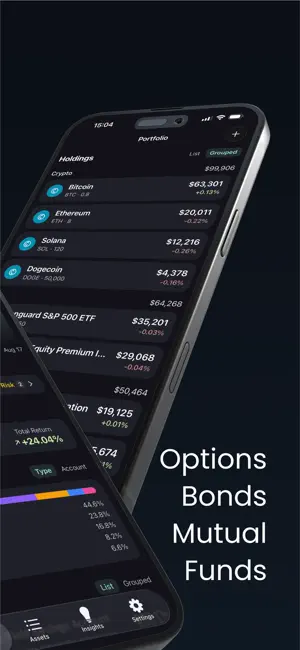
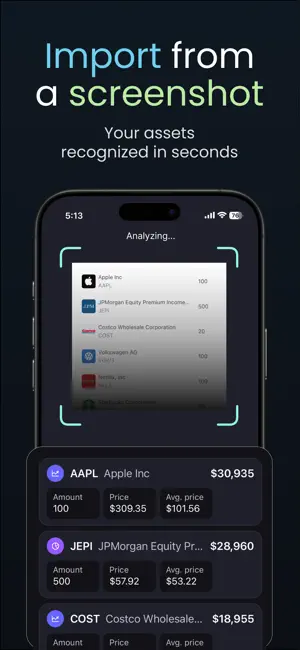

About SnapFolio: Portfolio Tracker
Screenshot your broker. Get your whole portfolio. No tickers to type. No account to connect. No password to hand anyone. Take a photo or screenshot of any broker app, exchange, or paper statement — SnapFolio reads every position off the image, prices it, and adds it to your portfolio. THERE IS NO LIST OF SUPPORTED BROKERS Because there is nothing to connect. A mobile trading app. Your bank's investment tab. A crypto exchange. A neobank in another country. A pension statement on paper. A spreadsheet on a laptop screen. If you can see the positions, SnapFolio can read them. From each one it pulls the name, the ticker or ISIN, the quantity, the value and the currency, prices what it can against live market data, then shows the list to correct before saving. Updating works the same way: screenshot the same account next month, and SnapFolio shows exactly which quantities changed. ELEVEN ASSET TYPES, ONE TOTAL Stocks. ETFs. Mutual funds. Crypto. Bonds. Options. Futures. Commodities including gold and silver. Real estate. Cash and savings accounts. And anything custom you type in yourself. Not everything has a market price, and SnapFolio doesn't pretend otherwise. A private bond is valued from its coupon, issue date and maturity. A savings account from its rate and compounding. An apartment from the number you set, until you change it. Values convert to USD, EUR, GBP, JPY, CAD, AUD, CHF or CNY at the exchange rate from the day of each transaction, not today's rate applied backwards. ON THE HOME SCREEN Total Value. Invested. Net Gain. Total Return. Allocation by asset type, sector, region and currency. Your biggest positions, ranked. Group holdings by account — one per broker, bank or exchange — or tag them yourself. Prices refresh every 30 seconds while markets are open, and the app says so when they are closed instead of passing off a stale number as live. INSIGHTS THAT NAME NAMES Other trackers give you charts and leave the conclusion to you. SnapFolio writes the conclusion. It produces lines like: "Your portfolio is Balanced." "Risk primarily driven by crypto." "Stocks 72% · Crypto 18% · +2" Six things get checked every time: how much sits in one asset class, one country, one currency, one sector, one position — and how much you could actually sell quickly. Every sentence points at a holding you own with the percentage attached. No jargon, and no buy or sell instructions. DATES YOU WOULD OTHERWISE MISS Bond maturities and coupon payments in the next 90 days. Interest compounding on savings. Manual valuations gone stale after 30 days, flagged harder the longer they sit. Grouped overdue, urgent, upcoming — and re-sorted every time the portfolio changes. NO ACCOUNT. NOT EVEN AN EMAIL. There is no sign-up screen. No password, no broker credentials, no trading permission — nothing that can be leaked. Your portfolio is stored on your iPhone. The screenshot you import is read once to pull out the positions and is not kept on our servers. TRY IT ON SAMPLE DATA Open the demo portfolio and walk through every screen before adding an asset of your own. FREE AND PREMIUM Free — 10 assets, entered by hand, prices delayed 15 minutes. Premium — unlimited assets, import by screenshot, AI insights, prices every 30 seconds, starting with a 7-day free trial. Terms of Use: https://www.snapfolio.ai/terms Privacy Policy: https://www.snapfolio.ai/privacy SnapFolio is a read-only analytics tool, not a broker, an exchange, or a financial advisor. It does not execute trades or provide investment advice. Observations are informational and educational only.
What’s new
Version 1.0.1 · Updated September 18, 2026
Improved portfolio charts and fixed bugs for a smoother experience. Fixed splash screen
App privacy
The developer, Vitalii Dus, reported these privacy practices to Apple.
Data Not Linked to You
The following data, which may be collected but is not linked to your identity, may be used for the following purposes:
- Purchases: Purchase History
- Identifiers: User ID
- Usage Data: Product Interaction
- Diagnostics: Crash Data, Performance Data
Used for: Analytics, App Functionality
Alternatives to SnapFolio: Portfolio Tracker
Looking for apps like SnapFolio: Portfolio Tracker? Here are 6 similar apps on the App Store. The highest rated is DivIncome (5.0/5), and all 6 are free to download.
-
 SimpleInvestor
-
 Qwanto
-
 Recap – Investment Tracker
-
 DivIncome
5.0
DivIncome
5.0
-
 Cedrus: Wealth Tracker
-
 MintGuardian: Token Scanner
| App | Rating | Price | Last updated | Compare |
|---|---|---|---|---|
| SnapFolio: Portfolio Tracker | – | Free | September 18, 2026 | |
| SimpleInvestor | – | Free | Sep 23, 2026 | Compare |
| Qwanto | – | Free | Sep 12, 2026 | Compare |
| Recap – Investment Tracker | – | Free | Jul 17, 2026 | Compare |
| DivIncome | 5.0 / 5 (2) | Free | Oct 17, 2026 | Compare |
| Cedrus: Wealth Tracker | – | Free | Jul 5, 2026 | Compare |
| MintGuardian: Token Scanner | – | Free | Oct 12, 2026 | Compare |