

Tomato Timer – Productivity
Ameliia Shekikhacheva Productivity iPhoneiPadiPod touch
Tomato Timer – Productivity is a free Productivity app for iPhone and iPad by Ameliia Shekikhacheva. Rated 3.6/5 from 5 ratings. Requires iOS 16.6.
- Rating
- 3.6
- 5 ratings
- Price
- Free
- on the App Store
- Size
- 11 MB
- Age 4+
- Updated
- Jul 31
- 2026 · v1.2
Screenshots



About Tomato Timer – Productivity
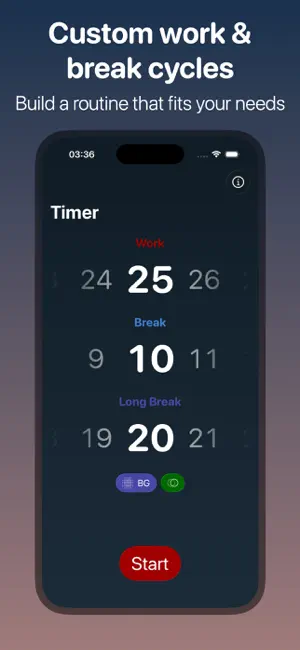
Meet Tomato Timer — a modern Pomodoro timer built to help you start, stay focused, and finish. Whether you need a study timer, a work timer, or a simple productivity timer for deep work, Tomato Timer keeps your sessions clear, calm, and easy to control. The Pomodoro Technique, simplified Pick a focus session, take a short break, repeat, then recharge with a longer break. Tomato Timer turns this proven rhythm into a clean focus timer you can trust during work, study sessions, and everyday tasks. ADHD-friendly, low-stimulation mode If animations, moving backgrounds, or visual effects pull you out of focus, enable ADHD-friendly mode: • Disable all animations • Disable background tinting • Keep the interface steady and predictable Less sensory noise → fewer interruptions → more sustained concentration. Core features • Pomodoro timer with fully customizable work & break cycles (classic 25/5, 50/10, 90/20, or your own) • Step-by-step sessions: work → break → repeat, with clear phase changes • One-tap start, pause/resume, restart, and skip (because real life is messy) • Convenient progress bar that makes time feel “visible” at a glance • Live Activity widgets for Lock Screen and Dynamic Island so your timer stays in view • Smooth, elegant modern design that stays out of your way Built for focus, not friction Tomato Timer is intentionally fast to use. Open the app, choose a cycle, start. No complicated setup, no clutter—just a productivity timer that helps you do the next small step. Use Tomato Timer as a… • Study timer for exams, language learning, homework, and reading • Focus timer for ADHD brains that prefer a clean, stable UI • Work timer for coding, writing, design, and meetings • Break timer to prevent burnout, stretch, hydrate, or reset your mind • Interval timer for any routine that benefits from clear phases Live Activities that keep you on track With Live Activity widgets, you can see your current session (work or break), remaining time, and progress without opening the app. Keeping the timer on your Lock Screen or Dynamic Island reduces “just checking my phone” distractions—so you return to the task faster. Customize your rhythm Different days need different cycles. Build what fits you: • Set focus minutes, short break minutes, and long break minutes • Choose how many cycles you want before a long break • Change your plan anytime (great for flexible schedules and ADHD variability)
Ratings & reviews
3.6
5 ratings
What’s new
Version 1.2 · Updated July 31, 2026
In this version I’ve changed the logo to a prettier one and added audio feedback when timer runs out. Thank you for using my application!
App privacy
The developer, Ameliia Shekikhacheva, reported these privacy practices to Apple.
Data Not Collected
The developer does not collect any data from this app.
Alternatives to Tomato Timer – Productivity
Looking for apps like Tomato Timer – Productivity? Here are 6 similar apps on the App Store. The highest rated is Tomato Timer ۬ (4.7/5), and all 6 are free to download.
-
 Pomofocus - Focus timer
2.9
-
 Pomodoro — Focus Timer
3.9
-
 Tomato Timer ۬
4.7
-
 Pond - Screen Time & Pomodoro
4.6
-
 Be Focused - Focus Timer
4.7
-
 Focus timer - time keeper
4.6
| App | Rating | Price | Last updated | Compare |
|---|---|---|---|---|
| Tomato Timer – Productivity | 3.6 / 5 (5 ratings) | Free | July 31, 2026 | |
| Pomofocus - Focus timer | 2.9 / 5 (12) | Free | Jan 17, 2024 | Compare |
| Pomodoro — Focus Timer | 3.9 / 5 (20) | Free | Oct 14, 2026 | Compare |
| Tomato Timer ۬ | 4.7 / 5 (189) | Free | Oct 30, 2024 | Compare |
| Pond - Screen Time & Pomodoro | 4.6 / 5 (848) | Free | Jun 15, 2026 | Compare |
| Be Focused - Focus Timer | 4.7 / 5 (4,323) | Free | Oct 19, 2026 | Compare |
| Focus timer - time keeper | 4.6 / 5 (1,886) | Free | May 25, 2026 | Compare |