

RetroGo - Retro Game Emulator
Jinan Matrix Information Technology Co., Ltd. Entertainment iPhoneiPadiPod touch
RetroGo - Retro Game Emulator is a free Entertainment app for iPhone and iPad by Jinan Matrix Information Technology Co., Ltd. Rated 4.5/5 from 70 ratings.
- Rating
- 4.5
- 70 ratings
- Price
- Free
- on the App Store
- Size
- 238 MB
- Age 9+
- Updated
- Oct 18
- 2026 · v1.14.0
Screenshots



About RetroGo - Retro Game Emulator
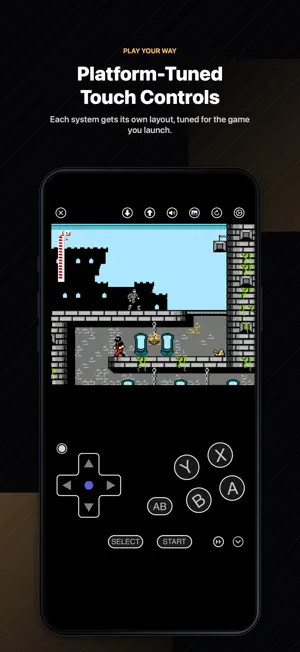
Relive classic games in a native iOS way with RetroGo. RetroGo is a high-performance retro game emulator for iPhone and iPad, built on RetroArch / Libretro cores and redesigned with native UIKit and SpriteKit interfaces. Smarter Game Library RetroGo is more than a ROM list: • Browse by folder, tree, tag, or emulator core • Switch between icon and list layouts • Import files or folders from the iOS Files app • Long-press files and folders to rename, move, tag, assign cores, or delete Built for Retro Collections • Intelligent detection for supported multi-file games • Clean grouping for formats such as CUE, M3U, GDI, and related files • Multi-disc games merged into one entry automatically, with disc switching • Core assignment for games that need a specific emulator core Discover Game Metadata Browse RetroArch RDB platform databases with metadata, region, checksums, and cover art. All-in-One Emulation Includes 20 built-in emulation cores: • PSP, PlayStation, Saturn, Dreamcast • Sega Mega Drive / Genesis, Mega-CD, Master System, Game Gear, SG-1000 • Game Boy, Game Boy Color, Game Boy Advance, Nintendo DS • NES, SNES, Nintendo 64 • Arcade: Neo Geo, CPS1/2/3, PGM, Cave, NAOMI, Atomiswave • DOS Gameplay Features • SpriteKit touch controls • Per-system control layouts • Save states and auto save • Physical controller support • Per-core and per-game settings Cheat Codes • Create, edit, and organize your own cheat codes • Browse built-in cheat template databases for supported platforms • Automatic template matching by CRC32 — when your ROM is recognized, RetroGo binds a matching cheat template for you • Turn cheats on during gameplay (Pro) Arcade Over 4,000 classic arcade games powered by MAME 0.289: • Automatic set recognition, BIOS placement, and parent-set linking • Library health check with one-tap repair and backups • Import Pugsy's MAME Cheat Collection • Six- and four-button arcade layouts • LAN play for arcade games LAN Multiplayer • Host or join a game session over the same Wi-Fi network • Automatic Bonjour discovery — no setup, no accounts Play Free, Go Pro for More Play free with no time limit on each platform's free core. RetroGo Pro unlocks: • Every emulator core • Cheats, including built-in templates • Fast-forward up to 6x • Unlimited save slots and overwriting saves • Custom controller button mapping • More custom control layouts and your own combos Purchase options: monthly or yearly subscription, or a one-time lifetime unlock. Prices may vary by country or region and will be shown before purchase. Subscription Terms Payment will be charged to your Apple ID account at confirmation of purchase. Subscriptions automatically renew unless auto-renew is turned off at least 24 hours before the end of the current period. Renewal is charged within 24 hours before the end of the current period. You can manage or cancel subscriptions in your Apple ID account settings. Privacy & Open Source RetroGo is open-sourced under the GPLv3 license. RetroGo does not collect or track personal information. Your game files, saves, settings, and app data are stored locally on your device. GitHub: https://github.com/askrsw/RetroGo-iOS Privacy Policy: https://matrix4x4.com/retrogo/policy Terms of Use: https://matrix4x4.com/retrogo/eula About Screenshots The games shown in the App Store screenshots are homebrew games, open-source games, or games used with permission. They are shown only to demonstrate RetroGo's features. RetroGo does not include or provide commercial game ROMs or BIOS files. Users must import their own legally owned game files. Disclaimer RetroGo is not affiliated with Nintendo, Sony, Sega, Microsoft, Apple, RetroArch, Libretro, MAME, or any other console manufacturer, platform owner, publisher, developer, or trademark holder. All trademarks belong to their respective owners.
Ratings & reviews
4.5
70 ratings
What’s new
Version 1.14.0 · Updated October 18, 2026
This update adds the mGBA core and expands control customization with flexible layouts, button macros, more turbo options, and physical controller mappings that switch with your layout. • New mGBA Core Game Boy Advance games now have another core to choose from, with a localized set of core options. VBA-M remains the free default GBA core; mGBA requires Pro. • More Flexible Control Layouts Arrange action buttons in a fan and adjust the group's position, size and fan settings. Replace buttons with combos or macros, or move them out of the fan to place them individually. Configure portrait and landscape separately to suit the way you play. • Button Macros Build sequences of directional and action inputs, with adjustable step durations and gaps between steps. Tap once to play a macro and tap again to cancel. Choose an icon, add a direction marker, create a left/right mirrored copy, or copy macros from other layouts to reuse your favorite sequences. • Custom Combo and Turbo Buttons Add turbo to a single button, or combine two to four buttons with optional turbo, including on arcade platforms. Enable “Tap to Lock Turbo” to keep firing after a quick tap, without holding the button. Tap again to stop. “Turbo Speed” controls both single-button and combo turbo. • Controller Mappings That Follow Your Layout Each control layout can save its own physical controller mappings, including assignments to custom combos, turbo buttons and macros. Switching layouts during play also switches the mappings, and each player can choose a mapping scheme separately. The mapping page displays the selected layout, with bubbles showing which physical buttons are already in use. After this update, you may need to set up your previous controller mappings again. • Shared Layouts for Related Arcade Games MAME can now apply a layout to games using the same driver, in addition to one game or an entire platform. Configure games built for the same arcade hardware together, while preserving layout choices made for individual games. • Editing Improvements and Fixes When creating a layout, saving after adjusting only one screen orientation now offers to edit the other. Improved editor presentation, collapsing and expanding on iPhone and iPad, and game picture refresh after rotation. Added missing haptic feedback when tapping controls on layout configuration pages. Fixed long layout and disc names squeezing out setting titles. Fixed Pro features being blocked even when the Pro page showed an active entitlement, and improved recognition of subscription renewals. Fixed issues when pausing, closing and reopening some games.
App privacy
The developer, Jinan Matrix Information Technology Co., Ltd., reported these privacy practices to Apple.
Data Not Collected
The developer does not collect any data from this app.
Alternatives to RetroGo - Retro Game Emulator
Looking for apps like RetroGo - Retro Game Emulator? Here are 6 similar apps on the App Store. The highest rated is RetroEMU: Arcade Game Emulator (5.0/5), and all 6 are free to download.
-
 RetroEMU: Arcade Game Emulator
5.0
RetroEMU: Arcade Game Emulator
5.0
-
 Game Emulator - PS1, GBA, DS
4.6
Game Emulator - PS1, GBA, DS
4.6
-
 REmu — Retro Emulator
4.2
REmu — Retro Emulator
4.2
-
 Natura EMU - Game Emulator
3.7
Natura EMU - Game Emulator
3.7
-
 Foxol
2.9
Foxol
2.9
-
 Super Emulator
4.0
Super Emulator
4.0
| App | Rating | Price | Last updated | Compare |
|---|---|---|---|---|
| RetroGo - Retro Game Emulator | 4.5 / 5 (70 ratings) | Free | October 18, 2026 | |
| RetroEMU: Arcade Game Emulator | 5.0 / 5 (2) | Free | Apr 23, 2026 | Compare |
| Game Emulator - PS1, GBA, DS | 4.6 / 5 (106) | Free | Oct 10, 2026 | Compare |
| REmu — Retro Emulator | 4.2 / 5 (5) | Free | Jul 14, 2026 | Compare |
| Natura EMU - Game Emulator | 3.7 / 5 (3) | Free | Jun 28, 2026 | Compare |
| Foxol | 2.9 / 5 (8) | Free | Oct 4, 2026 | Compare |
| Super Emulator | 4.0 / 5 (9) | Free | Sep 22, 2026 | Compare |