

Built Correct: Business App
Built Correct LLC Business iPhoneiPadiPod touch
Built Correct: Business App is a free Business app for iPhone and iPad by Built Correct LLC. Rated 5.0/5 from 8 ratings. Requires iOS 15.0.
- Rating
- 5.0
- 8 ratings
- Price
- Free
- on the App Store
- Size
- 3 MB
- Age 4+
- Updated
- Oct 6
- 2026 · v2.0
Screenshots


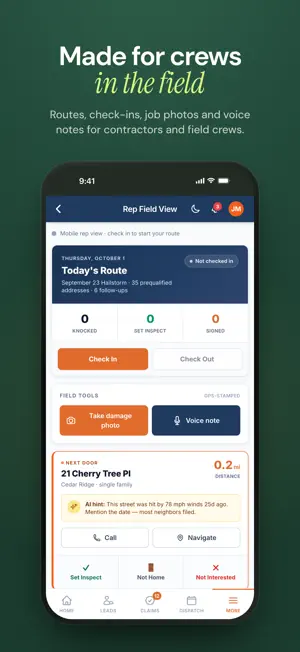
About Built Correct: Business App
Built Correct builds custom software for businesses, and this app is where your team uses it. Got a code from your company? Type it once and your company's app opens: jobs, schedules, checklists, photos and chat. Run a business? Open a Build Room and tell us what you need, or try one of the apps we've built. GETTING STARTED • Get your organization code from your company. It's the first part of your company's web address: the "yourcompany" in yourcompany.builtcorrect.com. • Type it in, tap Continue, then tap your company to open it. • Next time, the app opens your company's app right away. To switch, tap Choose another while it opens, or swipe back to your list. • Use more than one company's app? Your recent ones stay on the start screen. • No code yet? Under Apps we've built, open a cleaning, roofing, flooring or electrical company's app with sample data. WHAT YOUR COMPANY'S APP CAN DO Every company's app is different, made around how that business already works. Depending on yours, you can: • See your schedule, jobs and visits • Keep clients, estimates and invoices in one place • Take photos for jobs and work orders • Check in and out at job sites • Fill out checklists, inspections and reports • Scan a room to capture its floor plan and measurements, on iPhone and iPad models with LiDAR OPEN A BUILD ROOM A Build Room is where your business app gets built: • Describe what your business needs in a chat, with photos if you like • Watch the first version come together, then ask for changes • Our engineers oversee every room and can join you in the chat • Free to start, with no account needed. Save your room to a free account to open it on any device, and delete that account anytime from the room. TALK WITH THE PEOPLE WHO BUILD YOUR APP If you work with Built Correct on your company's app, your project chat is right here: • Tell our engineers what you need next • Send screenshots and photos • Talk instead of typing • Start a voice call from the chat. Afterwards, a transcript of the call is added to the chat. Replies come from our engineers or from our AI assistant, whose messages are marked AI. AI only reads your messages after you allow it. NOTIFICATIONS THAT TAKE YOU THERE • Turn on notifications in your project chat. When we reply, you get one notification, not one for every message. • Tap a notification to open the exact page it's about, even if the app was closed. MADE FOR EVERYDAY USE • Swipe from the left edge to go back, all the way to your list of companies. • The start screen follows your phone's light or dark mode. • Offline? The app tells you and lets you try again. • Need help? Text, call or email us from the start screen. NEW TO BUILT CORRECT? Companies that work with Built Correct use this app every day. If you'd like software built around your business, open a Build Room in the app or at builtcorrect.com.
Ratings & reviews
5.0
8 ratings
What’s new
Version 2.0 · Updated October 6, 2026
Built Correct 2.0 is a fresh start for the app. A NEW LOOK • A redesigned start screen and our new icon • Light and dark mode on the start screen, following your phone's setting • Clearer messages when a code isn't found, and a Retry button when you're offline FASTER TO YOUR WORK • No more waiting on the start screen: the app opens your last company right away • Tap Choose another while a company opens to switch to a different one. Your recent companies are kept. • Swipe from the left edge to go back, all the way to your list of companies • The start screen loads even without an internet connection • No code yet? Open one of the apps we've built, with sample data OPEN A BUILD ROOM • Tell us what your business needs in a chat and watch your app get built, free to start NOTIFICATIONS THAT OPEN THE RIGHT PAGE • Tap a notification to go straight to what it's about, like a new message in your project chat, even if the app was closed YOUR PROJECT CHAT, NOW WITH VOICE • Talk instead of typing • Start a voice call from the chat. Afterwards, a transcript of the call is added to the chat. • One notification per round of messages, not one for every message
App privacy
The developer, Built Correct LLC, reported these privacy practices to Apple.
Data Linked to You
The following data, which may be collected and linked to your identity, may be used for the following purposes:
- Identifiers: User ID, Device ID
- Usage Data: Product Interaction
- Purchases: Purchase History
- Financial Info: Other Financial Info
- Location: Precise Location
- Contact Info: Physical Address, Email Address, Name, Phone Number
- User Content: Emails or Text Messages, Photos or Videos, Audio Data, Customer Support, Other User Content
Used for: Analytics, App Functionality
Alternatives to Built Correct: Business App
Looking for apps like Built Correct: Business App? Here are 6 similar apps on the App Store. The highest rated is XL Sidekick (5.0/5), and all 6 are free to download.
-
 Virtusa’s Facility Intune
-
 FSB Allen Mobile
4.7
FSB Allen Mobile
4.7
-
 DPS FCU Mobile Banking
-
 XL Sidekick
5.0
XL Sidekick
5.0
-
 ASCP Now
5.0
ASCP Now
5.0
-
 Green Power Energy
5.0
Green Power Energy
5.0
| App | Rating | Price | Last updated | Compare |
|---|---|---|---|---|
| Built Correct: Business App | 5.0 / 5 (8 ratings) | Free | October 6, 2026 | |
| Virtusa’s Facility Intune | – | Free | Nov 20, 2025 | Compare |
| FSB Allen Mobile | 4.7 / 5 (52) | Free | Sep 30, 2025 | Compare |
| DPS FCU Mobile Banking | – | Free | Jan 2, 2024 | Compare |
| XL Sidekick | 5.0 / 5 (4) | Free | Oct 16, 2026 | Compare |
| ASCP Now | 5.0 / 5 (2) | Free | Aug 27, 2026 | Compare |
| Green Power Energy | 5.0 / 5 (4) | Free | Jan 19, 2024 | Compare |