

PrismaScribe: Voice to text AI
Fuerte Vision, MB Productivity iPhoneiPadiPod touchApple Watch
PrismaScribe: Voice to text AI is a free Productivity app for iPhone and iPad by Fuerte Vision, MB. Rated 5.0/5 from 1 ratings. Requires iOS 15.0.
- Rating
- 5.0
- 1 ratings
- Price
- Free
- on the App Store
- Size
- 52 MB
- Age 4+
- Updated
- Oct 6
- 2026 · v1.2.0
Screenshots


About PrismaScribe: Voice to text AI
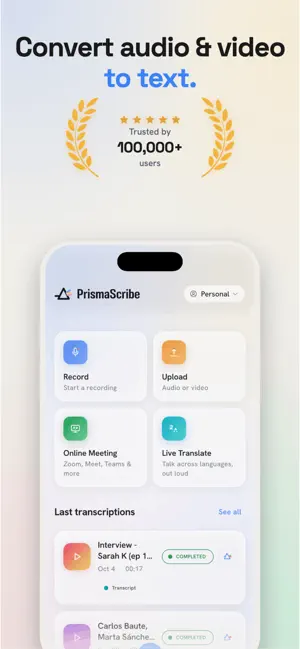
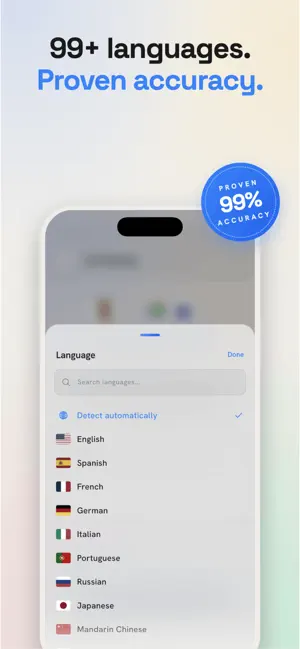
Record or upload a lecture, interview or meeting and get an accurate transcript with speakers — then turn it into a summary, flashcards or a quiz. In 99+ languages, even when you switch languages mid-sentence. TRANSCRIBE ANYTHING - Record in the app or on Apple Watch, or upload audio and video from Files or Photos (MP3, MP4, MOV, WAV and more) - Start recording from your Home Screen, Lock Screen or watch face - Long files: full lectures, interviews and conferences - A one-hour file is usually ready in minutes — lock your phone and get a notification when it's done - Up to 32 speakers, labeled automatically ANY LANGUAGE, EVEN MIXED - 99+ languages with automatic detection - Handles speakers who switch languages mid-sentence - Translate transcripts into 99+ languages FROM TRANSCRIPT TO STUDY MATERIAL - Summaries, plus meeting minutes with decisions and action items on paid plans - Flashcards and quizzes from your own lectures, with study progress - Tap any word for an explanation, or switch to a dyslexia-friendly reading mode LIVE TOOLS (PAID PLANS) - Live Translate: two people, one phone. Each of you speaks your own language and hears the other translated out loud - Live captions while you record - Send a bot to Zoom, Google Meet or Microsoft Teams to transcribe the call EDIT, ORGANIZE, EXPORT - Trim and arrange recordings before transcribing - Tap any word to jump to that moment in the audio - Bookmarks, clips and notes synced to the transcript - Folders, tags and shared workspaces - Export TXT, SRT, VTT, PDF, DOCX or Markdown PRIVATE BY DEFAULT Your files are encrypted, never used to train AI, and you can delete them anytime. Works on iPhone, iPad, Apple Watch and the web — one account, everything in sync. Start free: 30 minutes a month, no card needed. Terms of Use (EULA): https://www.apple.com/legal/internet-services/itunes/dev/stdeula/
What’s new
Version 1.2.0 · Updated October 6, 2026
PrismaScribe has a new look. • New logo and colours across the app, the widgets and Apple Watch • Upload videos straight from Photos, not just from Files • Redesigned Home Screen and Lock Screen widgets, built around the record button • Refreshed Apple Watch app and complications, with a live recording timer • Cleaner Live Activities while you record or listen back • A smoother launch, a tidier iPad layout, and fixes throughout
App privacy
The developer, Fuerte Vision, MB, reported these privacy practices to Apple.
Data Linked to You
The following data, which may be collected and linked to your identity, may be used for the following purposes:
- Contact Info: Email Address, Name
- Usage Data: Product Interaction
- Purchases: Purchase History
- User Content: Audio Data, Other User Content
- Identifiers: User ID
Used for: Developer’s Advertising or Marketing, Analytics, App Functionality
Alternatives to PrismaScribe: Voice to text AI
Looking for apps like PrismaScribe: Voice to text AI? Here are 6 similar apps on the App Store. The highest rated is MindMapper Mobile (5.0/5), and all 6 are free to download.


| App | Rating | Price | Last updated | Compare |
|---|---|---|---|---|
| PrismaScribe: Voice to text AI | 5.0 / 5 (1 rating) | Free | October 6, 2026 | |
| Smarto App | – | Free | Mar 24, 2025 | Compare |
| UnlimitedTranscribe | – | Free | May 29, 2026 | Compare |
| DocuMD – Medical Scribe | – | Free | Sep 2, 2026 | Compare |
| Talk: LB | – | Free | Feb 26, 2026 | Compare |
| MindMapper Mobile | 5.0 / 5 (1) | Free | Apr 23, 2026 | Compare |
| Addis AI | 4.0 / 5 (11) | Free | Sep 3, 2025 | Compare |