

Code To PC
Marko Babovic Business iPhoneiPadiPod touch
Code To PC is a free Business app for iPhone and iPad by Marko Babovic. Requires iOS 15.0. Updated August 16, 2026.
- Price
- Free
- on the App Store
- Size
- 32 MB
- Age 4+
- Updated
- Aug 16
- 2026 · v1.2.2
Screenshots


About Code To PC
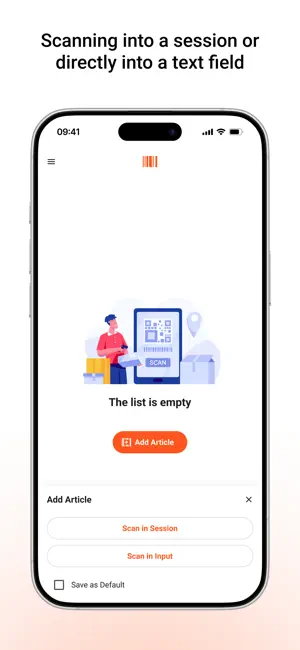
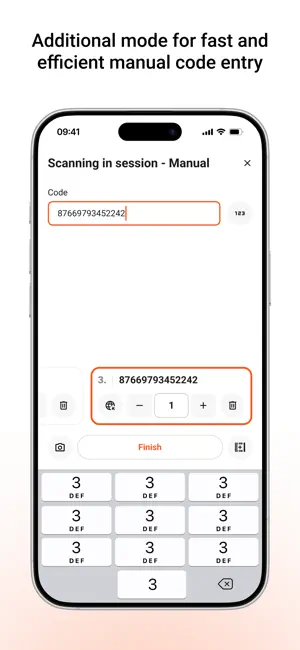
Code To PC – Fast and Reliable Barcode and QR Code Scanner Turn your phone into a high-precision barcode and QR scanner and send data to your PC. Download the server app here: https://codetopc.com Features - Data Transfer – Scan barcodes and QR codes and send them directly to your PC. - Wi-Fi Connection – No cables needed. Your phone and PC connect over the same network. - Keyboard Emulator – Automatically types scanned codes into any app on your PC. - CSV Export – Save scans instantly or export them later as a CSV file. - Multi-Platform Support – Works on Windows and macOS. - High-Precision Scanning – Uses advanced camera processing for accurate recognition. - User-Friendly Interface – Simple and intuitive design. How It Works - Download and install the Code To PC server on your PC - Make sure your phone and PC are on the same Wi-Fi network - Open the app and start scanning – data is instantly sent to your PC Server app download: https://codetopc.com Perfect For - Inventory Management - Retail and Point of Sale - Office and Productivity Automation - Logistics and Warehousing - Personal Use and More Download Code To PC and simplify your work!
What’s new
Version 1.2.2 · Updated August 16, 2026
• Fixed: scanning the same QR code again after a failed pairing attempt now works. Previously the camera would not pick it up a second time. • Fixed: the notice about your desktop app version no longer appears when your desktop app is already up to date, and its wording is clearer. • Improved: full-screen layout on Android 15 and newer. • Improved: smaller download size.
App privacy
The developer, Marko Babovic, reported these privacy practices to Apple.
Data Linked to You
The following data, which may be collected and linked to your identity, may be used for the following purposes:
- Identifiers: Device ID
Used for: App Functionality
Data Not Linked to You
The following data, which may be collected but is not linked to your identity, may be used for the following purposes:
- Diagnostics: Crash Data
Used for: App Functionality
Alternatives to Code To PC
Looking for apps like Code To PC? Here are 6 similar apps on the App Store. The highest rated is OAK POS (5.0/5), and all 6 are free to download.
-
 WiScanner: Barcode & Inventory
-
 Scan to Sheets: Scan & Export
-
 Barcode Sender: Scan to Sheets
3.0
Barcode Sender: Scan to Sheets
3.0
-
 QR Code Transfer
-
 ScanJet
-
 OAK POS
5.0
OAK POS
5.0
| App | Rating | Price | Last updated | Compare |
|---|---|---|---|---|
| Code To PC | – | Free | August 16, 2026 | |
| WiScanner: Barcode & Inventory | – | Free | Sep 29, 2026 | Compare |
| Scan to Sheets: Scan & Export | – | Free | Oct 30, 2026 | Compare |
| Barcode Sender: Scan to Sheets | 3.0 / 5 (2) | Free | Apr 16, 2026 | Compare |
| QR Code Transfer | – | Free | Dec 23, 2025 | Compare |
| ScanJet | – | Free | Apr 1, 2026 | Compare |
| OAK POS | 5.0 / 5 (1) | Free | Oct 10, 2026 | Compare |
Compare Code To PC with the top alternatives: ratings, updates, ASO score and keyword gaps →