

Clutch: Screenshot to Reminder
Ernist Isabekov Productivity iPhoneiPadiPod touch
Clutch: Screenshot to Reminder is a free Productivity app for iPhone and iPad by Ernist Isabekov. Requires iOS 26.2. Updated October 18, 2026.
- Price
- Free
- on the App Store
- Size
- 9 MB
- Age 4+
- Updated
- Oct 18
- 2026 · v2.0
Screenshots

About Clutch: Screenshot to Reminder
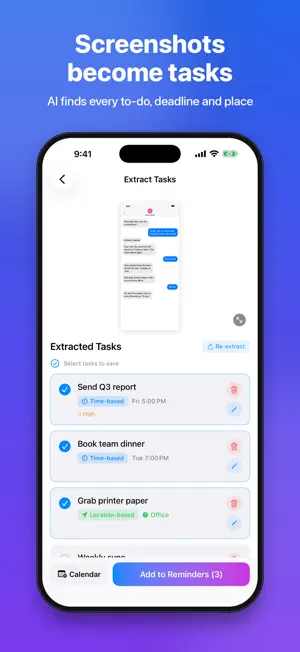
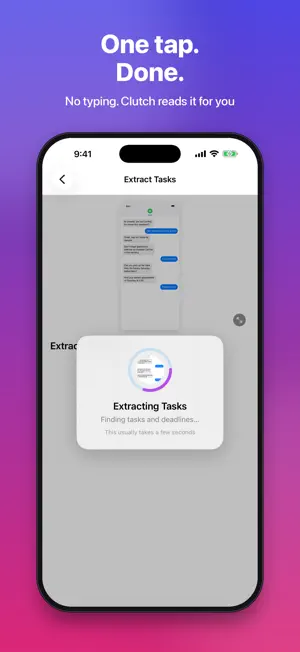
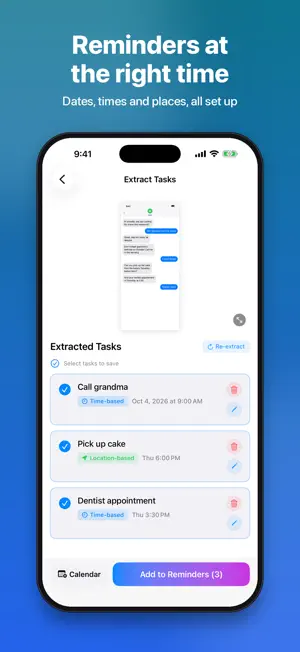
Screenshot anything. Clutch remembers it. We all screenshot things to deal with later: a message from your boss, a flight booking, shoes you want to buy, a concert, an apartment listing, a restaurant to try. Then they get lost in the camera roll. Clutch reads your screenshots with AI and turns them into reminders with the right dates, times and details, so nothing slips through. WHAT YOU CAN SCREENSHOT • Messages and emails → "Send the budget" on Thursday, "Set up client call" next week • Flights and bookings → your flight at departure time, plus a check-in reminder • Things to buy → "Buy Nike Air Max 90", with the price saved • Concerts and events → the event on its date, plus "Get Coldplay tickets" when sales open • Reservations → "Dinner at Nobu" on Friday at 8:30 PM, with the details saved • Apartments and listings → "Contact Mehmet about apartment", with the phone number • Restaurants and places → a reminder when you're nearby • Bills → "Pay electricity bill" before the due date • Articles and recipes → "Read later" so you actually come back to them HOW IT WORKS 1. Take a screenshot (or snap a photo, or paste text) 2. Open Clutch and tap it 3. Pick the tasks you want and save them to Apple Reminders KEY FEATURES • AI that understands what you want to do, even when no task is written • Save to Apple Reminders with dates, alerts and priority • Location reminders ("when I'm at the office"), with a time alert too when there is one • Repeating tasks ("every Monday at 10") • Keeps prices, phone numbers and booking codes in the notes • Works in your language: English, Russian, Spanish, French, German, Chinese and more • Paste text or share from any app • Siri & Shortcuts: "Extract tasks in Clutch" • No account needed CLUTCH PRO • 200 extractions every month • Add tasks to your Calendar • Extract all your screenshots at once • Export to CSV, plus files ready to import into Todoist and Notion TRY IT FREE Get 2 free extractions to try Clutch. Screenshots with no tasks don't count. Upgrade to Clutch Pro anytime with a monthly or yearly subscription. The yearly plan includes a 7-day free trial for new subscribers. SUBSCRIPTION INFO Payment is charged to your Apple ID at confirmation of purchase. Subscriptions renew automatically unless cancelled at least 24 hours before the end of the current period. Your account is charged for renewal within 24 hours before the period ends. Manage or cancel anytime in your App Store account settings. Any unused portion of a free trial is forfeited when you purchase a subscription. Terms of Use: https://screenshotclutch.xyz/terms.html Privacy Policy: https://screenshotclutch.xyz/privacy.html
What’s new
Version 2.0 · Updated October 18, 2026
• Clutch is now in Spanish, Portuguese, Italian, Dutch, Swedish, Norwegian, Danish, Ukrainian and Chinese (Traditional) • Tasks stay in the language of your screenshot, in every language • Weekdays and times are read correctly in every language • Bug fixes and improvements
App privacy
The developer, Ernist Isabekov, reported these privacy practices to Apple.
Data Linked to You
The following data, which may be collected and linked to your identity, may be used for the following purposes:
- Purchases: Purchase History
Used for: App Functionality
Data Not Linked to You
The following data, which may be collected but is not linked to your identity, may be used for the following purposes:
- User Content: Photos or Videos
Used for: App Functionality
Alternatives to Clutch: Screenshot to Reminder
Looking for apps like Clutch: Screenshot to Reminder? Here are 6 similar apps on the App Store. The highest rated is T2Do (5.0/5), and all 6 are free to download.


| App | Rating | Price | Last updated | Compare |
|---|---|---|---|---|
| Clutch: Screenshot to Reminder | – | Free | October 18, 2026 | |
| Ike Organizer | – | Free | Aug 6, 2026 | Compare |
| Doneward | – | Free | Oct 15, 2026 | Compare |
| PairPlan: Couples To-Do | – | Free | Sep 10, 2026 | Compare |
| T2Do | 5.0 / 5 (1) | Free | Oct 14, 2026 | Compare |
| TimenTask | – | Free | Jun 3, 2025 | Compare |
| Groupability | 5.0 / 5 (1) | Free | Nov 19, 2025 | Compare |