

Split Wayz
Adam Jaloudi Finance iPhoneiPadiPod touch
Split Wayz is a free Finance app for iPhone and iPad by Adam Jaloudi. Rated 5.0/5 from 1 ratings. Requires iOS 15.1. Updated February 3, 2026.
- Rating
- 5.0
- 1 ratings
- Price
- Free
- on the App Store
- Size
- 33 MB
- Age 4+
- Updated
- Feb 3
- 2026 · v1.0
Screenshots


About Split Wayz
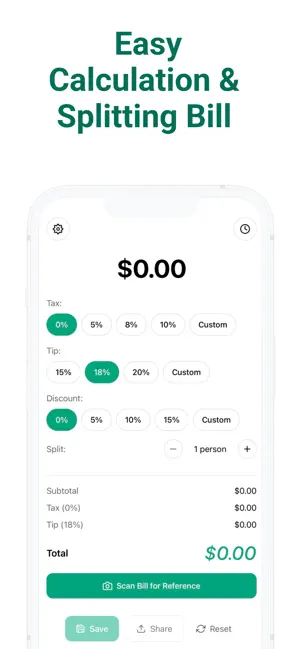
Main Features (Calculator Screen) Bill Amount Entry Tap the large dollar amount to enter your bill total Bold, easy-to-read display shows your current amount Discount Section Apply discounts before tax and tip are calculated Preset buttons: 0%, 5%, 10%, 15%, or Custom Discount is subtracted from the bill first Tax Calculation Preset buttons: 0%, 5%, 8%, 10%, or Custom Default starts at 0% (can be changed in Settings) Tax is applied after any discount Tip Calculation Preset buttons: 15%, 18%, 20%, 25%, or Custom Default starts at 18% (can be changed in Settings) Tip is calculated on the discounted subtotal Bill Splitting Use +/- buttons to split between 1-99 people Shows per-person amount automatically Breakdown Display Shows subtotal, discount amount, tax amount, tip amount Displays grand total and per-person amount Scan Bill for Reference Green button to take a photo of your receipt Image is saved with your calculation for reference Can remove the attached image anytime Action Buttons Save: Store the calculation to history Share: Send breakdown details to friends Reset: Clear all values and start fresh Settings Profile Enter your display name (shows first initial in avatar) Default Tip Set your preferred tip percentage (15%, 18%, 20%, 25%) Pre-selected when you open the calculator Default Tax Set your local tax rate (0%, 5%, 8%, 10%) Pre-selected when you open the calculator Appearance Light mode Dark mode Auto (follows your device settings) App Info Shows app name: Split Wayz Shows version: 1.0.0 Legal Privacy Policy: Details about data storage, camera usage, and privacy practices Help & Support How to Use: Step-by-step guide on using all features All settings save automatically History View all saved calculations Each card shows: name, date, total amount, per-person split Tap a card to view full details Delete individual calculations with the trash icon View attached receipt images in detail view Share saved calculations from detail view Key Details All data stored locally on your device No account required Works offline Supports both light and dark themes Camera permission required only for receipt scanning
App privacy
The developer, Adam Jaloudi, reported these privacy practices to Apple.
Data Not Collected
The developer does not collect any data from this app.
Alternatives to Split Wayz
Looking for apps like Split Wayz? Here are 6 similar apps on the App Store. The highest rated is Bwa Invest (5.0/5), and all 6 are free to download.
-
 Enfaq
Enfaq
-
 Bwa Invest
5.0
Bwa Invest
5.0
-
 Smart Savings.
1.0
Smart Savings.
1.0
-
 Carrollton Bank for Business
5.0
Carrollton Bank for Business
5.0
-
 Lennar Mortgage
-
 Superior Credit Union Mobile
4.6
Superior Credit Union Mobile
4.6
| App | Rating | Price | Last updated | Compare |
|---|---|---|---|---|
| Split Wayz | 5.0 / 5 (1 rating) | Free | February 3, 2026 | |
| Enfaq | – | Free | Sep 30, 2026 | Compare |
| Bwa Invest | 5.0 / 5 (2) | Free | Oct 18, 2026 | Compare |
| Smart Savings. | 1.0 / 5 (1) | Free | Sep 24, 2026 | Compare |
| Carrollton Bank for Business | 5.0 / 5 (2) | Free | Sep 21, 2026 | Compare |
| Lennar Mortgage | – | Free | May 21, 2026 | Compare |
| Superior Credit Union Mobile | 4.6 / 5 (333) | Free | Jun 3, 2026 | Compare |
Compare Split Wayz with the top alternatives: ratings, updates, ASO score and keyword gaps →