

Transfer Playlist for My Music
Emirhan Baskaya Music iPhoneiPadiPod touch
Transfer Playlist for My Music is a free Music app for iPhone and iPad by Emirhan Baskaya. Requires iOS 17.0. Updated October 19, 2026.
- Price
- Free
- on the App Store
- Size
- 38 MB
- Age 4+
- Updated
- Oct 19
- 2026 · v1.1
Screenshots
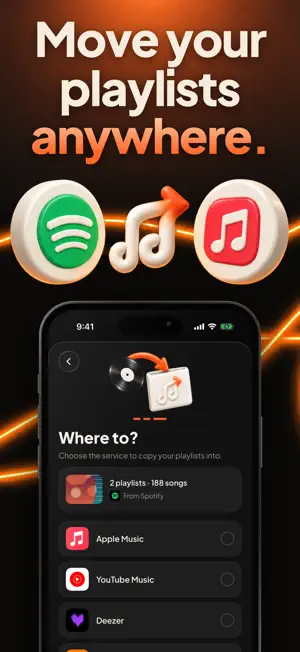

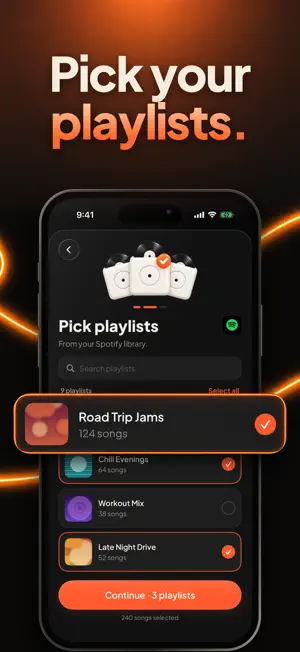

About Transfer Playlist for My Music
Switching from Spotify to Apple Music? Moving to YouTube Music after years somewhere else? Your playlists can come with you. Transfer Playlist copies your playlists from one music service to another. Pick where your music is now, pick where it should go, choose the playlists and start. The app looks up every song on the new service and rebuilds your playlists there, so you don't have to add them back one by one. Works with Spotify, Apple Music, YouTube Music, Deezer, SoundCloud, Amazon Music, Audiomack, Qobuz and Napster. HOW IT WORKS 1. Choose the service your playlists are on now. 2. Choose the service you're moving to. 3. Select the playlists you want. A few, or all of them. 4. Start the transfer. You can close the app; we'll let you know when it's done. When it's finished you'll see which songs were found and which weren't, so you can look up the missing ones yourself. YOUR MUSIC, IN NUMBERS Connect Spotify, Apple Music or YouTube Music to see your library from a new angle: your most played songs and artists, what you've been listening to lately, your saved albums and how many hours of music you've collected. GOOD TO KNOW - Big playlists take a few minutes. The transfer keeps going in the background. - Not every song exists on every service, so now and then a track won't be found. - Transfers need Transfer Playlist Pro. TRANSFER PLAYLIST PRO Pro is an auto-renewing subscription, billed weekly or yearly. Payment is charged to your Apple ID when you confirm the purchase. It renews automatically unless you turn it off at least 24 hours before the current period ends. You can manage or cancel it anytime in your App Store account settings. Questions or ideas? Write to us at [email protected] Terms of Use: https://transferplaylist.site/terms Privacy Policy: https://transferplaylist.site/privacy Apple's standard EULA: https://www.apple.com/legal/internet-services/itunes/dev/stdeula/
What’s new
Version 1.1 · Updated October 19, 2026
Your transfers are now easier to pick up where you left off, with a smoother start and a limited-time offer you won't miss. Also includes bug fixes and performance improvements.
App privacy
The developer, Emirhan Baskaya, reported these privacy practices to Apple.
Data Not Linked to You
The following data, which may be collected but is not linked to your identity, may be used for the following purposes:
- Identifiers: Device ID
- Diagnostics: Crash Data, Performance Data
Used for: Analytics, App Functionality
Alternatives to Transfer Playlist for My Music
Looking for apps like Transfer Playlist for My Music? Here are 6 similar apps on the App Store. The highest rated is Playlist Transfer – Music (5.0/5), and all 6 are free to download.
-
 Move Your Music - Song2Song
-
 Playlist Transfer – Music
5.0
Playlist Transfer – Music
5.0
-
 Playlist Transfer: TuneX Music
5.0
Playlist Transfer: TuneX Music
5.0
-
 Playlist Transfer - Easy Sync
3.0
Playlist Transfer - Easy Sync
3.0
-
 PlaylistPort:Playlist Transfer
4.3
PlaylistPort:Playlist Transfer
4.3
-
 playlist transfer-ClipTunes
1.0
playlist transfer-ClipTunes
1.0
| App | Rating | Price | Last updated | Compare |
|---|---|---|---|---|
| Transfer Playlist for My Music | – | Free | October 19, 2026 | |
| Move Your Music - Song2Song | – | Free | Jul 25, 2025 | Compare |
| Playlist Transfer – Music | 5.0 / 5 (4) | Free | Apr 1, 2026 | Compare |
| Playlist Transfer: TuneX Music | 5.0 / 5 (4) | Free | Aug 19, 2025 | Compare |
| Playlist Transfer - Easy Sync | 3.0 / 5 (2) | Free | Nov 25, 2024 | Compare |
| PlaylistPort:Playlist Transfer | 4.3 / 5 (21) | Free | Sep 25, 2026 | Compare |
| playlist transfer-ClipTunes | 1.0 / 5 (1) | Free | Oct 19, 2026 | Compare |