

Autocue Teleprompter for video
ARC FORM S.L Photo & Video iPhoneiPadiPod touch
Autocue Teleprompter for video is a free Photo & Video app for iPhone and iPad by ARC FORM S.L. Requires iOS 26.0. Updated October 17, 2026.
- Price
- Free
- on the App Store
- Size
- 15 MB
- Age 4+
- Updated
- Oct 17
- 2026 · v1.0.5
Screenshots

About Autocue Teleprompter for video
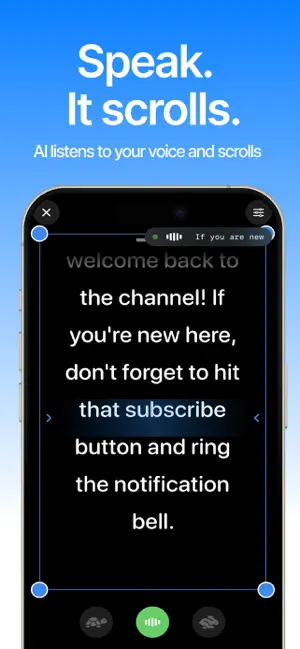
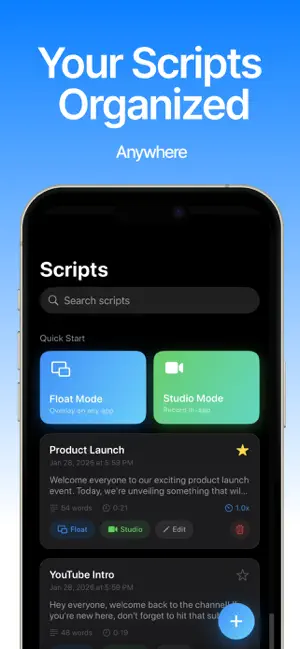
Stop Memorizing. Start Creating with Float. Tired of forgetting your lines? Sick of recording 50 takes just to get one minute of video? Float is the smart AI Teleprompter designed for the modern creator. Whether you are filming a TikTok, a YouTube Short, or a professional presentation, Float ensures you speak with confidence every time. THE MAGIC OF AI VOICE TRACKING Don’t let a scrolling screen dictate how fast you talk. Float’s advanced AI listens to your voice in real-time. Flow Mode: The text scrolls only when you speak. Auto-Pause: If you stop to breathe or emphasize a point, the script waits for you. Hands-Free: Stand back from the camera and be yourself—no remote or touching the screen required. PROFESSIONAL VIDEO RECORDING 4K Crystal Clear: Record in high resolution while reading your script. Eye-Contact Correction: The script is positioned perfectly near the camera lens, so your audience thinks you’re looking at them, not reading. Countdown Timer: Get ready and composed before the recording starts. EASY SCRIPT MANAGEMENT Instant Web Sync: Type your scripts on your laptop and they appear instantly in the app. Rich Text Editor: Highlight keywords, use bold for emphasis, and adjust font sizes for perfect readability. Import Anywhere: Copy and paste from Notes, Email, or PDFs. PERFECT FOR: Vloggers & Influencers: Create seamless Reels, TikToks, and Shorts. Business Pros: Nail your LinkedIn videos, Zoom presentations, and pitches. Educators: Record lectures and tutorials without missing a single point. Actors: The ultimate tool for recording self-tape auditions with perfect timing. FREE FEATURES: Unlimited script creation. Standard manual scrolling. High-quality video recording. FLOAT PRO (PREMIUM): Full AI Voice Tracking (The Scroller that Listens). No Watermarks on Video. 4K Recording & Pro Controls. Cloud Sync for Desktop Editing. Subs: Pro Lifetime: 39.99$ forever Pro Month: 2.99$ Mo Pro Yearly: 24.99$/y Terms and conditions: https://www.apple.com/legal/macapps/stdeula/
What’s new
Version 1.0.5 · Updated October 17, 2026
new paywall
App privacy
The developer, ARC FORM S.L, reported these privacy practices to Apple.
Data Not Collected
The developer does not collect any data from this app.
Alternatives to Autocue Teleprompter for video
Looking for apps like Autocue Teleprompter for video? Here are 6 similar apps on the App Store. The highest rated is Teleprompter AI & Video-Cue (5.0/5), and all 6 are free to download.
-
 Teleprompt: Video Teleprompter
-
 SpeechCue Voice Teleprompter
-
 Teleprompter AI & Video-Cue
5.0
Teleprompter AI & Video-Cue
5.0
-
 Teleprompt Overlay
1.0
Teleprompt Overlay
1.0
-
 PromptFy: Teleprompter & Video
5.0
PromptFy: Teleprompter & Video
5.0
-
 Autocue Teleprompter Video Cue
4.7
Autocue Teleprompter Video Cue
4.7
| App | Rating | Price | Last updated | Compare |
|---|---|---|---|---|
| Autocue Teleprompter for video | – | Free | October 17, 2026 | |
| Teleprompt: Video Teleprompter | – | Free | Dec 3, 2025 | Compare |
| SpeechCue Voice Teleprompter | – | Free | Oct 19, 2026 | Compare |
| Teleprompter AI & Video-Cue | 5.0 / 5 (5) | Free | Oct 23, 2026 | Compare |
| Teleprompt Overlay | 1.0 / 5 (1) | Free | Jul 7, 2026 | Compare |
| PromptFy: Teleprompter & Video | 5.0 / 5 (1) | Free | Oct 23, 2026 | Compare |
| Autocue Teleprompter Video Cue | 4.7 / 5 (19) | Free | May 31, 2026 | Compare |