

Magic Canvas: Kids Coloring
Ilyar Mnazhdin Education iPhoneiPadiPod touch
Magic Canvas: Kids Coloring is a free Education app for iPhone and iPad by Ilyar Mnazhdin. Rated 5.0/5 from 1 ratings. Requires iOS 18.
- Rating
- 5.0
- 1 ratings
- Price
- Free
- on the App Store
- Size
- 39 MB
- Age 4+
- Updated
- Oct 10
- 2026 · v1.6.0
Screenshots



About Magic Canvas: Kids Coloring
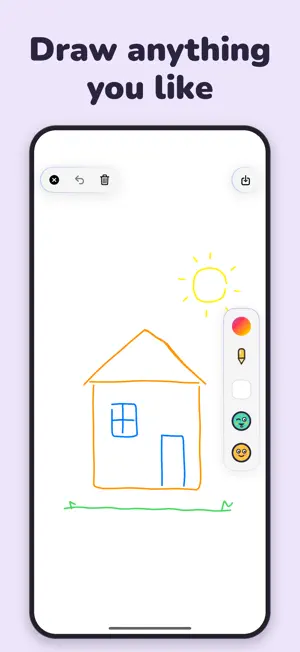
Color, draw, and mix colors with Magic Canvas: creative play for kids ages 3–8 on iPhone and iPad. No ads, no account, and no internet needed for drawing, coloring, or Color Lab. EASY COLORING FOR LITTLE HANDS • 180 coloring pages in 15 categories • Animals, nature, dinosaurs, ocean, space, princesses, vehicles, and more, plus playful Halloween pictures • Tap an area to fill it with color, then add emoji decorations • Celebrate finished pictures with confetti and automatic saving to the album DRAW YOUR OWN IDEAS • 6 drawing tools: pencil, chalk, brush, watercolor, marker, and calligraphy • Explore colors, shapes, backgrounds, and emoji decorations • Use the eraser and undo to keep experimenting • Keep favorite creations in a personal album on the device MIX YOUR OWN COLORS • Choose two colors in Color Lab or right on a coloring page • Use your new shade to fill a coloring page • Keep discovered shades in one color jar shared by Color Lab and coloring MADE FOR FAMILIES • Drawing, coloring, and color mixing work offline • No ads and no account required • Parental gates protect settings and purchases • Artwork is stored locally on the device • Available in 12 app languages, including English, Spanish, Brazilian Portuguese, and Arabic • Grown-ups can control drawing sounds and other sound effects separately in Settings FREE PLAY & OPTIONAL PREMIUM Start with free drawing, Color Lab, and a selection of free coloring pages. Magic Canvas Premium unlocks all coloring pages, all emoji decorations, and unlimited artwork saves. Monthly and yearly subscriptions are available; prices and any eligible trial are shown before purchase. Subscriptions renew automatically unless canceled. Manage or cancel them in your Apple account settings. Give your little artist space to color, explore, and create with Magic Canvas. Privacy Policy: https://www.notion.so/Privacy-Policy-2f9f5d4b1adb807bac25d88a482b951c Terms of Use: https://www.notion.so/Terms-of-Use-2f9f5d4b1adb80b5b174cf33a197e5ee
What’s new
Version 1.6.0 · Updated October 10, 2026
• Mix two colors right on a coloring page and use your new shade to fill it. • Choose colors and gradients from the new crayon palette. • Hear new sounds as you draw and explore. Each drawing tool has its own sound. • Grown-ups can switch drawing sounds and other sound effects on or off separately in Settings.
Alternatives to Magic Canvas: Kids Coloring
Looking for apps like Magic Canvas: Kids Coloring? Here are 6 similar apps on the App Store. The highest rated is Toddler Colors: Kids Coloring (5.0/5), and 5 of the 6 are free to download.
-
 Magic Draw: Kids Drawing Pad
4.0
Magic Draw: Kids Drawing Pad
4.0
-
 ClassNest
-
 Spelling Test - Spelli
-
 Toddler Colors: Kids Coloring
5.0
Toddler Colors: Kids Coloring
5.0
-
 Early Words for Baby +9 months
-
 Kid Canvas Art Studio
| App | Rating | Price | Last updated | Compare |
|---|---|---|---|---|
| Magic Canvas: Kids Coloring | 5.0 / 5 (1 rating) | Free | October 10, 2026 | |
| Magic Draw: Kids Drawing Pad | 4.0 / 5 (3) | Free | Oct 9, 2026 | Compare |
| ClassNest | – | Free | Sep 23, 2026 | Compare |
| Spelling Test - Spelli | – | Free | Sep 30, 2026 | Compare |
| Toddler Colors: Kids Coloring | 5.0 / 5 (1) | Free | Oct 23, 2026 | Compare |
| Early Words for Baby +9 months | – | 3.99 USD | Jun 26, 2026 | Compare |
| Kid Canvas Art Studio | – | Free | Oct 24, 2026 | Compare |