

YourPriority - Quit Doomscroll
MD Sabel Ahmad Tanjil Productivity iPhoneiPadiPod touch
YourPriority - Quit Doomscroll is a free Productivity app for iPhone and iPad by MD Sabel Ahmad Tanjil. Requires iOS 17.0. Updated October 20, 2026.
- Price
- Free
- on the App Store
- Size
- 10 MB
- Age 4+
- Updated
- Oct 20
- 2026 · v1.2.0
Screenshots

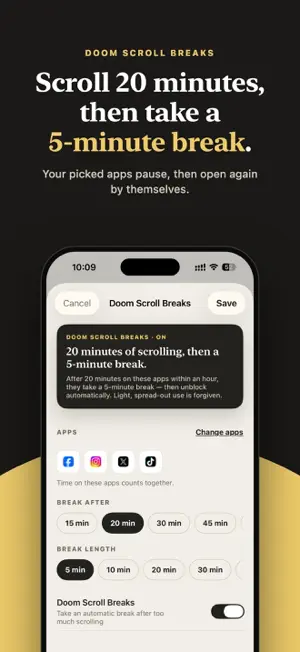


About YourPriority - Quit Doomscroll
Quit doomscrolling and spend your time on what matters to you. YourPriority pauses the apps you scroll too much and reminds you of your priorities instead. 2 HOURS A DAY IS 30 DAYS A YEAR Two hours of scrolling every day adds up to about 30 full days a year. YourPriority helps you take that time back for the things you really want to do. HOW IT WORKS 1. Pick the apps you scroll the most, like Instagram, TikTok or YouTube. 2. Set a break or a block. For example: after 20 minutes of scrolling, those apps pause for 10 minutes. 3. When you open a paused or blocked app, you see a reminder of your priorities, not the feed. DOOM SCROLL BREAKS After the minutes you choose, your picked apps pause for a short break. Then they open again by themselves. You can still use your phone. You just stop scrolling for a while. BLOCKS Block an app all day, at certain hours (like bedtime or work time), or after a daily limit. To remove a block, you wait 20 seconds first, so you have a moment to think. YOUR TOP PRIORITY Add your to-dos for the day. Your most important one sits at the top of the Today screen. Add steps, times, reminders and repeating to-dos. NOTES Write down ideas, lists and plans. Notes save as you type. ALSO • Morning and evening reminders to plan your day • See your screen time each week • Time = money: see what your scrolling costs, in your own currency ON MAC TOO Get the free Mac app at yourpriority.app. It blocks distracting websites in Safari, Chrome, Arc, Brave and Edge. PRIVATE BY DESIGN No account. No ads. No tracking. Your Screen Time data stays on your iPhone. WHY I MADE IT I'm Tanjil. I was spending 6 to 8 hours a day on my phone. Screen Time limits were easy to skip, and other apps only locked my apps. So I built an app that shows me what matters when I open a blocked app. FREE, WITH OPTIONAL PRO Blocks, Doom Scroll Breaks, to-dos and notes are free, with no limits. YourPriority Pro adds iCloud sync, so your to-dos and notes stay the same on your iPhone and Mac. Pro is an auto-renewing subscription, monthly or yearly. Payment is charged to your Apple ID when you confirm the purchase. The subscription renews automatically unless you turn it off at least 24 hours before the end of the current period. You can manage or cancel it in your App Store account settings. Terms of Use: https://yourpriority.app/terms Privacy Policy: https://yourpriority.app/privacy
What’s new
Version 1.2.0 · Updated October 20, 2026
A big update to help you quit doomscrolling on social media. • Blocks, Doom Scroll Breaks, to-dos and notes are now free, with no limits. • New: keep your to-dos and notes in sync between iPhone and Mac with iCloud. • YourPriority is now on Mac too. • Many fixes for blocking, reminders and repeating to-dos.
App privacy
The developer, MD Sabel Ahmad Tanjil, reported these privacy practices to Apple.
Data Not Linked to You
The following data, which may be collected but is not linked to your identity, may be used for the following purposes:
- Purchases: Purchase History
- Identifiers: User ID
Used for: App Functionality
Alternatives to YourPriority - Quit Doomscroll
Looking for apps like YourPriority - Quit Doomscroll? Here are 6 similar apps on the App Store. The highest rated is StoicLock: Focus & App Blocker (5.0/5), and all 6 are free to download.
-
 Habit Tracker & Widget – Almo
-
 Top3: Daily Focus & To-Do
-
 Urgent or Important - Matrix
-
 StoicLock: Focus & App Blocker
5.0
-
 Glade: Focus & Block Apps
-
 Be Like Ike
5.0
| App | Rating | Price | Last updated | Compare |
|---|---|---|---|---|
| YourPriority - Quit Doomscroll | – | Free | October 20, 2026 | |
| Habit Tracker & Widget – Almo | – | Free | Oct 24, 2026 | Compare |
| Top3: Daily Focus & To-Do | – | Free | Sep 19, 2026 | Compare |
| Urgent or Important - Matrix | – | Free | Sep 23, 2026 | Compare |
| StoicLock: Focus & App Blocker | 5.0 / 5 (2) | Free | May 24, 2026 | Compare |
| Glade: Focus & Block Apps | – | Free | May 15, 2026 | Compare |
| Be Like Ike | 5.0 / 5 (1) | Free | Aug 11, 2026 | Compare |