

NoCall: Spam Call Blocker
Byteguard Sociedad Limitada Utilities iPhoneiPadiPod touch
NoCall: Spam Call Blocker is a free Utilities app for iPhone and iPad by Byteguard Sociedad Limitada. Requires iOS 15.1. Updated October 13, 2026.
- Price
- Free
- on the App Store
- Size
- 69 MB
- Age 4+
- Updated
- Oct 13
- 2026 · v1.0.3
Screenshots

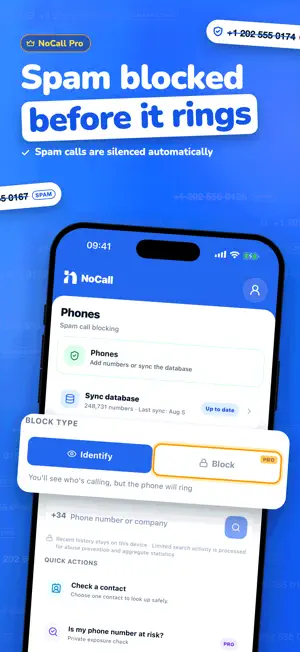

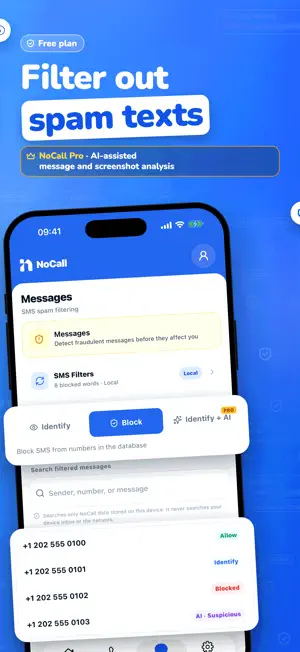
About NoCall: Spam Call Blocker
Block spam calls, identify reported numbers, and check who is calling before you answer. CALL PROTECTION • Identify known spam and reported callers with the NoCall database. • With NoCall Pro, automatically block numbers matched by your synced spam database. • Search Spanish and international phone numbers or companies. • Related numbers with prefix … help you explore nearby number patterns. • Report suspicious calls to help protect the NoCall community. SMS PROTECTION ON IPHONE • Before NoCall can move suspicious messages to spam, you need to enable the SMS extension in the system settings. • Search only messages already stored by NoCall on this device. • Run Pro SMS analysis only when you choose; NoCall never reads your inbox automatically. PRIVACY BY DESIGN Recent history stays on your device. Limited search activity is processed for abuse prevention and aggregate statistics. Enable the SMS filter on iPhone: • Before NoCall can move suspicious messages to spam, you need to enable the SMS extension in the system settings. • The other person must accept first. Alerts say only call or SMS; NoCall never shares a number, sender, or message content. • iPhone system limits prevent automatic per-call events. The SMS extension can queue content-free suspicious-message events for the app to deliver later; no sender or message content is shared. • Related numbers with prefix … NoCall Pro: One-time purchase. Payment is charged to your Apple account. Permanent access, no renewals. Only when you press the button, the sender and message are sent securely for remote analysis. No inbox access or automatic action. Only the screenshot you choose is sent for this analysis, and NoCall does not store it.
What’s new
Version 1.0.3 · Updated October 13, 2026
What's new: • SMS filters with NoCall Pro: phone numbers only, email senders, short senders, links, emojis or every unknown sender. • Trusted countries and blocked languages for your texts. • Your country's NoCall Base: texts with known scam words go to Junk, on the free plan too. • Test a message: check what your filter would do with any text. • Export and import your filters. • Design improvements and fixes.
App privacy
The developer, Byteguard Sociedad Limitada, reported these privacy practices to Apple.
Data Used to Track You
The following data may be used to track you across apps and websites owned by other companies:
- Identifiers: Device ID
- Usage Data: Advertising Data
Data Not Linked to You
The following data, which may be collected but is not linked to your identity, may be used for the following purposes:
- Identifiers: Device ID
- Usage Data: Advertising Data, Product Interaction
- Diagnostics: Crash Data, Performance Data
Used for: Third-Party Advertising, Analytics, App Functionality
Alternatives to NoCall: Spam Call Blocker
Looking for apps like NoCall: Spam Call Blocker? Here are 6 similar apps on the App Store. The highest rated is 威猛VPN (5.0/5), and 5 of the 6 are free to download.
-
 Aureum
-
 Identa: documenti e tessere
-
 Bloqueados
-
 威猛VPN
5.0
威猛VPN
5.0
-
 Kloky - Widgets & Alarms
5.0
Kloky - Widgets & Alarms
5.0
-
 NoCall - 隐私来电拦截与短信过滤
2.0
NoCall - 隐私来电拦截与短信过滤
2.0
| App | Rating | Price | Last updated | Compare |
|---|---|---|---|---|
| NoCall: Spam Call Blocker | – | Free | October 13, 2026 | |
| Aureum | – | Free | Jun 9, 2026 | Compare |
| Identa: documenti e tessere | – | Free | Jun 9, 2026 | Compare |
| Bloqueados | – | Free | Jan 21, 2026 | Compare |
| 威猛VPN | 5.0 / 5 (3) | Free | Oct 1, 2026 | Compare |
| Kloky - Widgets & Alarms | 5.0 / 5 (1) | Free | Oct 18, 2026 | Compare |
| NoCall - 隐私来电拦截与短信过滤 | 2.0 / 5 (1) | 0.99 USD | Oct 3, 2026 | Compare |