

SplitRight - Split Expenses
Binaryscript Private Limited Productivity iPhoneiPadiPod touch
SplitRight - Split Expenses is a free Productivity app for iPhone and iPad by Binaryscript Private Limited. Requires iOS 15.0. Updated October 18, 2026.
- Price
- Free
- on the App Store
- Size
- 37 MB
- Age 4+
- Updated
- Oct 18
- 2026 · v1.04
Screenshots



About SplitRight - Split Expenses
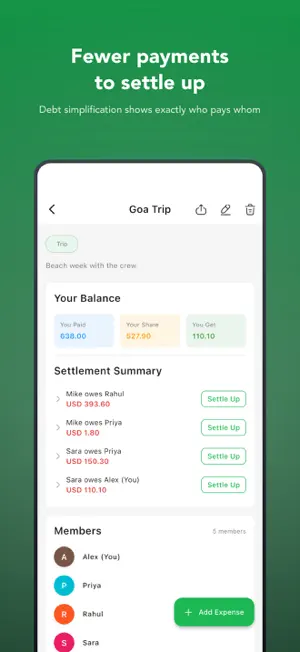
SplitRight ends the awkward "who owes what" conversations. Add the people you share costs with, log each expense as it happens, and SplitRight works out every balance for you: on trips, in a shared home, at dinner and everywhere in between. HOW IT WORKS - Create a group and add its members - Log an expense: amount, date, category, who paid and who shares it - Balances update as soon as you save - No group needed for a one-off: split an expense directly with one person FOUR WAYS TO SPLIT - Equally: everyone pays the same - By percentage: set each person's percent - By exact amounts: enter what each person owes - By shares: 2 shares pay twice as much as 1 - One payer or several for the same expense - Add an optional note to any expense GROUPS AND CATEGORIES - Group types for Trip, Home, Couple, Friends, Work and Other - 10 expense categories: Food & Drinks, Shopping, Transportation, Entertainment, Utilities, Rent, Travel, Healthcare, Education and Other WHO OWES WHOM - Your overall balance at a glance: what you owe and what you are owed - Balances per group and per person - Debt simplification turns a group's IOUs into a short list of who pays whom - Send a friendly reminder of what's owed by WhatsApp, SMS or email - Settle up: record a payment in full or in part, and every balance updates CONTACTS - Add friends and family by hand, or import them from your phone's contacts - See your balance with each person across every group - Imported contacts are saved in the app on your device, never uploaded EXPORT AND SHARE - CSV export for any spreadsheet - PDF report with totals and a spending-by-category pie chart - Filter by group, by person or by date range - Share the file straight from the app OFFLINE AND PRIVATE - Add expenses and check balances with no internet connection - No account and no sign-up - Your expenses, groups and contacts are stored on your device - No ads YOUR LANGUAGE, YOUR CURRENCY 19 languages: English, Arabic, Bengali, French, German, Gujarati, Hindi, Indonesian, Italian, Japanese, Korean, Marathi, Portuguese, Spanish, Tamil, Telugu, Thai, Turkish and Vietnamese. 30 currencies, including USD, EUR, GBP, INR, JPY, AUD, CAD, AED and SGD, each shown in its local format. MADE FOR Friends splitting dinner, roommates sharing rent and bills, couples, travel groups and colleagues: anyone who shares costs. FREE AND PREMIUM Free: up to 2 groups, with every feature above. Premium: unlimited groups. Choose a monthly or yearly subscription, or a one-time lifetime purchase. Payment is charged to your Apple ID at confirmation of purchase. A subscription renews automatically unless it is turned off at least 24 hours before the end of the current period, and your account is charged for the renewal within 24 hours before that period ends. Manage or cancel a subscription in your Apple ID account settings after purchase. The lifetime purchase is a one-time payment and does not renew. SUPPORT Questions or ideas: [email protected] LEGAL Privacy Policy: https://binaryscript.com/splitright/privacy-policy/ Terms of Use: https://binaryscript.com/splitright/terms/ SplitRight is built by BinaryScript. Download it and keep every shared cost fair and simple.
What’s new
Version 1.04 · Updated October 18, 2026
Fixes a crash when opening the app on iOS 27.
App privacy
The developer, Binaryscript Private Limited, reported these privacy practices to Apple.
Data Not Linked to You
The following data, which may be collected but is not linked to your identity, may be used for the following purposes:
- Identifiers: Device ID
- Usage Data: Product Interaction
- Diagnostics: Crash Data
Used for: Analytics, App Functionality
Alternatives to SplitRight - Split Expenses
Looking for apps like SplitRight - Split Expenses? Here are 6 similar apps on the App Store. The highest rated is Carry: To-Do List (5.0/5), and all 6 are free to download.
-
 BrontoAI
-
 Carry: To-Do List
5.0
Carry: To-Do List
5.0
-
 Critical Digital Service
-
 Punch time clock : Hourly
4.7
Punch time clock : Hourly
4.7
-
 Expertise Internationale
-
 Amory HR
| App | Rating | Price | Last updated | Compare |
|---|---|---|---|---|
| SplitRight - Split Expenses | – | Free | October 18, 2026 | |
| BrontoAI | – | Free | Mar 2, 2026 | Compare |
| Carry: To-Do List | 5.0 / 5 (1) | Free | Sep 4, 2026 | Compare |
| Critical Digital Service | – | Free | Feb 22, 2024 | Compare |
| Punch time clock : Hourly | 4.7 / 5 (3) | Free | Apr 17, 2026 | Compare |
| Expertise Internationale | – | Free | Jul 16, 2026 | Compare |
| Amory HR | – | Free | Oct 19, 2026 | Compare |