

DashSave - Saving Goal Tracker
Wei Yu Finance iPhoneiPadiPod touch
DashSave - Saving Goal Tracker is a free Finance app for iPhone and iPad by Wei Yu. Requires iOS 15.6. Updated September 17, 2026.
- Price
- Free
- on the App Store
- Size
- 40 MB
- Age 4+
- Updated
- Sep 17
- 2026 · v2.0.0
Screenshots
About DashSave - Saving Goal Tracker
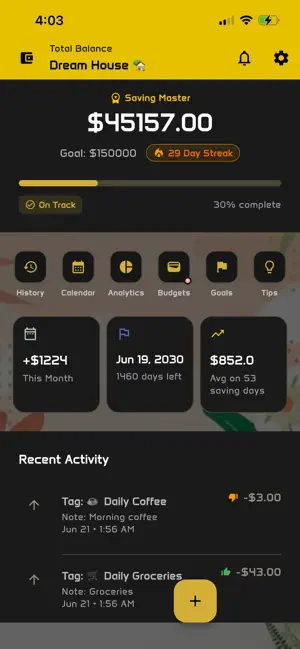
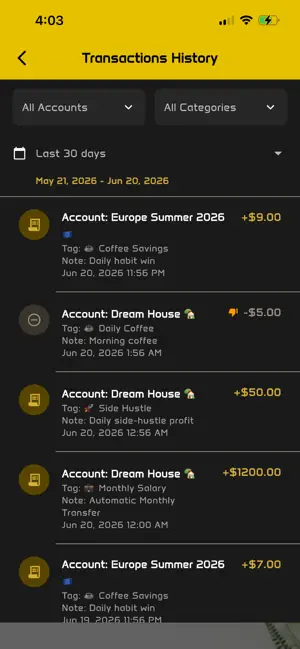
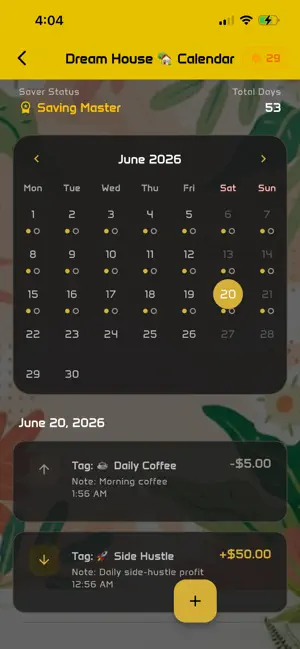
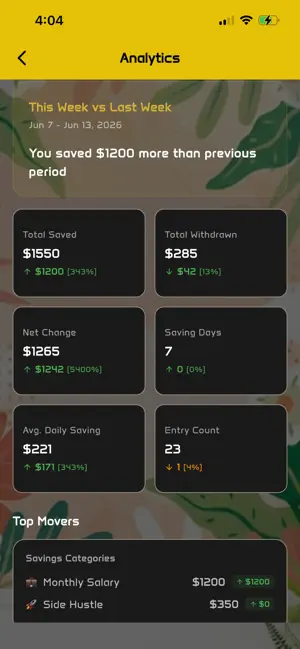
DashSave — Simple Savings Goal Tracker https://dashsave.lchteam.com/gallery.html Master Your Goals DashSave doesn’t just track your balance; it manages your progress. * Target-Driven: Set exactly how much you want to save and by when. * Account Health: The app acts as a financial coach. It compares your current savings to your timeline and tells you if you are "On Track," "Ahead," or "Behind" by a specific dollar amount. * Smart Insights: Get a daily breakdown showing your "Daily Target" (how much you need to save every day to hit your goal) and "Days Remaining." Automation & Recurring Rules Building a habit is hard, so DashSave makes it automatic. * Custom Schedules: Set up rules to save daily, weekly, bi-weekly, monthly, or even on specific days (like every Tuesday and Thursday). * Two Ways to Save: * Auto-Create: The app logs the transaction for you automatically on the scheduled day. * Notify Only: Get a friendly nudge to manually move your money and log the entry. * History Tracking: See exactly when your next "auto-save" is coming up so you’re never caught off guard. The Savings Calendar & Streaks Visualize your consistency and turn saving into a daily win. * Visual History: An interactive calendar highlights every day you’ve made a deposit. It’s a "Wall of Wins" that encourages you not to "break the chain." * Saving Streaks: Much like a fitness app, DashSave tracks how many days in a row you’ve saved. * Saver Status: Earn titles as you grow! Start as a "Saver Apprentice" and work your way up to "Elite Wealth Builder" based on your activity. Powerful Analytics Understand how you save and where you can improve. * Category Breakdown: Use tags (like "Salary," "Side Hustle," or "Coffee Savings") to see where your money comes from and where it goes via interactive pie charts. * Spending Review: A unique feature that lets you mark entries as "Necessary" or "Unnecessary." This helps you identify small, wasteful habits that could be redirected into your big goals. * History Charts: View your growth over time with bar charts that show your weekly or monthly progress. The "Luxe" Experience DashSave is arguably the most beautiful savings tracker on the market. * Premium Themes: Choose from 6+ stunning looks, including: Security & Extras * Private & Local: Your financial data stays on your device. DashSave doesn't require you to link your actual bank account, keeping your sensitive info safe. * Excel Export: Want to see your data on a big screen? Export your entire savings history to an Excel file with one tap. * Education Hub: Read built-in articles and tips on how to save faster, invest wisely, and cut unnecessary costs. * Multi-Language: Fully localized in English, Spanish, German, French, Japanese, and Chinese. DashSave is a lightweight savings tracker designed to help you stay focused on one thing: reaching your savings goals. Unlike complex budgeting apps, DashSave does not track expenses or link to your bank accounts. Instead, it keeps saving simple and intentional. You create a savings goal, add savings entries over time, and clearly see your progress toward your target. Whether you are saving for a short-term purchase or building a long-term habit, DashSave helps you stay motivated and consistent. How DashSave Works • Create a savings goal with a target amount • Add savings manually whenever you set money aside • Track your progress with clear and simple visuals • Stay focused without unnecessary features or distractions Terms of Use https://www.apple.com/legal/internet-services/itunes/dev/stdeula/
What’s new
Version 2.0.0 · Updated September 17, 2026
Support Monthly Subscription User Experience Improvements
App privacy
The developer, Wei Yu, reported these privacy practices to Apple.
Data Used to Track You
The following data may be used to track you across apps and websites owned by other companies:
- Identifiers: Device ID
- Usage Data: Advertising Data
Data Not Linked to You
The following data, which may be collected but is not linked to your identity, may be used for the following purposes:
- Identifiers: Device ID
- Usage Data: Advertising Data
Used for: Third-Party Advertising
Alternatives to DashSave - Saving Goal Tracker
Looking for apps like DashSave - Saving Goal Tracker? Here are 6 similar apps on the App Store. The highest rated is Money Saving App: SaveSmart (5.0/5), and all 6 are free to download.
-
 轻感存钱-365天攒钱计划与打卡挑战
-
 Gestion d’épargne: Peeksou
-
 Stashly: Savings Goals
-
 Savings goal - Budget Planner
-
 Money Saving App: SaveSmart
5.0
Money Saving App: SaveSmart
5.0
-
 拼图存钱罐- 365天攒钱计划存钱打卡
| App | Rating | Price | Last updated | Compare |
|---|---|---|---|---|
| DashSave - Saving Goal Tracker | – | Free | September 17, 2026 | |
| 轻感存钱-365天攒钱计划与打卡挑战 | – | Free | Jul 27, 2026 | Compare |
| Gestion d’épargne: Peeksou | – | Free | Sep 27, 2026 | Compare |
| Stashly: Savings Goals | – | Free | Aug 7, 2026 | Compare |
| Savings goal - Budget Planner | – | Free | Aug 2, 2026 | Compare |
| Money Saving App: SaveSmart | 5.0 / 5 (4) | Free | Aug 26, 2026 | Compare |
| 拼图存钱罐- 365天攒钱计划存钱打卡 | – | Free | Sep 17, 2026 | Compare |