

My Files:File Manager&Browser
AURORA PROMISE GLOBAL TRADING LIMITED Productivity iPhoneiPadiPod touch
My Files:File Manager&Browser is a free Productivity app for iPhone and iPad by AURORA PROMISE GLOBAL TRADING LIMITED. Requires iOS 16.0.
- Price
- Free
- on the App Store
- Size
- 4 MB
- Age 4+
- Updated
- Mar 22
- 2026 · v1.0.0
Screenshots
About My Files:File Manager&Browser
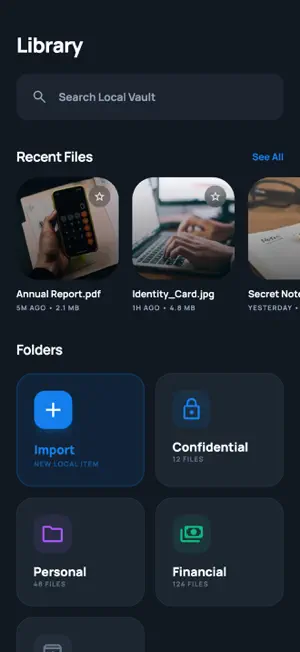
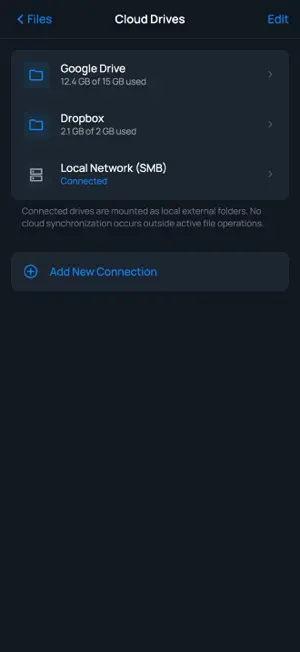
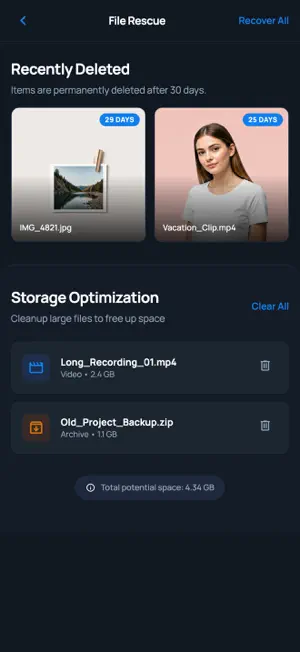
【My Files】My Files is a secure, privacy-focused document manager designed to help you organize, protect, and work with your files directly on your device. Key Features: On-Device OCR Extract text from images and scanned documents without sending data to external servers. All text recognition is processed locally on your device, keeping your content private. Private Vault Store sensitive documents in a protected vault with an additional layer of security. Access your confidential files only when you need them, with peace of mind that they remain safe. File Organization Manage your documents in a clean, intuitive interface. Browse, sort, and search through your files with ease, keeping everything accessible and well-structured. Utility Tools Access a set of built-in tools to handle everyday document tasks such as file conversion, compression, and sharing — all within a single app. Privacy-First Design Your files stay on your device. My Files is built with privacy at its core, minimizing data exposure and ensuring your personal documents remain under your control. My Files brings together essential document management, security, and utility features in one straightforward app — helping you stay organized while keeping your data private. Premium Account Pricing and Terms $ 4.99/week* $ 39.99/year* *Prices shown are in U.S. dollars; actual charges may be converted to your local currency. Payment will be charged to your iTunes account at confirmation of purchase. Subscriptions automatically renew unless auto-renewal is turned off at least 24 hours before the end of the current period. Your account will be charged for renewal within 24 hours prior to the end of the current period, and the renewal cost will be provided. Subscriptions can be managed by the user. Turning off auto-renewal may be done by going to your account settings after purchase. Cancellation of the current subscription is not allowed during the active subscription period. Any unused portion of a free trial period, if offered, will be forfeited when the user purchases a subscription to that publication. EULA: https://www.apple.com/legal/internet-services/itunes/dev/stdeula/ Privacy Policy: https://weylianliu.xyz/wodewenjian/privacy.html
App privacy
The developer, AURORA PROMISE GLOBAL TRADING LIMITED, reported these privacy practices to Apple.
Data Not Collected
The developer does not collect any data from this app.
Alternatives to My Files:File Manager&Browser
Looking for apps like My Files:File Manager&Browser? Here are 6 similar apps on the App Store. The highest rated is CelioAI (5.0/5), and all 6 are free to download.
-
 Foldered: File Manager
4.4
Foldered: File Manager
4.4
-
 SaveNShare
-
 AI Compress - Photo & Video
-
 SurfBreeze
4.7
SurfBreeze
4.7
-
 Enterprise Browser APP
-
 CelioAI
5.0
CelioAI
5.0
| App | Rating | Price | Last updated | Compare |
|---|---|---|---|---|
| My Files:File Manager&Browser | – | Free | March 22, 2026 | |
| Foldered: File Manager | 4.4 / 5 (7) | Free | Jul 22, 2026 | Compare |
| SaveNShare | – | Free | Sep 3, 2026 | Compare |
| AI Compress - Photo & Video | – | Free | May 14, 2026 | Compare |
| SurfBreeze | 4.7 / 5 (3) | Free | Dec 18, 2023 | Compare |
| Enterprise Browser APP | – | Free | Sep 17, 2026 | Compare |
| CelioAI | 5.0 / 5 (2) | Free | Oct 24, 2026 | Compare |