

Ultimate Piper
Mixolydian Limited Music iPhoneiPadiPod touchMacApple Watch
Ultimate Piper is a free Music app for iPhone and iPad by Mixolydian Limited. Rated 4.0/5 from 1 ratings. Requires iOS 26.0. Updated October 30, 2026.
- Rating
- 4.0
- 1 ratings
- Price
- Free
- on the App Store
- Size
- 216 MB
- Age 4+
- Updated
- Oct 30
- 2026 · v4.0.1
Screenshots


About Ultimate Piper
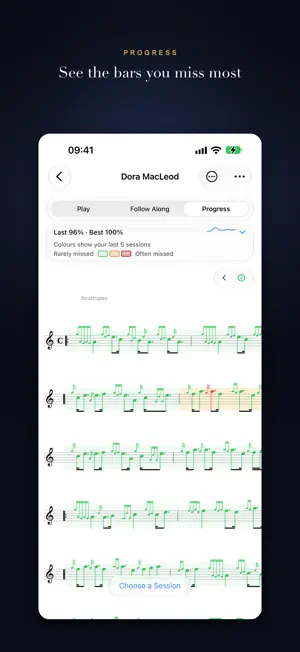
Ultimate Piper is the complete music app for bagpipers – whether you're learning on a practice chanter or performing with a full pipe band. SCAN ANY SCORE Point your camera at a printed bagpipe score – or import a PDF or photo – and Ultimate Piper reads it into a playable tune, all on-device: in seconds for a typical tune, a little longer for a long or busy one. Several pages scan in one go, and braced harmony comes in as harmony parts. SEE THE BARS YOU MISS MOST Progress shades every bar of a tune by how your last five runs went, from green for the bars you play solidly to red for the ones you miss. Most Missed Bars lists them; tap one to select it for the Practice Loop. Say yes to recording your runs and you can listen back to any of them. PLAY ALONG Follow Along hears your playing through the microphone or a MIDI chanter and scrolls the score, lighting each note as you play it. Runs on the pipes are scored like runs on the chanter, gracenotes included, against your chanter's tuning on the day. Connect a Blair Digital Chanter or Fagerström Technopipes for precise detection. Turn your iPhone sideways and the score fills the screen. PRACTICE Mark the tunes you're working on as Focus and they join every session, longest-neglected first, with a Tune of the Week and warm-ups from tunes you know. A calendar and streak show your practice; log band practice too. Rate every tune from Want to Learn to Mastered. Loop any bars and let Auto + raise the tempo each time round. COMPOSE & EDIT Complete scores for light music and piobaireachd, with reactive grace notes and an embellishment wheel – doublings, grips, taorluaths and more. Mixed-value triplets play as written. Select notes to raise, lower, lengthen or copy them into another tune. Add rests, 1st/2nd time bars, harmonies, notes on the score, and tempo changes that speed up or slow down across a run of bars. LISTEN & SHARE AUDIO Hear any tune on realistic chanter or pipes – or record your own instrument and hear every tune on it – with each idiom's own timing, from strathspey snap to piobaireachd's held close. Render a tune or set, with harmonies and drones, to an audio file to send to a pupil or bandmate. TUNE UP The tuner hears bass, tenors and chanter at once, with a beat meter for the tenors and drones tuned to your chanter, not a number, on Apple Watch too. A guided tune-up takes the tenors one at a time. Four tuning schemes. Blowing mode scores your bag's steadiness out of 100. METRONOME Pipe band side, bass and tenor drums, tuned to your Low A, with accents, subdivisions and tap tempo. Also on Apple Watch, with haptic taps. JUST ASK SIRI "Tune my pipes in Ultimate Piper." "Start the metronome at 84 in Ultimate Piper." "Play Scotland the Brave in Ultimate Piper." Your library is in Spotlight, and every command is a Shortcut. HISTORY, SHARING & LIBRARY Every save is kept as a version, with colour-coded diffs; compare two tunes note by note and merge them. Export to PDF, send .pipescore to the PipeScore web editor, or share folders that keep your band on the latest music, choosing who can edit. Import BWW and PipeScore files into nested folders, and search by title, composer, genre or time signature. FOR EVERY PIPER VoiceOver reaches every note in the editor and tells you where playback is. Resize the score without a pinch. Works on iPhone, iPad, Mac and Apple Watch. Ready for iPhone Duo. SUBSCRIPTION INFORMATION Ultimate Piper Premium is a monthly or yearly auto-renewable subscription with a 7-day free trial, and Family Sharing lets up to five family members use it. After the trial, payment is charged to your Apple ID account and recurs each billing period; it renews automatically unless cancelled at least 24 hours before the period ends. Manage or cancel subscriptions in your Account Settings. Privacy Policy: https://ultimatepiper.com/privacy.html Terms of Use (EULA): https://www.apple.com/legal/internet-services/itunes/dev/stdeula/
What’s new
Version 4.0.1 · Updated October 30, 2026
Ultimate Piper 4.0.1 — see the bars you miss most PROGRESS Progress is a third way to look at a tune, beside Play and Follow Along: a heat map of your runs, pale green for the bars you play solidly, yellow to red for the ones you miss most, each note coloured by how it usually goes. Tap the chart for your accuracy over time and Most Missed Bars, then tap a bar to loop it with Follow Along. After each run you see how it stands against your best. RECORD YOUR RUNS The first time you start Follow Along you're asked whether to record your runs. Say yes and they're kept for Progress and listening back. Recording starts with your first note and stops after 30 seconds without one; change it with Record Every Session in Settings. HEARING MORE OF WHAT YOU PLAY Runs on the pipes are scored like runs on the practice chanter, gracenotes included. Gracenotes are judged against your chanter's tuning on the day, with Low A looked for near where you calibrated it, so a chanter that drifts a little no longer has most of its gracenotes marked missed. Every sample from the microphone is analysed: Low A and Low G strikes between repeated notes, High G flicks between High As, the flick that closes a doubling and three Low As parted only by their gracenotes are all heard. After a run the app listens back to the whole recording, so a tune you played well is still marked if the live tracker lost its place. MIDI CHANTER Follow Along on a MIDI chanter stays with you through a repeated phrase instead of jumping ahead to its next appearance, and the open-fingered high A stops sounding two seconds after you take your hands off. PRACTICE Mark the tunes you're working on as Focus and they're added to every session, the longest-unplayed first. Weekly Focus becomes Tune of the Week. A calendar and streak top Practice Insights. Follow Along runs count as practice. Log a band practice after it happens and keep notes on each tune. The Practice Loop opens smaller, remembers your zoom, pauses beside Stop and has its own Metronome button. Tap a note to move the Follow Along cursor there. A month practised every day gets fireworks. SPEED UP AND SLOW DOWN In the editor, Add Tempo Change in the Tools menu marks a run of bars accel. or rit., with a dashed line to the new tempo, and playback follows it. PIPESCORE A tune exported for PipeScore opens there again, with embellishments PipeScore lacks written out as the gracenotes they play. ICLOUD Change a tune on two devices and both changes are kept; if both change the same thing, you choose. Offline, pull to refresh ends at once and your changes are sent when the network returns. A tune not yet on this device opens in half the time. Runs on a shared tune reach iCloud, and a shared folder arriving in parts goes back for the rest. ALSO Braced melody and harmony pages scan in as one tune with its harmonies. The embellishment wheel opens centred on its note. Type a letter to move a selected note or gracenote to that pitch. A tie can cross a line break. The user guide, ultimatepiper.com/guide, is in Settings ▸ About. Fit Score to Page Width also shrinks a score slightly too wide. FIXED A daily practice reminder keeps its time when the clocks change. Progress colours reach the barline where a time signature changes. Double-tapping a note never adds a gracenote that clashes with it. The metronome's taps are felt again with an Apple Watch nearby. A folder shared from an iPhone or iPad shows as shared at once. Clear Cache no longer empties the library, a network blip no longer takes an edited tune out of its shared folder, and a slow iCloud no longer leaves the library stuck loading. Harmonies stay in time with the melody right through a march. A Progress replay stops when you leave the tune. Closing a Practice Loop in Follow Along goes back to listening. Progress opens on your Follow Along instrument. Practice History names runs on shared tunes. Empty Trash and Delete Instrument ask first.
App privacy
The developer, Mixolydian Limited, reported these privacy practices to Apple.
Data Not Collected
The developer does not collect any data from this app.
Alternatives to Ultimate Piper
Looking for apps like Ultimate Piper? Here are 6 similar apps on the App Store. The highest rated is pipeband.net (5.0/5), and 4 of the 6 are free to download.
-
 Bagpipe Tutorial - Bagpipes
4.2
-
 Air Pipes
4.9
-
 pipeband.net
5.0
-
 PolyNome Pro: Drum Sequencer
4.8
-
 Ultimate Tuner Pro
-
 Metronome Watch - BPM Counter
1.0
| App | Rating | Price | Last updated | Compare |
|---|---|---|---|---|
| Ultimate Piper | 4.0 / 5 (1 rating) | Free | October 30, 2026 | |
| Bagpipe Tutorial - Bagpipes | 4.3 / 5 (8) | Free | Oct 30, 2026 | Compare |
| Air Pipes | 4.9 / 5 (14) | Free | Aug 11, 2026 | Compare |
| pipeband.net | 5.0 / 5 (2) | Free | Oct 24, 2026 | Compare |
| PolyNome Pro: Drum Sequencer | 4.8 / 5 (329) | 59.99 USD | Oct 22, 2026 | Compare |
| Ultimate Tuner Pro | – | Free | Oct 20, 2026 | Compare |
| Metronome Watch - BPM Counter | 1.0 / 5 (1) | 2.99 USD | Nov 3, 2026 | Compare |
Compare Ultimate Piper with the top alternatives: ratings, updates, ASO score and keyword gaps →