

Introra - AI Biz Card Scanner
Hsin Chuan Huang Business iPhoneiPadiPod touch
Introra - AI Biz Card Scanner is a free Business app for iPhone and iPad by Hsin Chuan Huang. Requires iOS 16.0. Updated April 1, 2026.
- Price
- Free
- on the App Store
- Size
- 135 MB
- Age 4+
- Updated
- Apr 1
- 2026 · v1.0.13
Screenshots


About Introra - AI Biz Card Scanner
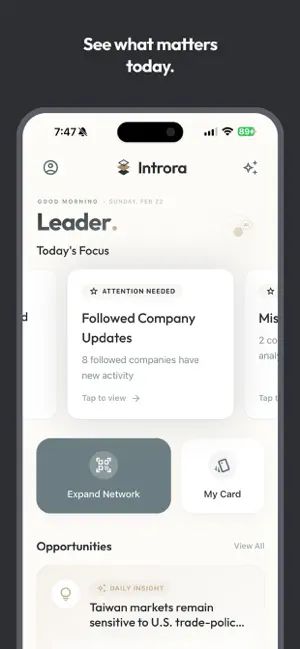
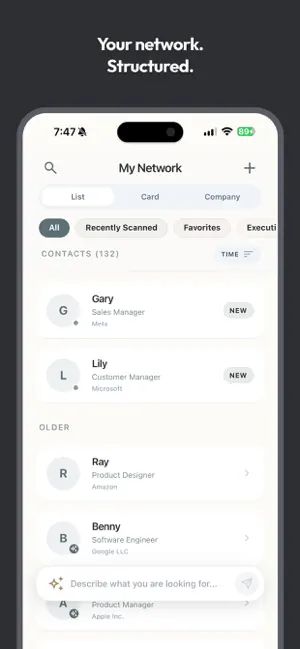
Introra – AI Business Advisor Most business card apps turn your contacts into a digital drawer. Introra turns them into decisions. Introra is an AI business advisor that only works within one boundary: the people you already know. No public noise. No scraped data. No strangers pretending to be experts. Just your network—finally useful. -------- Why Introra is different Traditional AI tools know everything—and help with nothing. Introra is built on a simple idea: The best advice often already exists inside your own network. Introra helps you surface it. -------- What Introra does Scan and structure your network • High-accuracy on-device OCR and entity recognition • No cloud upload required for card recognition • Your data stays private and under your control Understand companies instantly • Automatic industry tagging (Company Sketch) • AI-generated company summaries • Weekly company updates and key movements Discover real opportunities • Daily market insights tailored to your network’s industries • Each insight points to one relevant person you should talk to—and why Ask better questions • An AI advisor that searches your own contacts • Ask who to talk to, when, and for what reason • Clear recommendations with transparent logic -------- Built for trust and focus • No ads • No social feed • No engagement tricks Introra is not a CRM. It’s not a directory. It’s not another generic AI chatbot. It’s your AI, thinking inside your network. -------- Subscription options Free • No ads, unlimited scans (manage up to 100 cards) • Batch scanning, auto-merge, custom fields & relations • 1 Daily Market Opportunity & Insight • 1 Daily AI Advisor Question (Person insights) • AI-powered Import (CSV, Excel, Numbers) Pro • Everything in Free • Unlimited card management • Unlock 50 AI Deep Analysis per month • Unlimited AI Advisor Questions • Unlock All Daily Market Opportunities • Cloud Encrypted Backup • Export to Excel -------- Turn business cards into decisions. Introra helps you talk to the right person, at the right time, for the right reason. Privacy Policy: https://www.introra.ai/privacy Terms of Service: https://www.introra.ai/terms
What’s new
Version 1.0.13 · Updated April 1, 2026
• Judicial Risk Scanner: Integrated public litigation records with a 30-day smart cache to safeguard your business networking. • AI Search Upgrade: Drastically improved the semantic precision of AI-driven contact and company searches. • Experience Tweaks: Enhanced cross-page search consistency and multilingual keyword routing.
App privacy
The developer, Hsin Chuan Huang, reported these privacy practices to Apple.
Data Linked to You
The following data, which may be collected and linked to your identity, may be used for the following purposes:
- Purchases: Purchase History
- Identifiers: User ID
Used for: App Functionality
Data Not Linked to You
The following data, which may be collected but is not linked to your identity, may be used for the following purposes:
- Contact Info: Physical Address, Email Address, Name, Phone Number, Other User Contact Info
- User Content: Emails or Text Messages, Photos or Videos
Used for: App Functionality
Alternatives to Introra - AI Biz Card Scanner
Looking for apps like Introra - AI Biz Card Scanner? Here are 6 similar apps on the App Store.
-
 Splash - 水花分帳
-
 Halo: AI Business Card Scanner
-
 ReMeet
-
 AI 名片人脈王
-
 Jobmark:Business card library
-
 報帳小幫手ExpenseMate
| App | Rating | Price | Last updated | Compare |
|---|---|---|---|---|
| Introra - AI Biz Card Scanner | – | Free | April 1, 2026 | |
| Splash - 水花分帳 | – | Free | Jul 10, 2026 | Compare |
| Halo: AI Business Card Scanner | – | Free | Oct 13, 2026 | Compare |
| ReMeet | – | Free | Feb 13, 2026 | Compare |
| AI 名片人脈王 | – | Free | Jan 29, 2026 | Compare |
| Jobmark:Business card library | – | Free | Apr 4, 2026 | Compare |
| 報帳小幫手ExpenseMate | – | Free | Jul 18, 2026 | Compare |