

CommandKit: SSH Terminal & AI
Piotr Ozog Developer Tools iPhoneiPadiPod touch
CommandKit: SSH Terminal & AI is a paid Developer Tools app for iPhone and iPad by Piotr Ozog. Requires iOS 18.0. Updated June 26, 2026.
- Price
- 2.99 USD
- on the App Store
- Size
- 16 MB
- Age 4+
- Updated
- Jun 26
- 2026 · v1.2.0
Screenshots


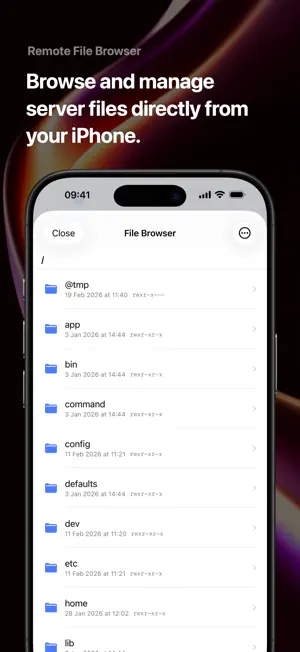

About CommandKit: SSH Terminal & AI
CommandKit turns your iPhone and iPad into a full SSH terminal, server dashboard, and AI command assistant — private by design, with no traffic routed through anyone else's cloud. Unlike clients that sync your servers through a vendor cloud, CommandKit connects you straight to your machines. Your keys and credentials never leave your device. — WHY COMMANDKIT — • A real terminal, not a viewer — full VT100/ANSI with htop, vim, nano, tmux, and TUI apps that actually work • Built-in AI assistant — the only SSH client that helps you write, explain, and debug shell commands on the go • Monitoring + terminal in one app — no separate tool, no paywall to open a shell — SSH & CONNECTIVITY — • Tabbed SSH sessions with per-tab history and TUI support • Ed25519 & ECDSA key manager with secure Keychain storage • Safe multiline paste, buffer search (⌘F), clickable URLs • Full external keyboard support on iPad — SERVER MONITORING — • Real-time CPU, memory, disk, network & temperature • Auto-refresh and an at-a-glance overview of every host — SECURITY & PRIVACY — • Face ID / Touch ID for sudo and session unlock • Direct connection to your servers — no proxy, no middleman • Session disconnect notifications — AI ASSISTANT (OPTIONAL) — • Bring your own API key — you control cost and privacy • Supports Gemini, OpenAI, and local LLMs (Ollama, LM Studio) • Works fully offline with the built-in rule-based assistant — PRODUCTIVITY — • Command snippets for your frequent workflows • Custom themes & fonts (Solarized, Dracula, Nord, One Dark) • Fast native copy/paste Perfect for developers, sysadmins, DevOps engineers, and anyone managing Linux servers, a VPS, Raspberry Pi, or a home lab from iPhone or iPad — no laptop needed.
What’s new
Version 1.2.0 · Updated June 26, 2026
- Added quick AI suggestions directly in the terminal, making it easier to choose the next command. - Improved AI chat with a context preview that shows what will be used for the response. - Improved AI privacy. - Improved AI suggestions for Git, Docker, editors, and common command errors. - Improved terminal rendering for emoji, special characters, and multilingual text. - Improved terminal stability when resizing, clearing lines, and disconnecting SSH sessions.
App privacy
The developer, Piotr Ozog, reported these privacy practices to Apple.
Data Not Linked to You
The following data, which may be collected but is not linked to your identity, may be used for the following purposes:
- Usage Data: Product Interaction
- Diagnostics: Crash Data, Performance Data
Used for: Analytics, App Functionality
Alternatives to CommandKit: SSH Terminal & AI
Looking for apps like CommandKit: SSH Terminal & AI? Here are 6 similar apps on the App Store. The highest rated is pseudocoder (5.0/5), and 4 of the 6 are free to download.
-
 Punk Code
-
 pseudocoder
5.0
pseudocoder
5.0
-
 python3$
4.7
python3$
4.7
-
 Muxy
5.0
Muxy
5.0
-
 GitHubba: GitHub Repo Finder
-
 AI Code Editor & Compiler
| App | Rating | Price | Last updated | Compare |
|---|---|---|---|---|
| CommandKit: SSH Terminal & AI | – | 2.99 USD | June 26, 2026 | |
| Punk Code | – | Free | Mar 26, 2026 | Compare |
| pseudocoder | 5.0 / 5 (3) | Free | Mar 20, 2026 | Compare |
| python3$ | 4.7 / 5 (23) | 2.99 USD | Sep 9, 2025 | Compare |
| Muxy | 5.0 / 5 (1) | 2.99 USD | Oct 7, 2026 | Compare |
| GitHubba: GitHub Repo Finder | – | Free | Oct 16, 2026 | Compare |
| AI Code Editor & Compiler | – | Free | Sep 29, 2026 | Compare |