

ACE - OPTCG Pregrading
Terror LLC Utilities iPhoneiPadiPod touch
ACE - OPTCG Pregrading is a free Utilities app for iPhone and iPad by Terror LLC. Rated 5.0/5 from 1 ratings. Requires iOS 15.1. Updated February 16, 2026.
- Rating
- 5.0
- 1 ratings
- Price
- Free
- on the App Store
- Size
- 41 MB
- Age 4+
- Updated
- Feb 16
- 2026 · v1.0.4
Screenshots


About ACE - OPTCG Pregrading
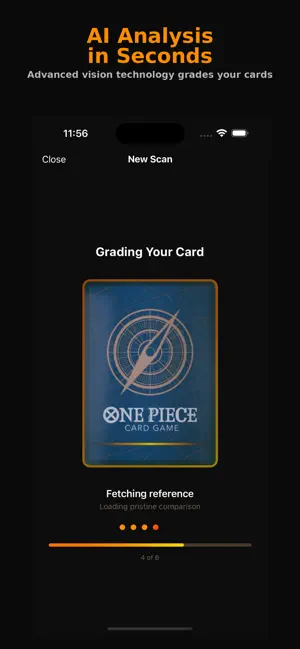
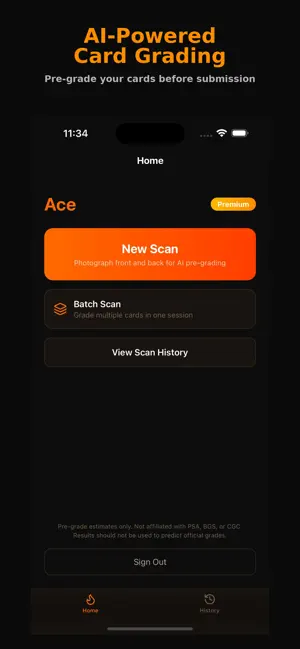
Ace uses advanced AI to analyze your One Piece Trading Card Game cards and deliver detailed pre-grade estimates — right from your phone. HOW IT WORKS 1. Photograph the front and back of your card 2. Ace's AI identifies your card and matches it against a reference catalog 3. Receive a detailed grade report with subgrades for centering, corners, edges, and surface DETAILED GRADING Every scan produces a comprehensive report modeled after professional grading standards. Each card receives an overall grade (1-10) along with individual subgrades and confidence scores. The AI examines your card for whitening, centering shifts, corner wear, edge damage, and surface defects — on both the front and back. CARD IDENTIFICATION Ace automatically identifies your card by reading the card number and matching it against a catalog of One Piece TCG cards. It even distinguishes between regular art, alternate art, and parallel variants using visual comparison. REFERENCE COMPARISON When your card is identified, Ace fetches a pristine reference image and uses it as a baseline during grading — the same way a professional grader would compare against a known standard. BATCH GRADING Grade multiple cards in a single session with batch scanning. Photograph each card, add it to your queue, and submit them all at once. Track progress as each card is graded. SHARE YOUR RESULTS Generate a styled grade report image and share it directly to social media, messaging apps, or anywhere else using the native share sheet. SCAN HISTORY All your past scans are saved so you can revisit grades and track your collection's condition over time. FREE & PREMIUM Start grading for free with a daily scan limit. Upgrade to Premium for unlimited scans, batch grading, and priority processing. IMPORTANT DISCLAIMER Ace provides AI-powered pre-grade estimates only. Results may differ from official grading services such as PSA, BGS, or CGC. Do not use Ace to guarantee or predict grades from professional grading companies. Link to Terms of Use: https://www.apple.com/legal/internet-services/itunes/dev/stdeula/
What’s new
Version 1.0.4 · Updated February 16, 2026
fixed bugs
App privacy
The developer, Terror LLC, reported these privacy practices to Apple.
Data Linked to You
The following data, which may be collected and linked to your identity, may be used for the following purposes:
- Contact Info: Email Address
Used for: App Functionality
Data Not Linked to You
The following data, which may be collected but is not linked to your identity, may be used for the following purposes:
- Identifiers: Device ID, User ID
- Diagnostics: Crash Data, Performance Data
- Purchases: Purchase History
- Usage Data: Product Interaction
Used for: Analytics, App Functionality
Alternatives to ACE - OPTCG Pregrading
Looking for apps like ACE - OPTCG Pregrading? Here are 6 similar apps on the App Store. The highest rated is CenterMint: Card Centering (5.0/5), and all 6 are free to download.
-
 CenterMint: Card Centering
5.0
CenterMint: Card Centering
5.0
-
 CenterGrade App
5.0
CenterGrade App
5.0
-
 Chasing Foil
5.0
Chasing Foil
5.0
-
 Slabmint: TCG Card Grader
-
 MTG Scanner • Card Collector
-
 Fiveoak
5.0
Fiveoak
5.0
| App | Rating | Price | Last updated | Compare |
|---|---|---|---|---|
| ACE - OPTCG Pregrading | 5.0 / 5 (1 rating) | Free | February 16, 2026 | |
| CenterMint: Card Centering | 5.0 / 5 (1) | Free | Oct 14, 2026 | Compare |
| CenterGrade App | 5.0 / 5 (2) | Free | Apr 16, 2026 | Compare |
| Chasing Foil | 5.0 / 5 (4) | Free | Jul 21, 2026 | Compare |
| Slabmint: TCG Card Grader | – | Free | Oct 12, 2026 | Compare |
| MTG Scanner • Card Collector | – | Free | Feb 3, 2026 | Compare |
| Fiveoak | 5.0 / 5 (4) | Free | Oct 10, 2026 | Compare |