

ACLogics: Pro HVAC Field Tool
ACLogics LLC Utilities iPhoneiPadiPod touch
ACLogics: Pro HVAC Field Tool is a free Utilities app for iPhone and iPad by ACLogics LLC. Rated 5.0/5 from 1 ratings. Requires iOS 17.0.
- Rating
- 5.0
- 1 ratings
- Price
- Free
- on the App Store
- Size
- 94 MB
- Age 4+
- Updated
- Oct 22
- 2026 · v1.2.8
Screenshots


About ACLogics: Pro HVAC Field Tool
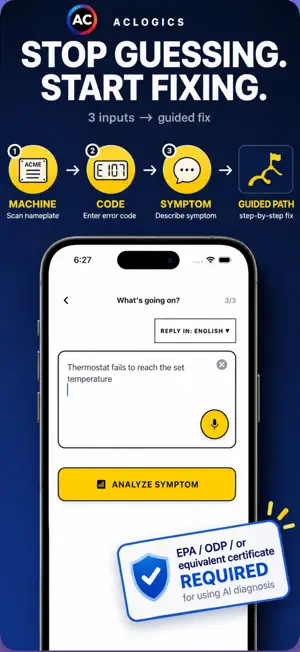
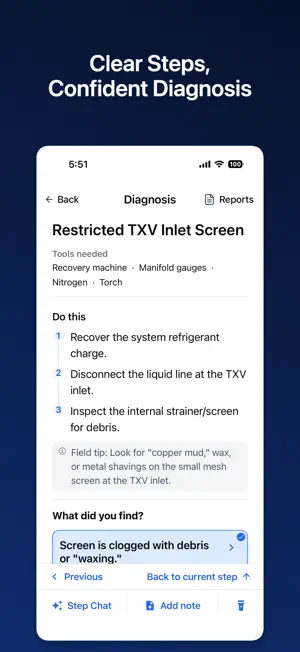
ACLOGICS — STOP GUESSING. START FIXING. NOT FOR HOMEOWNERS. You arrive at a no-cool service call. The basic checks are done, but the cause isn't clear. What should you test next? ACLogics helps you find the root cause with clear, step-by-step diagnostic workflows. No guesswork. No random part swapping. HOW IT WORKS 1. SCAN THE EQUIPMENT Take a photo of the nameplate. ACLogics extracts the brand, model, and serial number. 2. DESCRIBE THE PROBLEM Enter the symptom or error code. AI uses the information to identify possible causes and guide where to start. 3. SEE WHAT TO CHECK — AND WHY Follow a structured diagnostic path. Start with simple checks or tests that help narrow down multiple possible causes. Understand why each check matters. 4. ONE TAP. NEXT STEP. No typing required during the guided checks. Simply tap the result that matches what you find—Pass/Fail, voltage range, or component condition. ACLogics follows the corresponding path automatically. 5. FIND THE ROOT CAUSE Each result narrows down the possibilities. Follow the evidence and verify the cause before replacing parts. BUILT FOR THE FIELD • AI-powered nameplate scanner • HVAC troubleshooting and error code assistance • Step-by-step, decision-based diagnostics • Clear explanations behind each check • Diagnostic history and service reports • Residential HVAC and commercial refrigeration (HVACR) • Air conditioners, heat pumps, furnaces, walk-in coolers, freezers, and ice machines FOR EVERY HVAC TECHNICIAN Junior techs get a clear path to follow. Senior techs stay organized. Teams troubleshoot more consistently. NOT FOR HOMEOWNERS ACLogics is built for trained HVAC professionals, not DIY repairs. AI-guided diagnosis requires a valid refrigerant-handling certification, such as EPA Section 608 (U.S.) or ODP or equivalent (Canada), as an ACLogics access requirement. ACLogics supports professional judgment but does not replace proper training, testing equipment, manufacturer instructions, or safety procedures. ACLogics — Know what to check. Understand why. Fix with confidence.
What’s new
Version 1.2.8 · Updated October 22, 2026
- Add iPad support.
App privacy
The developer, ACLogics LLC, reported these privacy practices to Apple.
Data Not Linked to You
The following data, which may be collected but is not linked to your identity, may be used for the following purposes:
- Contact Info: Email Address, Name
- User Content: Photos or Videos, Audio Data, Customer Support, Other User Content
Used for: App Functionality
Alternatives to ACLogics: Pro HVAC Field Tool
Looking for apps like ACLogics: Pro HVAC Field Tool? Here are 6 similar apps on the App Store. The highest rated is Prentis - HVAC Troubleshooting (5.0/5), and all 6 are free to download.
-
 Prentis - HVAC Troubleshooting
5.0
Prentis - HVAC Troubleshooting
5.0
-
 HVAC Pro Calculator: NEC + P-T
5.0
HVAC Pro Calculator: NEC + P-T
5.0
-
 HVAC AI: Tools & Simulator
1.0
HVAC AI: Tools & Simulator
1.0
-
 HVACsim
2.2
HVACsim
2.2
-
 HVAC Load Calculator Manual J
4.8
HVAC Load Calculator Manual J
4.8
-
 InspectorIQ
4.3
InspectorIQ
4.3
| App | Rating | Price | Last updated | Compare |
|---|---|---|---|---|
| ACLogics: Pro HVAC Field Tool | 5.0 / 5 (1 rating) | Free | October 22, 2026 | |
| Prentis - HVAC Troubleshooting | 5.0 / 5 (4) | Free | Oct 26, 2026 | Compare |
| HVAC Pro Calculator: NEC + P-T | 5.0 / 5 (1) | Free | Oct 25, 2026 | Compare |
| HVAC AI: Tools & Simulator | 1.0 / 5 (2) | Free | Jun 19, 2026 | Compare |
| HVACsim | 2.2 / 5 (13) | Free | May 19, 2026 | Compare |
| HVAC Load Calculator Manual J | 4.8 / 5 (43) | Free | Oct 23, 2026 | Compare |
| InspectorIQ | 4.3 / 5 (6) | Free | Oct 16, 2026 | Compare |