

Just Walk: Interval Walking
On World Tech LLC Health & Fitness iPhoneiPadiPod touchApple Watch
Just Walk: Interval Walking is a free Health & Fitness app for iPhone and iPad by On World Tech LLC. Rated 5.0/5 from 3 ratings. Requires iOS 17.0.
- Rating
- 5.0
- 3 ratings
- Price
- Free
- on the App Store
- Size
- 11 MB
- Age 4+
- Updated
- Oct 25
- 2026 · v1.5.1
Screenshots


About Just Walk: Interval Walking
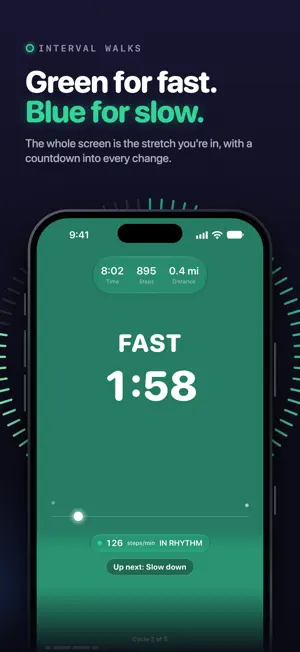
The Japanese interval walking method, coached from your wrist. On iPhone Duo, Just Walk opens out: Today rests in the middle of the big screen, and held sideways the Walks tab splits into your walk modes and the walks you've done. Three minutes fast, three minutes slow. It's almost impossible to pace correctly on your own. Just Walk is the coach: haptic cues on your Apple Watch keep your fast intervals actually fast, without audio, without looking at your phone. YOUR WALKS ON IPHONE DUO Half-fold it during an interval walk and the stretch you're in and its countdown take the top half, your pace and controls the bottom. Shut, it's the Just Walk you know, on the outer display. On Today, held sideways, your step ring sits beside your day. Close it mid-walk and your walk keeps going on the outer display; open it again and the clock and the stretch are where you left them. Held half-open with the fold running top to bottom, Today and the Walks tab give you one column per page. Held that way during an interval walk, the right page turns the stretch's colour, with its countdown in large type. WHAT MAKES JUST WALK DIFFERENT • CADENCE COACHING — Live steps-per-minute with a target band for every fast interval. Fall off the pace and your wrist tells you. Hit it and you'll know. • A SCREEN YOU READ AT A GLANCE — When you do look, the whole screen is the stretch you're in: green for fast, blue for slow, with a tide that rises as it runs and a countdown into every change. In fast stretches, a dot swings at your target pace. Your Lock Screen and the Dynamic Island carry the same colour, the time left and what's next. • SEE HOW IT WENT — After an interval walk, a chart shows each fast stretch against your pace band, with one plain sentence that sums it up. • THE 4-WEEK PROGRAM — Start at 3 cycles, and the plan adapts to how you actually walk: finish strong and it levels up; struggle and it repeats the week. Miss a day? The program waits for you. • WE NOTICE REAL LIFE — Walked briskly to the train for 14 minutes? That counts. Just Walk credits walking you did without opening the app. • HOW IT'S GOING — Two honest numbers. Showing Up counts the walking you did. Ease watches whether walks are getting easier for your body — compared to one person only: you, weeks ago. Most weeks it says Steady, because that's the truth. It isn't a grade or a medical measurement, just a mirror we hold steady. • STREAKS THAT FORGIVE — Daily step streaks with 4 shields a month (bank up to 8) for the days life happens. If a shield can cover a missed day, your streak waits on Today, dimmed, until you decide. Use one and you see it land on the day it saved. Free for everyone. ALSO IN JUST WALK • Step tracking that matches Apple Health • Tap your step ring to see about how many minutes of walking are left, at the pace of your recent walks (a steady walk until you have some) • VoiceOver announces each new stretch of an interval walk, with its time and what's next • Home Screen and Lock Screen widgets • Fat Burn Zone walks with live heart-rate guidance (Apple Watch) • Post-meal walks: 10 minutes on your feet after you eat • Full Apple Watch app with complications TRY THE COACHING FREE Every interval walk comes with live cadence coaching, including your free weekly walk. The first 7 days of the program are free too, and your How it's going numbers are free, always. Just Walk Pro unlocks the full 4-week program, unlimited coached walks, and the story behind your numbers: full history, your weekly Ease readings, and a note from your coach about why they moved. Eligible new subscribers can start with a 7-day free trial on the annual plan. No account. No ads. Your step counts and other health data stay on your devices, in Apple Health; iCloud syncs your streaks and walks without them. Terms of Use (EULA): https://onworld.tech/just-walk/terms Privacy Policy: https://onworld.tech/just-walk/privacy
What’s new
Version 1.5.1 · Updated October 25, 2026
On an iPhone Duo opened flat, Just Walk now lays out across the whole inner screen: • Today rests in the middle of the screen instead of sitting at the top. • Turned sideways, the Walks tab shows your walk modes on the left and Your Walks on the right, with "Apple Watch Connected" at the top right when your watch is paired. • During an interval walk held upright, the stretch's colour now fills the whole screen and the tide rises from the bottom, with no seam across the middle. • Held half-open with the fold running top to bottom, the Walks tab gives your walk modes one page and Your Walks the other. On every iPhone, the walk screen now starts exactly where the 3·2·1 countdown leaves it, with no jump at Go. And while a walk is running, its banner now sits above your screen instead of covering Today's headline. On iOS 27, the grey strip that sat above Today's step ring is gone. Thank you for walking with us.
App privacy
The developer, On World Tech LLC, reported these privacy practices to Apple.
Data Not Collected
The developer does not collect any data from this app.
Alternatives to Just Walk: Interval Walking
Looking for apps like Just Walk: Interval Walking? Here are 6 similar apps on the App Store. The highest rated is Interval Walking - Splits (5.0/5), and all 6 are free to download.
-
 Interval Walking - Splits
5.0
Interval Walking - Splits
5.0
-
 WalkPace Pro
5.0
WalkPace Pro
5.0
-
 IWT - Japanese Walking
3.0
IWT - Japanese Walking
3.0
-
 Just Walk - Walking Tracker
5.0
Just Walk - Walking Tracker
5.0
-
 StepsFit: Step Counter & Walks
5.0
StepsFit: Step Counter & Walks
5.0
-
 StepStreak: Walk Daily
5.0
StepStreak: Walk Daily
5.0
| App | Rating | Price | Last updated | Compare |
|---|---|---|---|---|
| Just Walk: Interval Walking | 5.0 / 5 (3 ratings) | Free | October 25, 2026 | |
| Interval Walking - Splits | 5.0 / 5 (2) | Free | Oct 27, 2026 | Compare |
| WalkPace Pro | 5.0 / 5 (2) | Free | Jul 7, 2026 | Compare |
| IWT - Japanese Walking | 3.0 / 5 (1) | Free | Oct 30, 2026 | Compare |
| Just Walk - Walking Tracker | 5.0 / 5 (3) | Free | Oct 26, 2026 | Compare |
| StepsFit: Step Counter & Walks | 5.0 / 5 (1) | Free | Oct 29, 2026 | Compare |
| StepStreak: Walk Daily | 5.0 / 5 (3) | Free | Aug 19, 2026 | Compare |