

Smart Printer App for HP •
Halmob Utilities iPhoneiPadiPod touch
Smart Printer App for HP • is a free Utilities app for iPhone and iPad by Halmob. Rated 3.9/5 from 15 ratings. Requires iOS 17.0. Updated September 18, 2026.
- Rating
- 3.9
- 15 ratings
- Price
- Free
- on the App Store
- Size
- 58 MB
- Age 4+
- Updated
- Sep 18
- 2026 · v2.3
Screenshots


About Smart Printer App for HP •
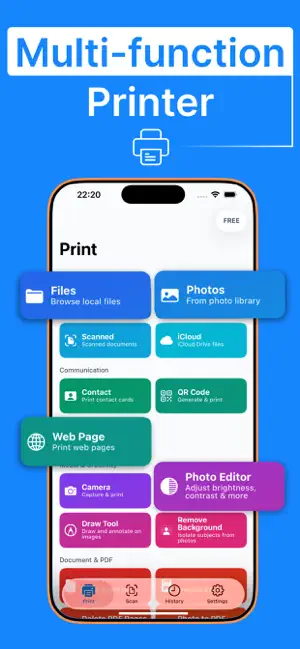
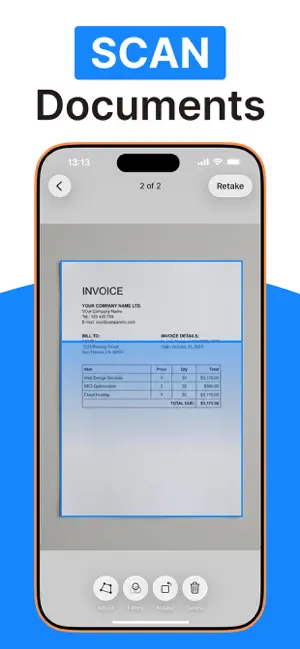
Smart Printer App for HP helps you print, scan, edit, and organize documents and photos directly from your phone whenever you need. This all-in-one printer and scanner app is designed to simplify your everyday tasks. The app is compatible with most printers, making wireless printing fast and effortless. Whether you're handling work files, study materials, or personal documents, you can manage everything from your iPhone or iPad without switching between multiple apps or devices. Our smart printer & scanner app works seamlessly with most printer models, including HP, Canon, Brother, Epson, Samsung, Dell, Xerox, Lexmark, Ricoh, Panasonic, Toshiba, Lanier, Aurora, and many more. - PRINT ANYTHING Smart Printer gives you the freedom to print almost any type of content with ease. Documents, photos, emails, plain text, web pages, and even generated QR codes can be sent to your printer in just a few taps. The app delivers smooth performance and reliable output, making printing simple instead of technical. - SUPPORTS 10,000+ PRINTERS Smart Printer is built to work with over 10,000 printer models across major brands. The app automatically detects and connects to your printer over Wi-Fi. No complicated setup, no manual drivers — just connect and start printing. - SCAN DOCUMENTS & PHOTOS With the built-in smart scanner and camera, your phone becomes a portable scanning tool. Scan receipts, contracts, handwritten notes, or photos, then adjust brightness, crop edges, and enhance clarity before saving or printing. - EDIT PHOTOS & REMOVE BACKGROUND Enhance images before printing with the built-in photo editor. Crop, adjust lighting, improve clarity, or remove backgrounds easily to create clean and professional results. - EDIT PDFs & DRAW Make quick changes before printing. Add text, annotate, sign documents, or use the draw tool to create sketches and notes directly inside the app. - PRINT FROM EMAIL, TEXT & WEBSITE Print email attachments, plain text, and web pages by sharing them directly to Smart Printer. No copying or exporting — just share and print. Upgrade to Premium to unlock all features — Payment is charged to the iTunes account at purchase confirmation. — Subscription auto-renews unless auto-renew is turned off at least 24 hours before the current period ends. — Manage subscriptions & auto-renewal in Account Settings after purchase. — Account is charged for renewal within 24 hours before the current period ends. — Any unused portion of a free trial (if offered) is forfeited upon subscription purchase. DISCLAIMER: This is an independent third-party app and is not affiliated with, endorsed by, or sponsored by HP, Canon, Epson, Apple, or any other brand mentioned in this description. AirPrint is a trademark of Apple Inc. EULA: https://www.apple.com/legal/internet-services/itunes/dev/stdeula/ Terms of Use: https://halmob.com/apps/smart-printer/terms-and-conditions Privacy Policy: https://halmob.com/apps/smart-printer/privacy-policy
Ratings & reviews
3.9
15 ratings
What’s new
Version 2.3 · Updated September 18, 2026
- We added iPad support.
App privacy
The developer, Halmob, reported these privacy practices to Apple.
Data Used to Track You
The following data may be used to track you across apps and websites owned by other companies:
- Purchases: Purchase History
- Identifiers: User ID, Device ID
- Usage Data: Product Interaction
Data Linked to You
The following data, which may be collected and linked to your identity, may be used for the following purposes:
- Purchases: Purchase History
- Identifiers: Device ID
Used for: Third-Party Advertising, Developer’s Advertising or Marketing, Analytics, App Functionality
Data Not Linked to You
The following data, which may be collected but is not linked to your identity, may be used for the following purposes:
- Usage Data: Product Interaction
- Identifiers: User ID
- Diagnostics: Crash Data, Performance Data
- Contacts: Contacts
- User Content: Photos or Videos
Used for: Third-Party Advertising, Developer’s Advertising or Marketing, Analytics, App Functionality
Alternatives to Smart Printer App for HP •
Looking for apps like Smart Printer App for HP •? Here are 6 similar apps on the App Store. The highest rated is Smart Printer App: Print Scan (4.7/5), and all 6 are free to download.
-
 Smart Printer App: Print Scan
4.7
Smart Printer App: Print Scan
4.7
-
 Smart Air Printer App For Hp
4.6
Smart Air Printer App For Hp
4.6
-
 Smart Printer App for Canon·
4.3
Smart Printer App for Canon·
4.3
-
 Printr - Smart Printer App
4.2
Printr - Smart Printer App
4.2
-
 Smart Printer App | Air Print
2.8
Smart Printer App | Air Print
2.8
-
 HP Smart Printer app FREE
4.5
HP Smart Printer app FREE
4.5
| App | Rating | Price | Last updated | Compare |
|---|---|---|---|---|
| Smart Printer App for HP • | 3.9 / 5 (15 ratings) | Free | September 18, 2026 | |
| Smart Printer App: Print Scan | 4.7 / 5 (27) | Free | Sep 18, 2026 | Compare |
| Smart Air Printer App For Hp | 4.6 / 5 (12) | Free | Sep 8, 2026 | Compare |
| Smart Printer App for Canon· | 4.3 / 5 (430) | Free | Oct 19, 2026 | Compare |
| Printr - Smart Printer App | 4.2 / 5 (34) | Free | Oct 15, 2026 | Compare |
| Smart Printer App | Air Print | 2.8 / 5 (22) | Free | Oct 15, 2026 | Compare |
| HP Smart Printer app FREE | 4.5 / 5 (56) | Free | Aug 27, 2026 | Compare |